There's no best ChatGPT SEO tracking tool in general. There's the one that collects answers the way you need them, at a prompt volume you can pay for. Every tool below sends prompts to ChatGPT and logs whether your brand gets named, which pages get cited and how you stack up against competitors. They part ways on method, cadence and what the cheapest plan really buys.
Below: ten trackers compared on what each vendor publishes, why two people get different answers from ChatGPT, and a setup that makes the numbers worth reading. Skygen is our product, and it's labeled wherever it shows up.
Key takeaways
- ChatGPT rewrites prompts into search queries and personalizes by location and memory. One manual check proves little.
- Vendors reach ChatGPT differently: real browsers, real requests, APIs or a mix. Several don't say.
- Entry plans that cap prompts hold 15 to 125. What you buy is answers per month: prompts × assistants × runs.
- Our read: repeat the same prompts under the same conditions, and open the answers behind a change before you trust it.
What does a ChatGPT tracking tool measure?
A ChatGPT tracking tool measures what ChatGPT says about your brand across many prompts, not one. It logs whether your brand gets named, whether your pages get cited and how you compare with competitors. Ahrefs calls these three core numbers mentions, citations and share of voice, and defines each on its Brand Radar page.
- Mentions: "how often your brand name appears in AI answer text."
- Citations: "how often AI links to your pages or domains as a source."
- Share of voice: "the percentage of AI responses within your topic set that mention or cite your brand versus competitors."
Profound adds position: "your relative position among mentioned brands." Most trackers also score sentiment.
Definitions vary by tool. Ahrefs counts responses that mention or cite your brand, versus competitors. Skygen, ours, counts the share of measured answers that name your brand, per assistant. Our read: compare scores only after checking how each tool defines them.
ChatGPT's search adds two more things to watch:
- Fan-out queries. OpenAI says ChatGPT search "typically rewrites your query into one or more targeted queries that it sends those providers." Ahrefs, Profound, Peec AI and LLM Pulse describe showing those queries. Otterly.AI lists a "Query Fan Out Tool," but its pages don't say whether it reads them from tracked answers.
- Sources versus citations. OpenAI's API docs say sources are "the complete list of URLs the model consulted," and that "the number of sources is often greater than the number of citations." A page can feed an answer without a visible link.
Don't mix up mentions and citations. Scrunch "only counts explicit brand mentions," and Skygen marks a link without your name as "cited, not named."
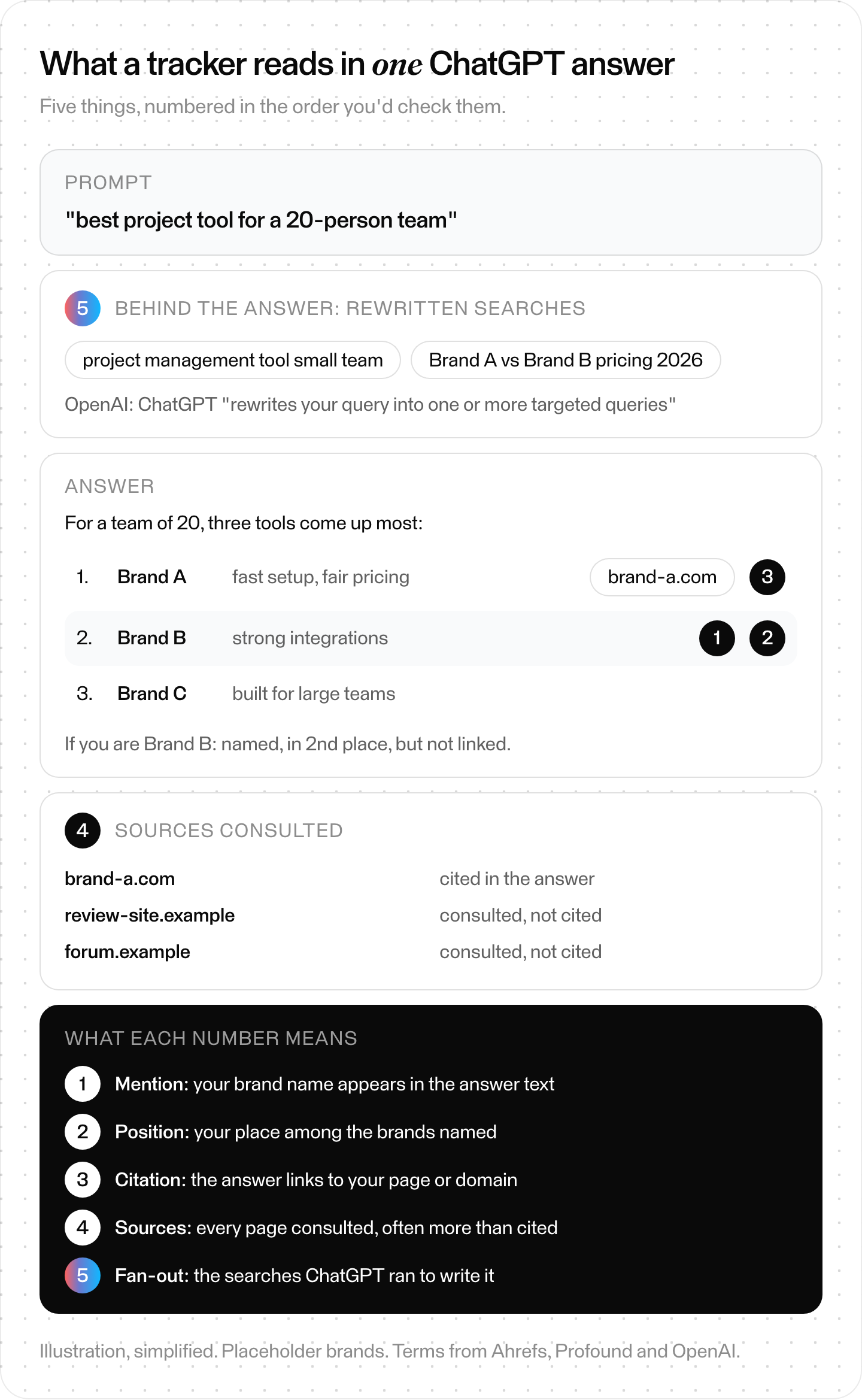
What a tracker may record from one answer. What it can see depends on the tool and how it collects answers. Placeholder brands; definitions from Ahrefs, Profound and OpenAI.
Why isn't one ChatGPT check enough?
One check isn't enough because ChatGPT doesn't give everyone the same answer. OpenAI's help article on searching the web with ChatGPT says why. ChatGPT chooses whether to search, and it typically rewrites your question into its own search queries. It also uses your IP location, and it may use saved memories if memory is enabled.
- It decides when to search. "ChatGPT may search the web automatically when your question would benefit from current information." Answers that use search "may include citations."
- It rewrites your question. ChatGPT sends "one or more targeted queries" to search partners. The help page links Microsoft's and Shopify's privacy policies for those partners.
- It uses your location. "ChatGPT also collects general location information based on your IP address and may share that general location with third-party search providers."
- It uses memory. "If memory is enabled, ChatGPT may use relevant saved memories when rewriting a search query." OpenAI's post on memory says memory "references all your past conversations to deliver responses that feel more relevant and tailored to you."
Ads sit outside the answer. OpenAI's help article "Ads in ChatGPT: The Basics" says "Ads appear below ChatGPT responses" and that OpenAI doesn't show ads "to users on Plus, Pro, or any Business plan." Its post "Testing ads in ChatGPT" adds: "Ads do not influence the answers ChatGPT gives you." So, by OpenAI's account, your plan changes whether you see an ad, not what the answer says. Our ChatGPT ads guide covers who sees them and how they're bought.
Even the vendors admit it. Semrush says "no platform can provide exact numbers on visibility" and calls its own metrics "reliable directional signals." So track many prompts, keep the conditions fixed and repeat the runs. Read the trend. One answer is an anecdote.
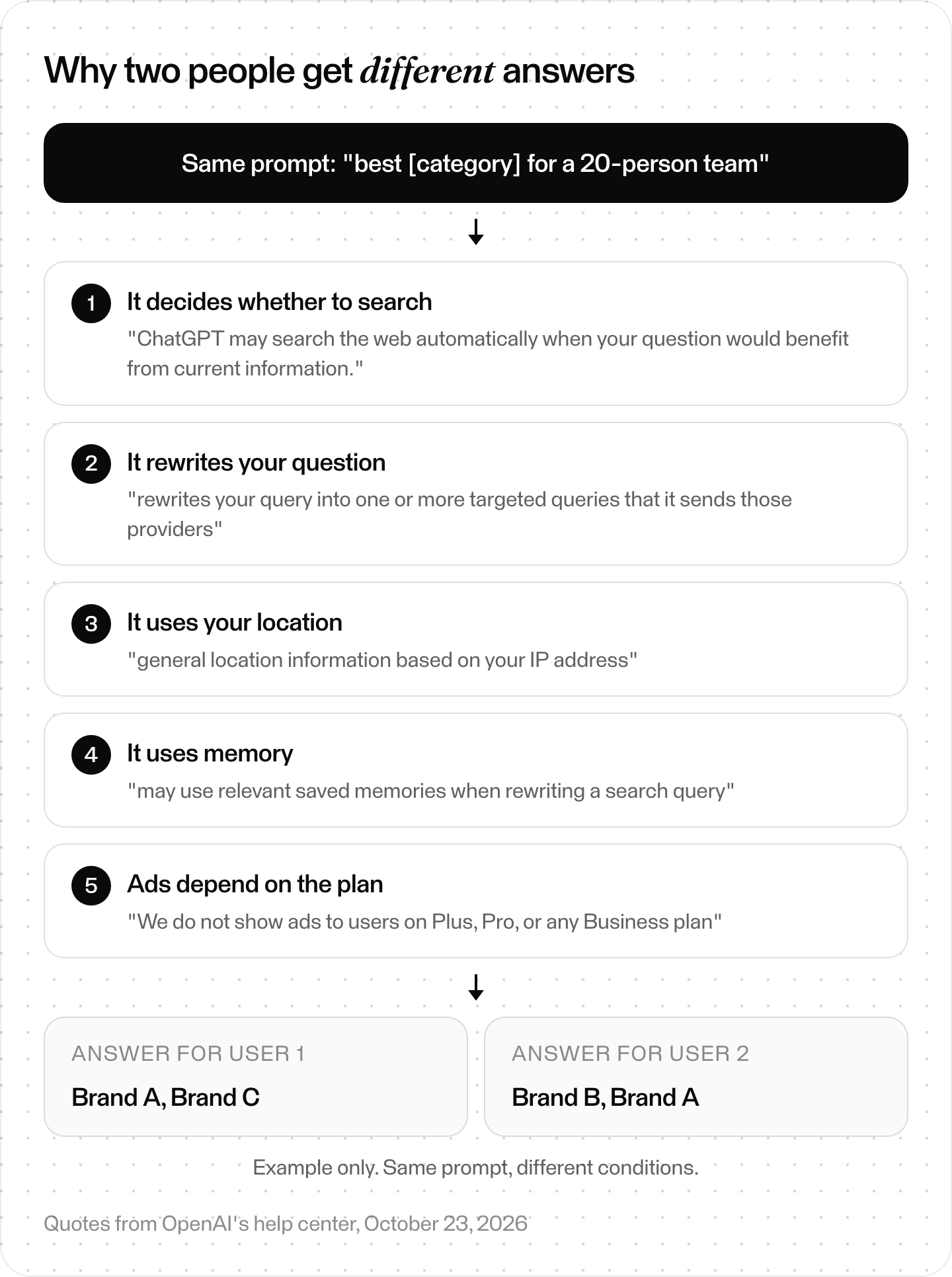
Why two people see different answers to the same prompt. Ads sit outside the answer. From OpenAI's help center and its post on testing ads.
How do ChatGPT tracking tools collect answers?
Every ChatGPT tracking tool runs the same loop. It sends your prompt list to each assistant from a set location, on a schedule, and turns the answers into metrics. Where vendors say how they reach ChatGPT, their pages name real browsers, real requests, APIs or a mix. Several don't say.
LLM Pulse describes the core step: it "runs your configured prompts against ChatGPT on a regular basis, capturing the full response and analyzing it for brand mentions, competitor references, and citation sources."
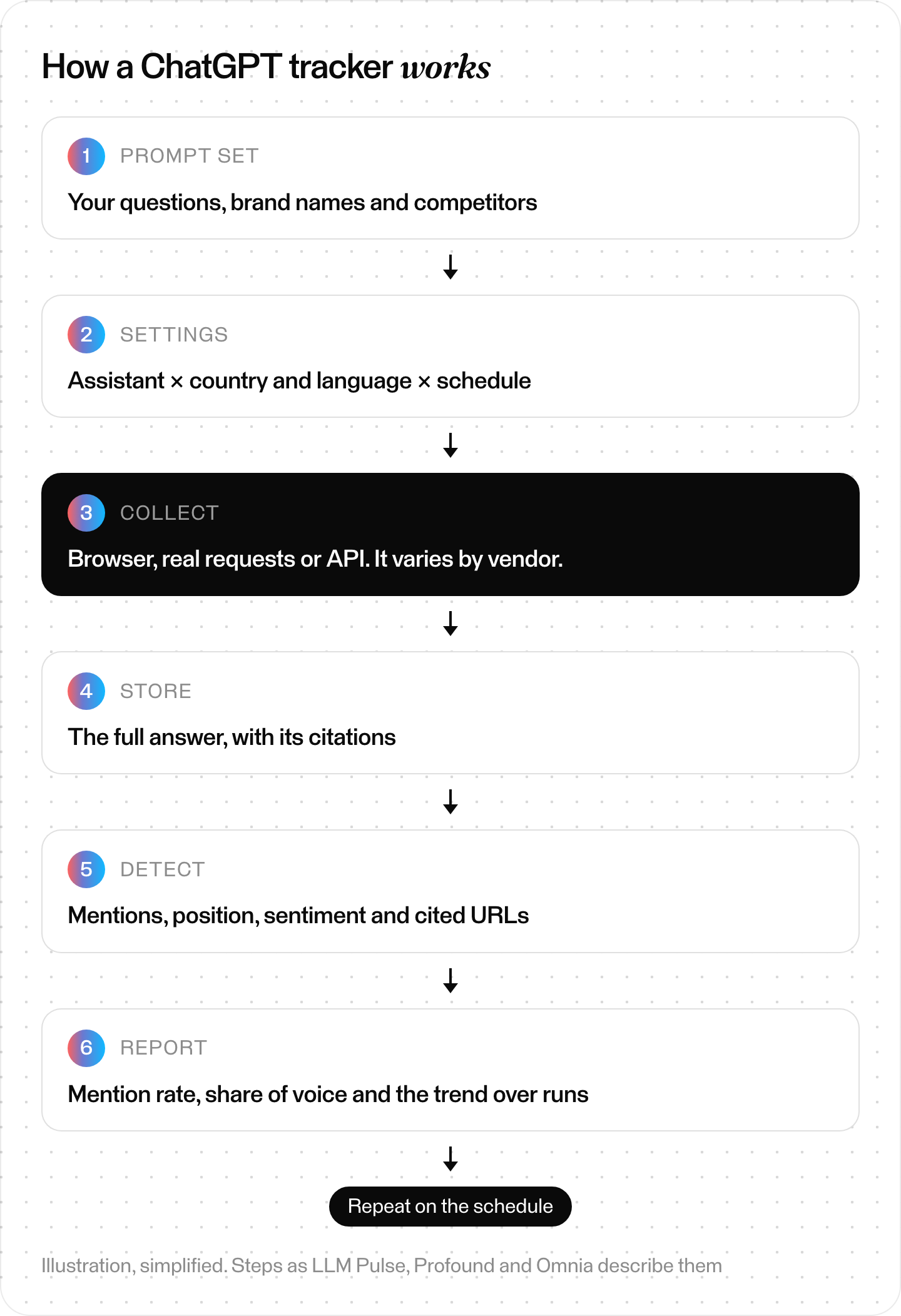
The loop every tracker runs. Illustration, simplified.
Where vendors differ is step three: how they get the answer out of ChatGPT. Omnia and Profound describe browser or front-end capture. Semrush says "real requests and not via any APIs of LLMs." Scrunch mixes browser automation and official APIs, choosing per platform. LLM Pulse's fan-out page describes reading search queries from API responses. Skygen, ours, uses model APIs. Ahrefs, Peec AI and AthenaHQ don't say. Each tool's entry below quotes its own words.
This matters more than it looks. OpenAI's web search API docs say developers can "directly access the fine-tuned models and tool used by Search in ChatGPT" and set an approximate location. The app adds each user's IP location and memory. So API and app answers can differ, and so can two tools that collect differently. Ask any vendor which surface it queries, from where and how often.
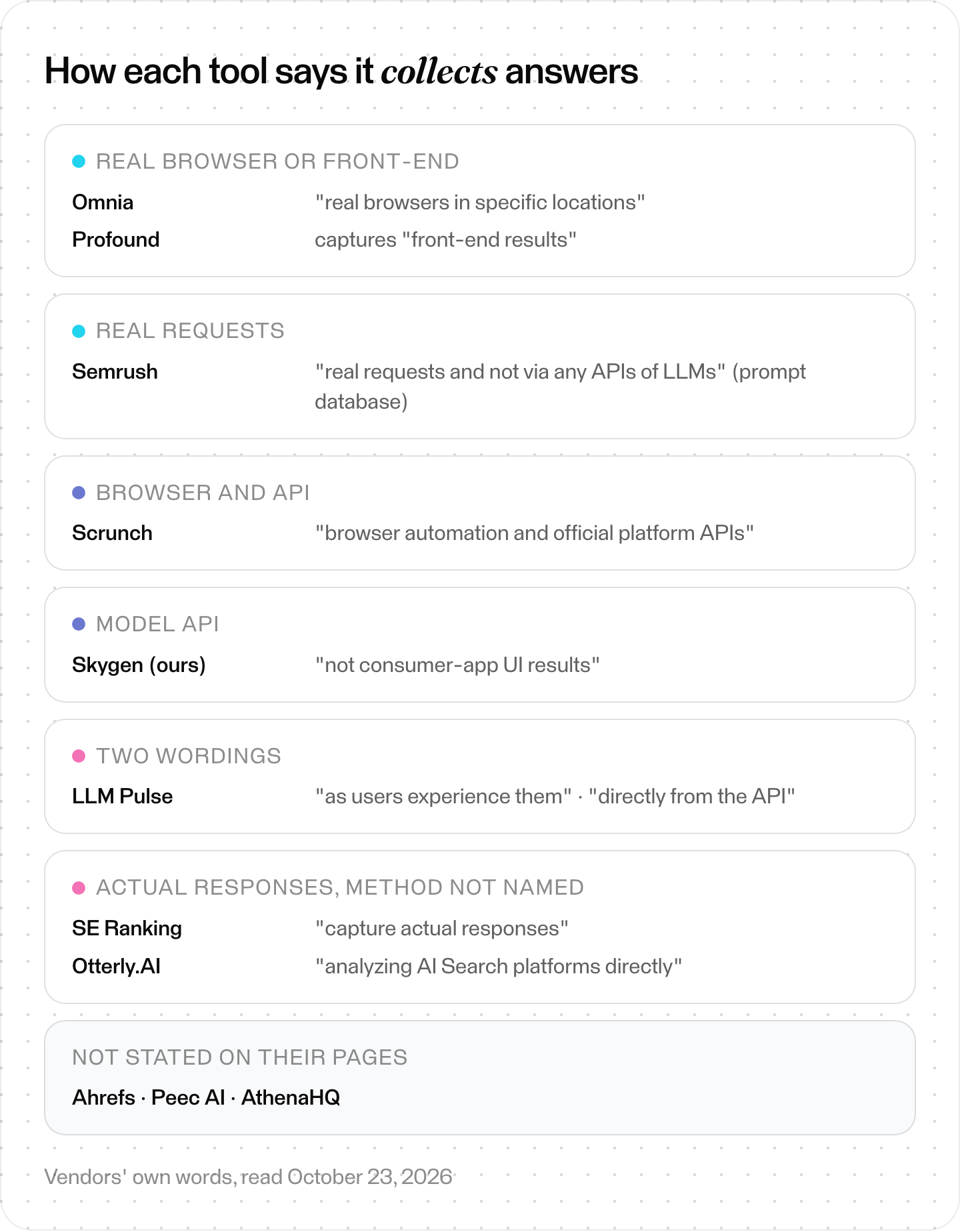
Collection methods in each vendor's own words, October 23, 2026.
How we compared these tools
We read each vendor's own product, pricing, FAQ and docs pages on October 23, 2026. Every capability, method quote and price below comes from those pages. We didn't buy paid plans, run prompts through the tools or benchmark accuracy. So this compares what vendors say. It isn't a lab test.
- Prices are as displayed on the vendor's page that day, in the currency shown. LLM Pulse lists euros, and Omnia's page showed euros to us. Some pages pick a currency by where you open them, so yours may differ. We didn't convert anything.
- Two later reads: Peec AI draws its prices in the browser, so its price comes from a rendered copy we saved on October 24, 2026. Skygen's prices are from its pricing page that day.
- Gaps: where a vendor's page doesn't say something, we write not stated on its page.
- Disclosure: Skygen is our product. It's labeled wherever it appears. For Skygen, we also checked saved copies of its production code.
- Other lists: of the 19 tool lists we read for these searches, 14 were written by a tracker vendor that ranks its own tool first.
What are the best ChatGPT SEO tracking tools?
We compared ten ChatGPT SEO tracking tools using only their vendors' own pages. Three are SEO suites: Semrush, Ahrefs and SE Ranking. Seven are dedicated AI visibility trackers: Profound, Peec AI, Otterly.AI, Scrunch, AthenaHQ, LLM Pulse and Omnia. Our read: there isn't one winner, so compare how each collects answers and what its entry plan buys.
Prices as displayed on each vendor's own page on October 23, 2026 (Peec AI and Skygen: October 24), in the currency shown. Not converted.
| Tool | How it says it collects answers | Other assistants |
|---|---|---|
| Semrush AI Visibility Toolkit | "real requests and not via any APIs of LLMs" (prompt database; Prompt Tracking method not stated) | AI Mode, AI Overviews, Gemini, Perplexity |
| Ahrefs Brand Radar | Not stated on its page | AI Overviews, AI Mode, Perplexity, Gemini, Copilot, Claude |
| SE Ranking | "capture actual responses" | Separate AI Overviews, AI Mode and Gemini trackers |
| Profound | "front-end results" | Gemini, AI Overviews; up to 9 on Enterprise |
| Peec AI | Not stated on its page | 3 models of your choice; up to 13 on Enterprise |
| Otterly.AI | "analyzing AI Search platforms directly" | AI Overviews, Perplexity, Copilot; 3 add-ons |
| Scrunch | "browser automation and official platform APIs" | Perplexity, Google AI Overviews, Copilot |
| AthenaHQ | Not stated on its page | Perplexity, Gemini, AI Overviews, Copilot; more paid |
| LLM Pulse | "directly from the API response" (described for fan-out data) | Perplexity, AI Mode, AI Overviews, Gemini; add-ons |
| Omnia | "real browsers in specific locations" | AI Overviews, AI Mode, Perplexity |
| Skygen (ours) | Model APIs, "not consumer-app UI results" | Claude, Gemini, Grok, Perplexity |
Entry plans, prices and trials, from the same pages:
| Tool | Entry plan | Price as displayed | Trial |
|---|---|---|---|
| Semrush AI Visibility Toolkit | 25 prompts, daily | $99 per month in the knowledge base; pricing page: $99/mo per domain, billed annually | None |
| Ahrefs Brand Radar | Prompt package: 2,500 checks a month | From $199/mo; prompt packages from $50/mo | None mentioned |
| SE Ranking | 100 prompts, daily | $129.00/mo | 14 days, no card |
| Profound | Trial: 50 prompts daily for 7 days | Trial free; Enterprise custom | 7 days |
| Peec AI | 50 prompts, daily | $95/mo | Yes; length not stated |
| Otterly.AI | 15 prompts, daily | $29/month | Yes; length differs on its page |
| Scrunch | 125 prompts, 5,000 responses a month | $250/mo | 7 days |
| AthenaHQ | 3,600 credits a month (1 credit = 1 answer) | $295/month | Free plan, 300 credits |
| LLM Pulse | 50 prompts, weekly (daily option) | 49 € weekly, 79 € daily, per month | 14 days on weekly plans |
| Omnia | 25 prompts, daily | €79/month | 14 days, no card |
| Skygen (ours) | Organic Pro: 300 AI answer checks a month; 20 proposed questions, up to 150 | $799 / month | Free first check, up to 3 questions |
Sticker prices don't compare well on their own. Count answers per month first; we do that further down.
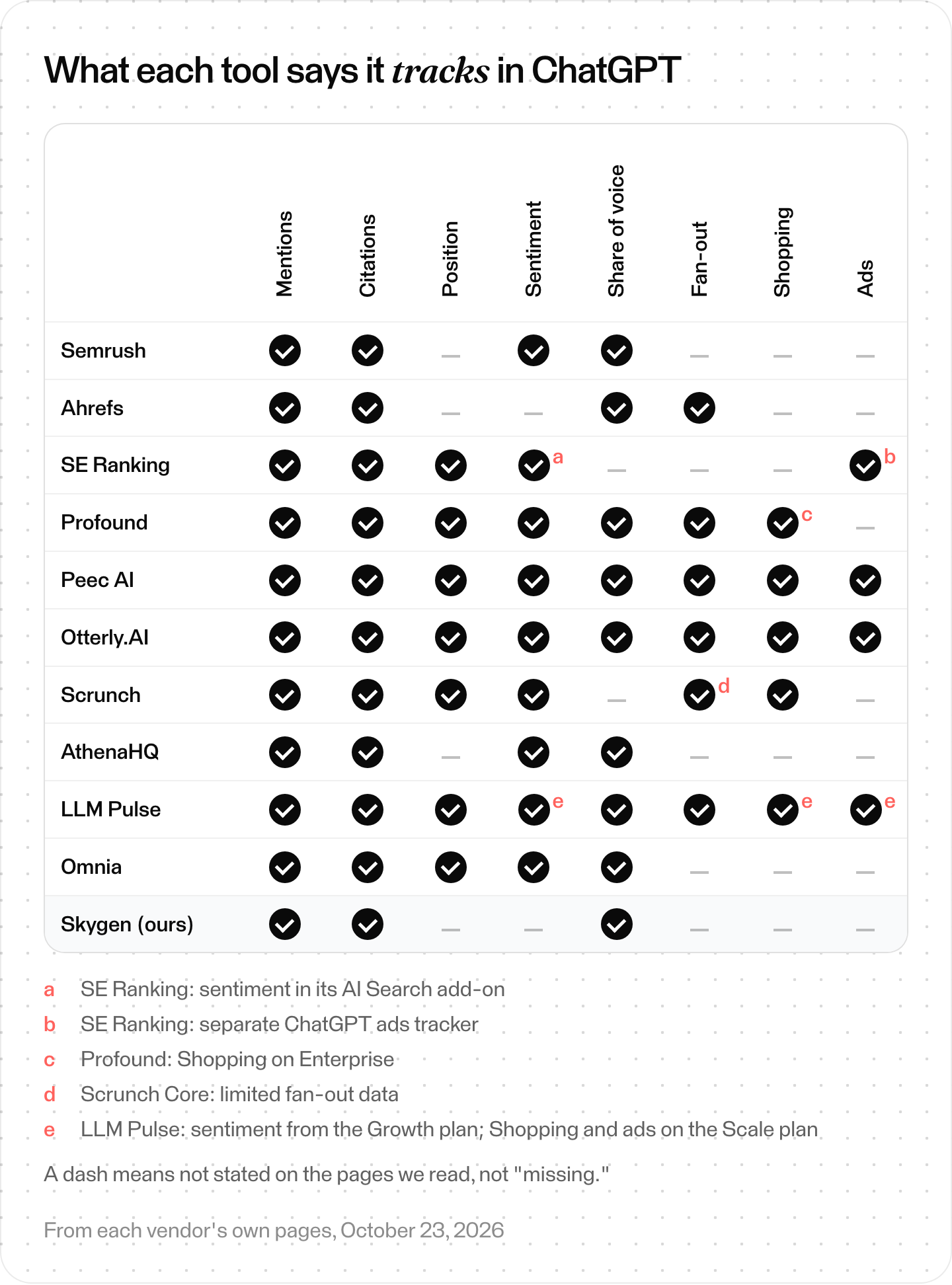
What each vendor's own pages say it tracks. A dash means not stated on the pages we read, not "missing."
Which ChatGPT tracker fits your team?
Our read, going only on what each vendor states: teams on Semrush, Ahrefs or SE Ranking can try those suites' ChatGPT tracking first. For browser or front-end capture by location, look at Omnia and Profound. Otterly.AI Lite and LLM Pulse's weekly Starter fit small budgets. To start free, try Profound, AthenaHQ, SE Ranking or Omnia.
- You already pay for an SEO suite. Start with its ChatGPT tracking. On Ahrefs, every paid plan includes a daily Custom Prompts quota (Lite 5, Standard 10, Advanced 20). Add a prompt package if you need more checks. On Semrush, that's the AI Visibility Toolkit; on SE Ranking, the Core plan.
- You want answers captured the way users see them, by location. Compare Omnia and Profound, which describe browser or front-end capture. Scrunch describes mixed methods across platforms, so ask which one it uses for ChatGPT.
- You have the smallest budget. Look at Otterly.AI Lite, an Ahrefs prompt package or LLM Pulse's weekly Starter.
- You sell products, or rivals buy ads in ChatGPT. Otterly.AI records ads and Shopping Cards by default; Profound tracks Shopping on Enterprise; Peec AI has an ads library.
- You want a free look first. Try Profound's 7-day trial, AthenaHQ's free credits, or a 14-day trial from SE Ranking or Omnia. Skygen's first check is free too.
The 10 best ChatGPT SEO tracking tools, one by one
Each entry uses the same fields. The Best for lines are our read of published features, not findings from hands-on testing. Prices are as displayed on October 23, 2026, except Peec AI's (October 24).
SEO suites with ChatGPT tracking
1. Semrush AI Visibility Toolkit
- Best for: teams already working in Semrush.
- What it tracks in ChatGPT: mentions, citations, sentiment and share of voice. Prompt Tracking checks your own prompts in ChatGPT Search daily.
- How it collects answers: for its prompt database, its knowledge base says "Prompt responses are captured from real requests and not via any APIs of LLMs." It reads "the latest model of ChatGPT in search mode."
- Other assistants: Google AI Mode, AI Overviews and Gemini; brand reports add Perplexity.
- Entry plan: $99 per month with 25 prompts, per the knowledge base; the pricing page shows $99/mo per domain billed annually. Fifty more prompts cost $60 a month.
- Trial: none. The knowledge base says "the AI Visibility Toolkit does not offer a free trial."
- Watch out for: brand report data "is updated weekly," not daily.
2. Ahrefs Brand Radar
- Best for: benchmarking competitors before you write your own prompts.
- What it tracks in ChatGPT: mentions, citations and share of voice in a pre-built index. Custom Prompts add "the fanout queries AI generates behind the scenes."
- How it collects answers: it runs "496 million+ search-backed prompts through AI platforms" (as of October 23, 2026) and stores every response. App or API: not stated on its page.
- Other assistants: AI Overviews, AI Mode, Perplexity, Gemini and Copilot; Custom Prompts add Claude.
- Entry plan: Brand Radar AI from $199/mo. Prompt packages from $50/mo with 2,500 checks ("E.g. 80 prompts daily on 1 platform").
- Trial: none mentioned. Its pricing FAQ points to Ahrefs Free, which covers Site Explorer and Site Audit.
- Watch out for: the index is "re-tested monthly on a 90-day reporting window." Claude uses 8 checks per update.
3. SE Ranking ChatGPT Visibility Tracker
- Best for: teams that want ChatGPT data next to classic rank tracking.
- What it tracks in ChatGPT: mentions and links, where you rank in answers, competitors and history, with cited sources broken down "by media, blogs, forums."
- How it collects answers: its tracker page says it captures "actual responses," which you "can review." App or API: not stated.
- Other assistants: "This tool is designed for ChatGPT mention monitoring." AI Overviews, AI Mode, Gemini and ChatGPT ads have separate trackers.
- Entry plan: Core is $129.00/mo, or $103.20/mo billed annually, with 100 prompts tracked daily.
- Trial: 14 days, no credit card.
- Watch out for: the pricing page lists 5 LLMs to track without naming them.
Dedicated AI visibility trackers
4. Profound
- Best for: enterprise and ecommerce teams.
- What it tracks in ChatGPT: visibility, rank, share of voice, citations and sentiment, plus fan-out sub-queries and, on Enterprise, how often prompts "trigger ChatGPT's shopping interface."
- How it collects answers: Profound "captures AI-generated answers, citation sources, and front-end results for every tracked prompt each day," by country, city, language or persona.
- Other assistants: Gemini and Google AI Overviews on the trial; Enterprise lists "Up to 9 Answer Engines tracked."
- Entry plan: a free Trial, then a custom-priced Enterprise plan.
- Trial: "50 prompts run daily for 7 days."
- Watch out for: its pricing page for brands lists only the free Trial and the custom-priced Enterprise plan.
5. Peec AI
- Best for: content teams that want the searches behind ChatGPT's answers.
- What it tracks in ChatGPT: mentions, sources, sentiment, share of voice and average positions. Its pricing page also lists an ads library and AI Shopping.
- How it collects answers: not stated on its page. Its ChatGPT tracker page says it "reveals the internal query expansions ChatGPT runs to formulate its answers."
- Other assistants: choose 3 models on Starter; up to 13 on Enterprise.
- Entry plan: Starter is $95/mo (monthly) with 50 prompts on 3 models, daily.
- Trial: a free trial is offered ("Start free trial"); its length isn't stated.
- Watch out for: answers are "calculated by multiplying tracked prompts by active models and tracking frequency."
6. Otterly.AI
- Best for: small teams on a budget, and anyone watching ChatGPT ads.
- What it tracks in ChatGPT: mentions, citations, share of voice and sentiment. Lite also lists a "Query Fan Out Tool," but its pages don't say whether it reads queries from tracked answers. Every Brand Report also records ads and Shopping Cards: "the advertiser brand, the destination link, the ad copy, and the product details."
- How it collects answers: Otterly.AI says it works "by analyzing AI Search platforms directly." App or API: not named.
- Other assistants: Google AI Overviews, Perplexity and Copilot; Claude, AI Mode and Gemini are add-ons.
- Entry plan: Lite is $29/month, or $25/month billed annually, with 15 prompts tracked daily.
- Trial: yes; its page says 7 days in the FAQ and 14 on the button.
- Watch out for: 15 prompts is the smallest entry panel here.
7. Scrunch
- Best for: teams that want the method and refresh rate spelled out.
- What it tracks in ChatGPT: presence, position ("top, middle, bottom"), sentiment and citations, counting only "explicit brand mentions." Core includes limited fan-out data.
- How it collects answers: Scrunch says it uses "browser automation and official platform APIs."
- Other assistants: Perplexity, Google AI Overviews and Copilot on Core; 9 LLMs on Enterprise.
- Entry plan: Core is $250/mo with 125 prompts and 5,000 responses a month.
- Trial: 7 days.
- Watch out for: new prompts run daily for 14 days, then on "a default 72-hour refresh cadence."
8. AthenaHQ
- Best for: trying many models on free credits.
- What it tracks in ChatGPT: mention frequency, competitor share of voice, sentiment and citations, at the prompt level.
- How it collects answers: not stated on its page.
- Other assistants: Perplexity, Gemini, Google AI Overviews and Copilot on all plans; paid plans add AI Mode, Claude, Grok, DeepSeek and Meta AI.
- Entry plan: Starter is $295/month with 3,600 credits, and "1 credit = 1 AI response," per its pricing page.
- Trial: a Free plan with "$25 free credit," which includes 300 credits.
- Watch out for: refresh cadence isn't stated, and every answer uses a credit.
9. LLM Pulse
- Best for: covering five models cheaply, with weekly data.
- What it tracks in ChatGPT: mentions, sentiment (from the Growth plan, 99 € a month), "citation URLs, citation position," competitors, share of voice and fan-out queries. Shopping and paid-ads tracking are on the Scale plan (299 € per month).
- How it collects answers: its Query Fan Out page says "When your tracked prompts run against ChatGPT, the API returns rich structured data beyond just the text response." Its ChatGPT page says it monitors "the current version" but doesn't name a method.
- Other assistants: Perplexity, Google AI Mode, AI Overviews and Gemini; Grok, Claude and Copilot are add-ons.
- Entry plan: Starter is 49 € per month weekly or 79 € daily, with 50 prompts on 5 models.
- Trial: 14 days on weekly plans; "it needs a valid payment method."
- Watch out for: "ChatGPT data is updated weekly by default."
10. Omnia
- Best for: small marketing teams that want browser capture and an agent.
- What it tracks in ChatGPT: share of voice, brand ranking, mentions, competitors, cited pages and domains, and sentiment.
- How it collects answers: "We open real browsers in specific locations and run prompts the same way users do," says Omnia. It keeps "full response snapshots."
- Other assistants: Google AI Overviews, Google AI Mode and Perplexity; up to 7 engines.
- Entry plan: Growth is €79/month, or €63/month billed yearly, with up to 25 prompts.
- Trial: 14 days, no credit card.
- Watch out for: data refreshes "every 24 hours, then applies a moving average," so a one-day jump won't show at full size.
What does an entry plan really buy?
What an entry plan really buys is answers per month, not prompts. One prompt asked on one assistant in one run is one answer, so the total is prompts × assistants × runs. Ahrefs, Scrunch, AthenaHQ and Peec AI state the unit their plans count, and their billing rules differ.
- Ahrefs: "Tracking one prompt on one platform in one location uses 1 check." The $50 package includes 2,500 checks a month, which Ahrefs puts at about 80 prompts daily on one platform. Claude uses 8 checks per update.
- Scrunch: Core includes 125 prompts and 5,000 responses a month.
- AthenaHQ: Starter includes 3,600 credits, and "1 credit = 1 AI response."
- Peec AI: monthly answers are prompts × active models × tracking frequency, and its pricing table lists 4,500 a month for Starter: 50 prompts on 3 models, daily.
Cadence changes the count too. LLM Pulse runs weekly by default, "because that is the cadence where trends show up without daily noise," and charges 49 € weekly or 79 € daily for Starter.
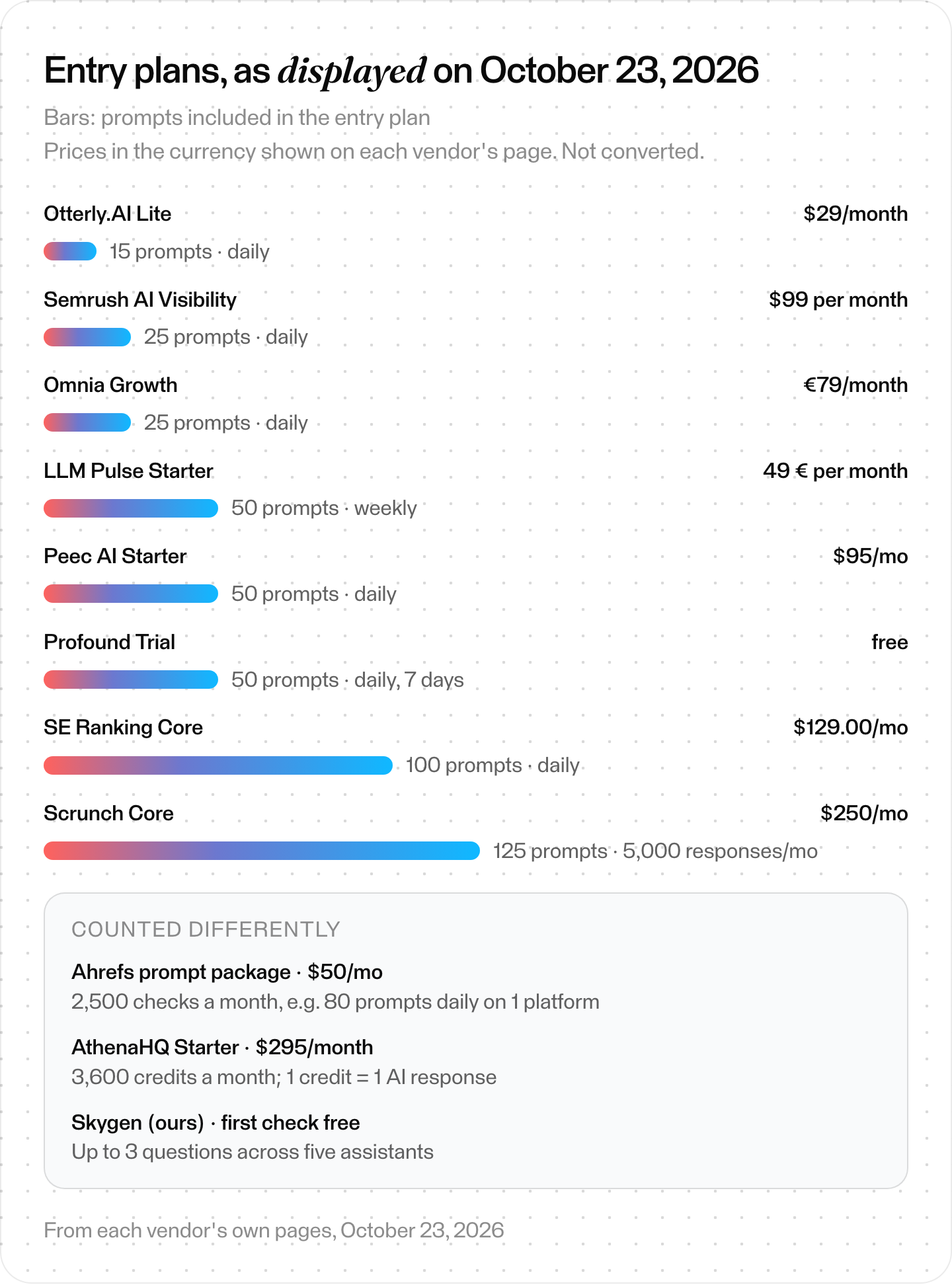
Entry plans as displayed on vendor pages, October 23, 2026 (Peec AI and Skygen: October 24). Currencies not converted.
How do you set up ChatGPT tracking that holds up?
A sloppy setup makes any tool's numbers useless, so follow these six steps, whichever tool you pick. Cover unbranded and branded questions, as Scrunch advises. Fix the country, language, assistant and search mode, and add competitors and name variants. Run a baseline, repeat it, read the answers behind each change, and spot-check in a Temporary Chat.
Step 1: Cover discovery and brand evaluation
Write what a buyer asks before they know your name, such as best [category] for a small team. Then add questions that name your brand or compare it with rivals. Scrunch recommends "a mix of branded and non-branded prompts" across the customer journey.
- How many: Scrunch suggests topic clusters × 12 to 15 questions each.
- Mix: Profound recommends broad prompts for the whole category plus strategic prompts close to your brand, such as "brand-specific queries, or competitor comparisons."
- Keep them apart: Our read: report branded and unbranded questions separately, so a question that already names you isn't mistaken for unprompted discovery. Skygen, ours, measures only unbranded questions.
- Drop flattering questions: Skygen rejects a question that quotes a claim only one vendor makes. It's a branded question in disguise.
What you should see: two lists, unbranded and branded, each grouped by topic and buying stage.
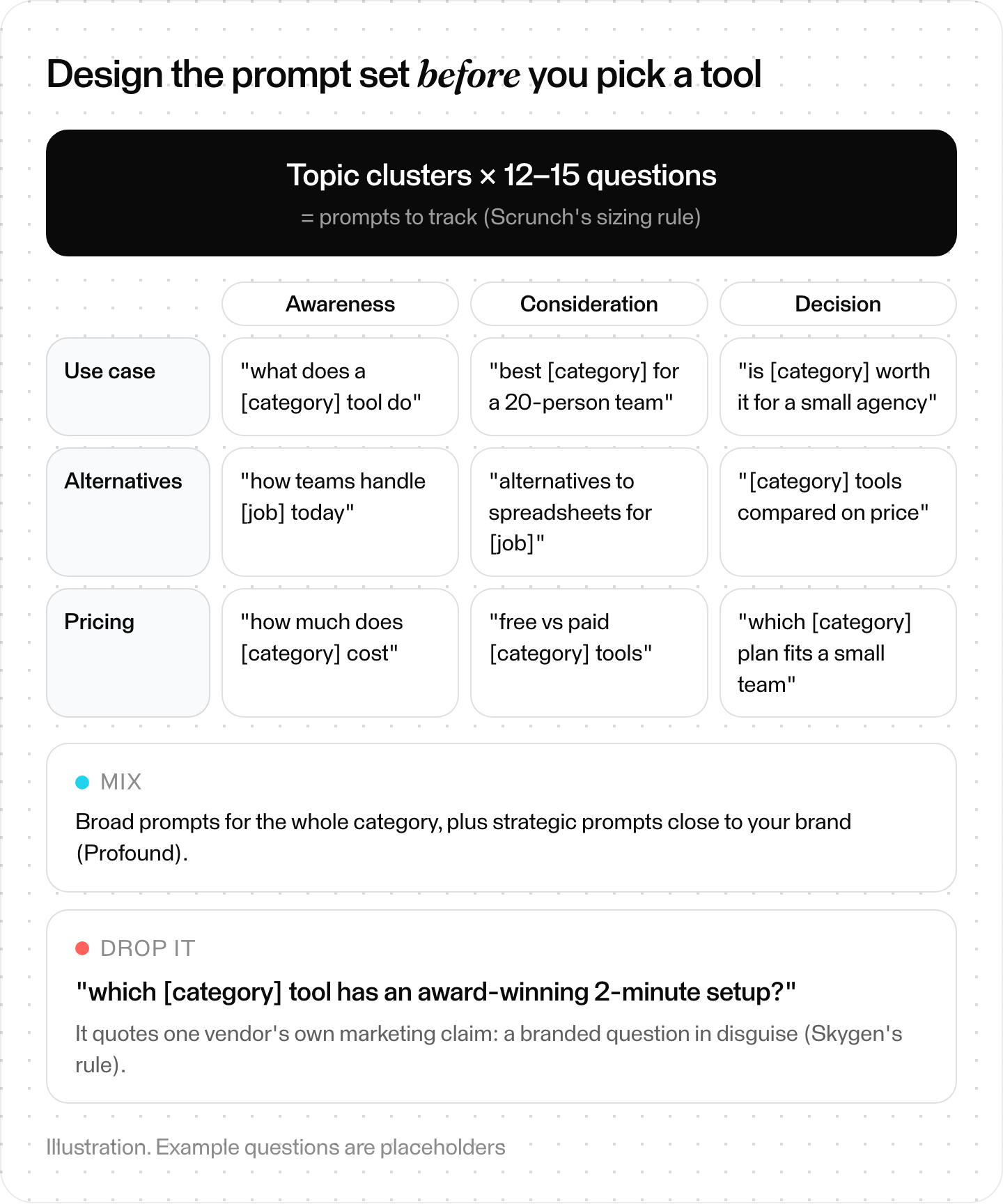
Designing a prompt set. Example questions are placeholders.
Step 2: Fix the conditions
Pick the country, language, assistant and search mode, and keep them for the whole series. ChatGPT uses your approximate location for search, so a new location is a new instrument. Skygen refuses to compare runs if the model or search mode changed.
What you should see: one settings line per series.
Step 3: Add competitors and name variants
SE Ranking lets you "monitor the names of companies, products, people, and places." Semrush matches brands by context, including "sub-brands or products of a main brand."
What you should see: your brand, its products and your main rivals, with spelling variants.
Step 4: Run a baseline, then repeat
Before you prune prompts, Scrunch says: "Allow prompts to run for a minimum of 2 weeks to collect necessary data." Skygen needs two comparable runs before it shows a change, and its method note says "One run is a baseline, not a trend." Our read: inspect repeated answers under the same conditions before you interpret a change.
What you should see: repeated runs on identical settings, with the answers saved, before you report a change.
Step 5: Read the answers, not only the score
Open the answers behind every big move. SE Ranking lets you review real responses, and Omnia keeps full snapshots. Check cited pages too: OpenAI says "Search results and citations can be incomplete, outdated, or incorrect."
Separate a failed request from a real miss. Skygen records an answer that didn't arrive as "not measured," never as "not named."
What you should see: for every drop, the sentence or missing citation behind it.
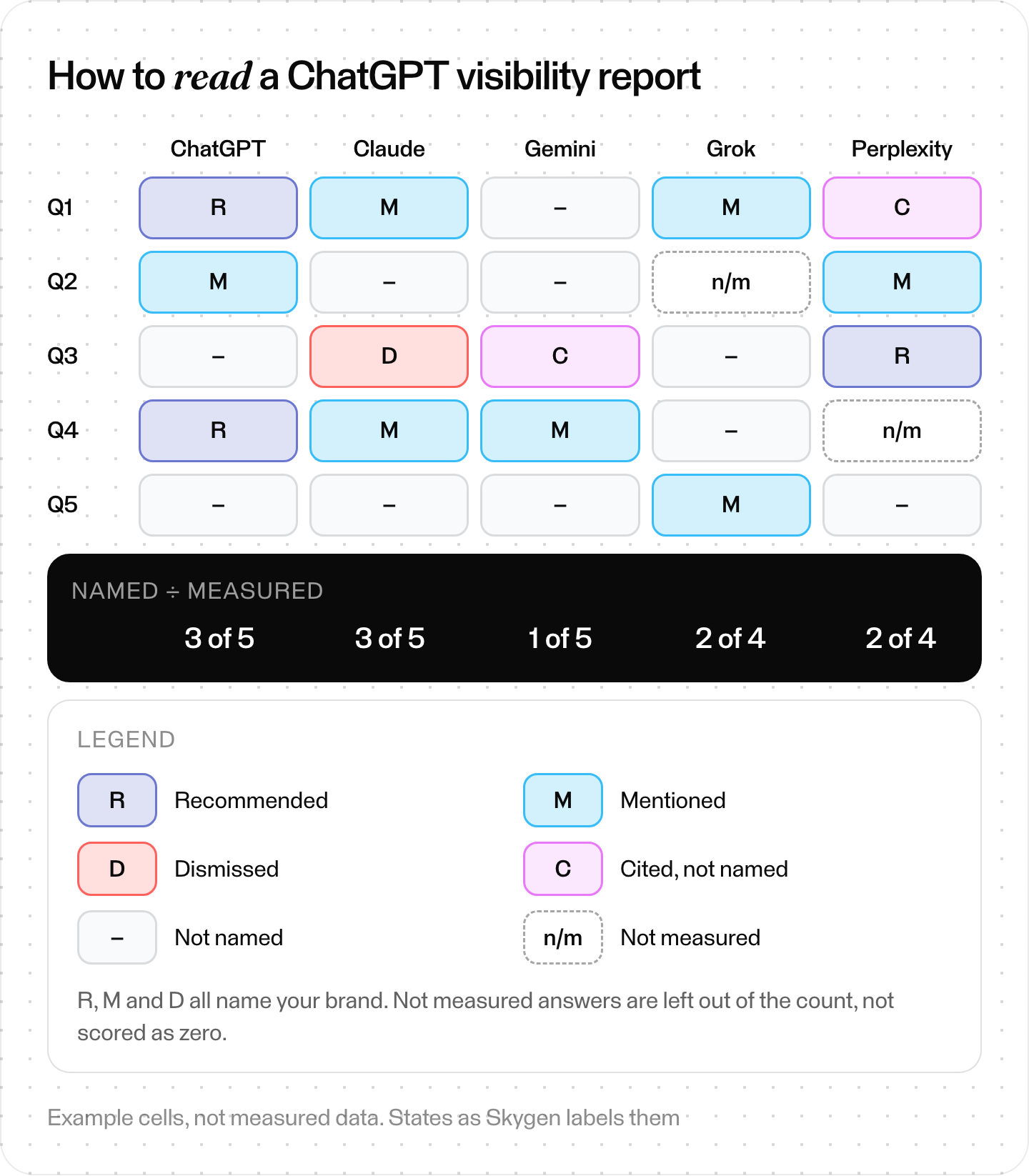
How to read a report. Example cells, not measured data.
Step 6: Spot-check by hand, the fair way
Use a Temporary Chat, which OpenAI says "won't use memory." Put the place in the question, as OpenAI suggests: "Include your city, neighborhood, or postal code in your question."
What you should see: a manual comparison with memory removed and the intended location stated. Our read: use a mismatch to investigate the tool's method. It doesn't by itself prove that either answer is wrong.
Why do ChatGPT tracking numbers look wrong?
ChatGPT tracking numbers can look wrong for several reasons. Your own ChatGPT can disagree with a tracker, since OpenAI says ChatGPT uses your IP location and may use saved memories. Two tools may collect differently. If you're never cited, OpenAI recommends allowing OAI-SearchBot in robots.txt. A failed request can also look like a zero.
| Problem | What to check |
|---|---|
| Your own ChatGPT shows something else | Memory and IP location shape your answers. Retry in a Temporary Chat with the city in the question. |
| Two tools disagree | They may collect differently (browser, requests or API), from other locations, on other schedules. Compare methods first. |
| You're never cited | Check that robots.txt allows OAI-SearchBot and that requests from OpenAI's published IP ranges are allowed. Opted-out sites "will not be shown in ChatGPT search answers," though they "can still appear as navigational links." A robots.txt change "can take ~24 hours." |
| A cited page doesn't support the answer | OpenAI warns citations "can be incomplete, outdated, or incorrect." Open the source. |
| The score jumps from day to day | Read rates over many runs. Omnia uses a moving average, and Scrunch aggregates over 90 days. |
| A zero that was really a failed request | Check whether the tool separates "not measured" from "not named." |
| Ads appear in some answers and not others | OpenAI shows ads below answers but not to Plus, Pro or Business users. Otterly.AI and Peec AI record ads. |
OpenAI's crawler documentation explains OAI-SearchBot. It's the bot "used to surface websites in search results in ChatGPT's search features."
Where Skygen fits (our product)
Disclosure first: Skygen is ours. Its AI visibility check asks ChatGPT, Claude, Gemini, Grok and Perplexity the same questions through model APIs and records what each answer says about you and your competitors.
- Free first check: up to 3 grounded questions from your website, across all five assistants, with no credit card.
- Price: Recurring AI answer checks come with Organic Pro at $799 a month (300 checks), Organic Superior at $2,000 (1,200 checks) and All-in-one at $7,000 (3,000 checks).
- Workspace: Skygen's agent proposes 20 questions; you can add your own, up to 150. Competitors are named from their own homepage titles, and the market starts as US English.
- Report: each answer is marked recommended, mentioned, dismissed, cited but not named, not named, or not measured. Share of voice is the share of measured answers that name you, counted per assistant.
- Repeats: weekly by default, a daily pulse of five questions, or off. A change shows after two comparable runs on the same model and search mode.
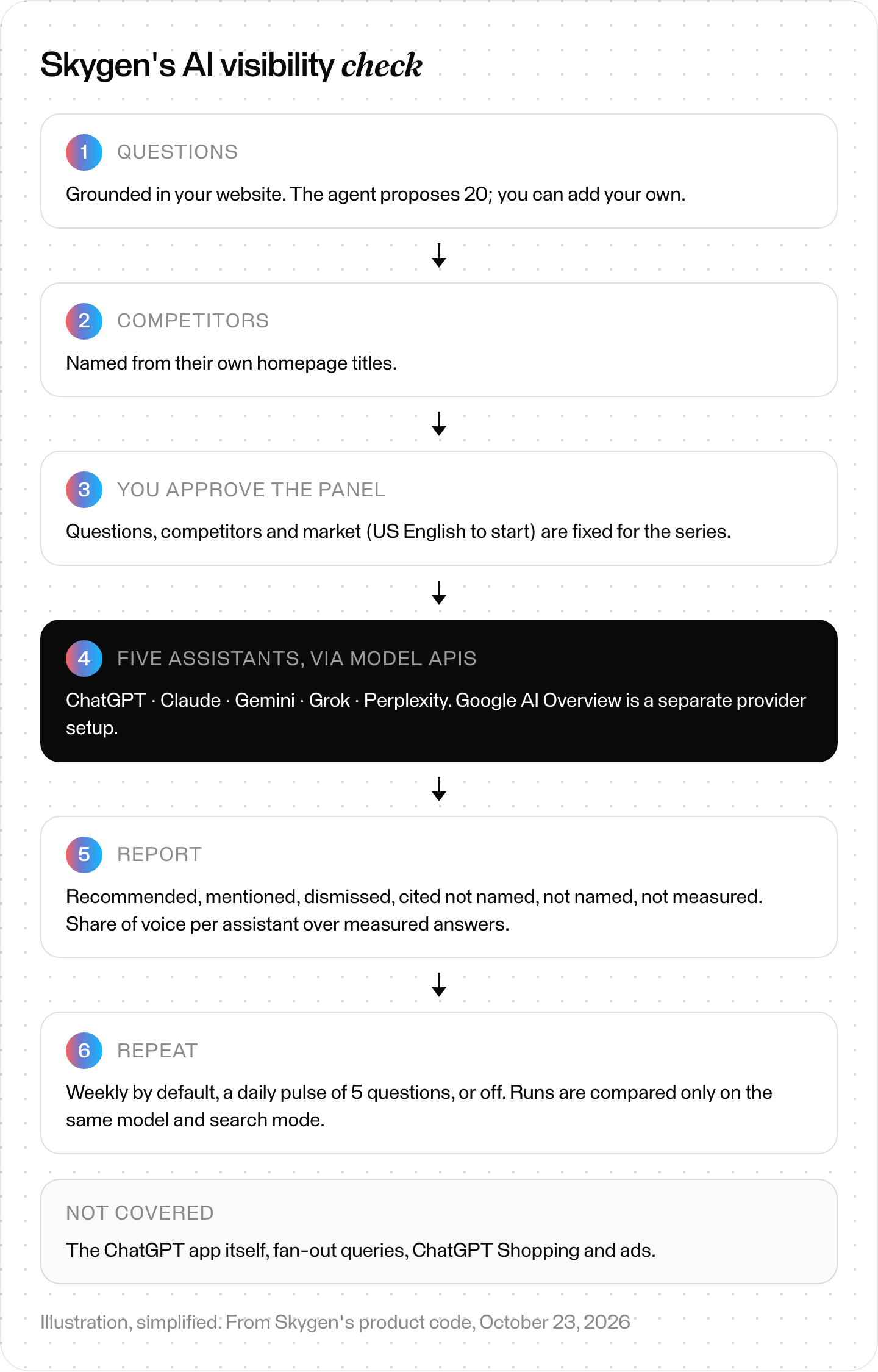
Skygen's AI visibility check. Illustration, simplified.
Our read: if you want five assistants asked the same questions on a fixed schedule, starting with a free check, Skygen is the one to pick.
The short version
All of these tools count mentions and citations. Choose on what differs: how a tool reaches ChatGPT and how many answers a month its plan buys. Then cover unbranded and branded questions, keep the conditions fixed, repeat the runs, and read the raw answers before you believe a score. To improve what you find, see our guide on how to rank in ChatGPT and get cited.