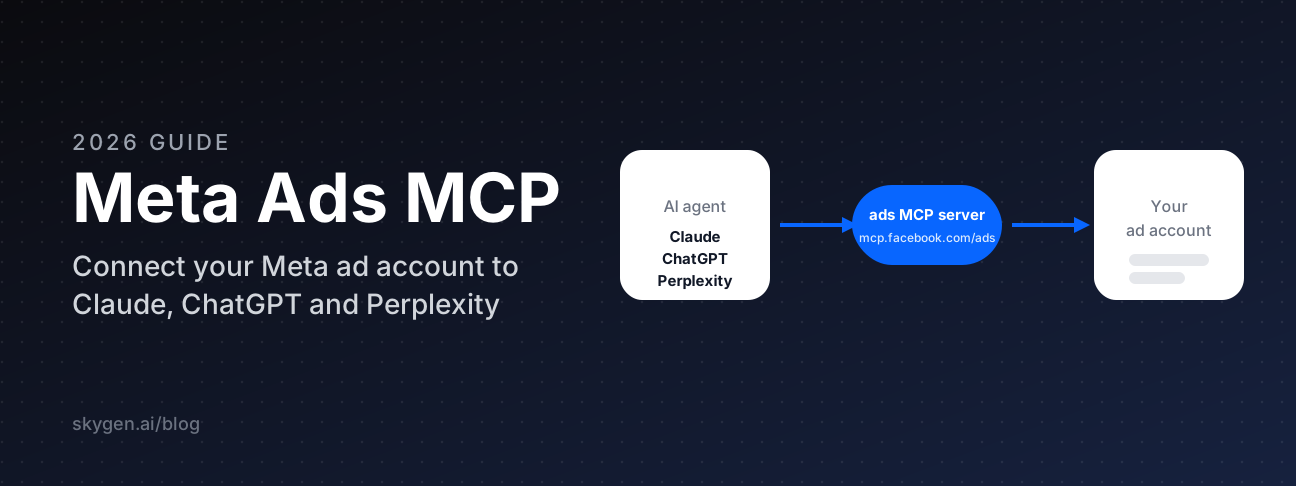

Meta Ads MCP is Meta's official way to connect an AI agent to your ad account. You add one URL, https://mcp.facebook.com/ads, to Claude, ChatGPT, Perplexity or Claude Code, sign in with Meta, and ask for what you need in plain language: a spend report, a paused campaign, a catalog fix.
This guide walks through it step by step. You'll see what the server can do, how to connect it in each client, the first prompts to run, a library of prompts by job, and how to make sure an agent never spends money you didn't approve.
Key takeaways
- The server lives at mcp.facebook.com/ads. Meta lists Claude, ChatGPT, Claude Code and Perplexity as supported agents.
- You don't need a developer app. Add the URL as a custom connector and sign in with Meta.
- New campaigns, ad sets and ads start paused. Turning them on is a separate step.
- Ads MCP server rules in Business Suite can block actions or cap budgets for any agent.
What is Meta Ads MCP?
Meta Ads MCP is a server hosted by Meta that lets an AI agent read and manage your Meta ads through structured tools. Meta announced it in open beta on April 29, 2026, and on July 16, 2026 opened it to any developer with their own Meta app and added rules that limit what agents can do.
MCP stands for Model Context Protocol, an open standard for plugging tools into AI assistants. Instead of exporting a CSV from Ads Manager and pasting it into a chat, your agent calls a tool like ads_get_ad_entities and gets the numbers straight from your account.
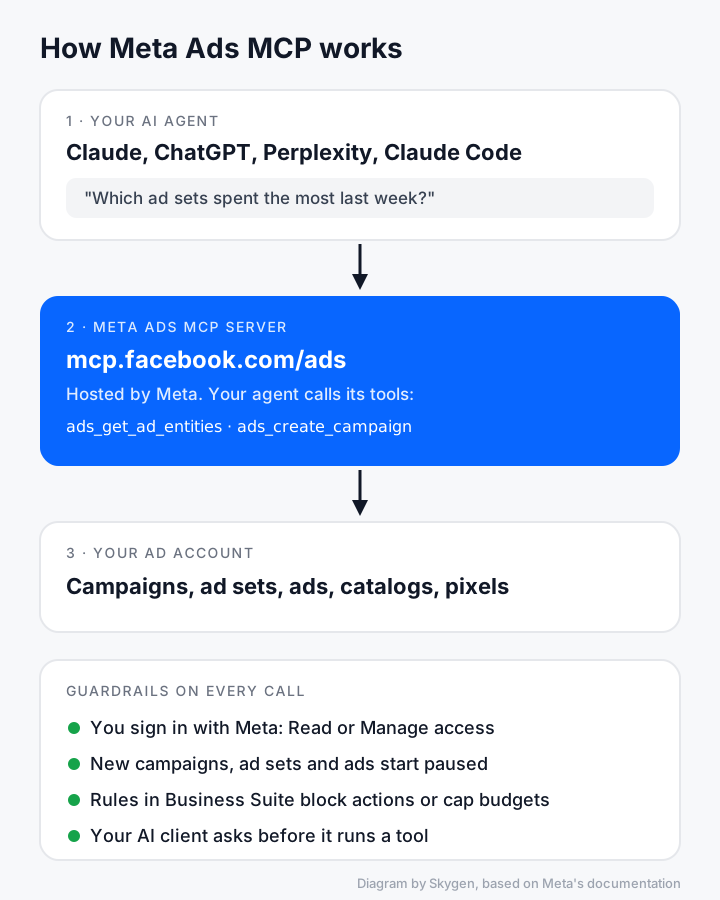
How the pieces fit together. Every call goes through your Meta sign-in, your scopes and your rules.
Three things make it different from older ways of wiring AI to Meta ads:
- It's first-party. Meta hosts it, so you don't hand your ad account to a script or a wrapper you can't inspect.
- It writes, not just reads. It creates and edits campaigns, ad sets, ads, creatives, audiences and catalogs.
- It has guardrails built in. New objects start paused, and you can set account-level rules for agents.
What can Meta Ads MCP do?
Meta's help article on ads AI connectors lists eight jobs the server handles, and its developer reference listed 86 named tools on October 20, 2026. The table maps each job to real tool names and a prompt you can try.
| Job | Example tools | Try asking |
|---|---|---|
| Reporting and insights | ads_get_ad_entities, ads_insights_performance_trend, ads_insights_anomaly_signal | "Which campaigns spent the most in the last 7 days, and what was their cost per result?" |
| Ad creation and editing | ads_create_campaign, ads_create_ad_set, ads_create_ad, ads_update_entity | "Create a paused traffic campaign for the spring sale with a $50 daily budget." |
| Creatives and previews | ads_create_creative, ads_get_ad_preview, ads_boost_ig_post | "Show me how this ad renders in Reels and in Feed." |
| Custom audiences | ads_create_custom_audience, ads_get_custom_audience_adsets | "Which ad sets target my website visitors audience?" |
| Catalogs | ads_catalog_get_diagnostics, ads_catalog_get_dynamic_ads_health | "List catalog errors that could stop my product ads from delivering." |
| Signals and pixels | ads_get_dataset_quality, ads_get_dataset_stats | "How healthy is my pixel's event quality this week?" |
| A/B tests and lift studies | ads_experiment_check_eligibility, ads_experiment_abtest_create_test | "Can I run an A/B test on these two ad sets?" |
| Help and activity history | ads_get_errors, ads_get_help_article, ads_account_get_activity_logs | "What changed in this ad account yesterday, and who changed it?" |
Creatives cover single image, single video, carousel and product media carousel ads, and the agent can upload image or video assets to your library. There's also ads_library_search for the public Meta Ad Library, which is handy for competitor research.
Meta rolls tools out gradually, so the set you see may differ. The simplest check is to ask your agent: "Which Meta ads tools do you have access to?"
Before you start: a 2-minute checklist
You need four things before you connect. The agent works through your own Meta sign-in, so check your access to the ad account first.
- Access to the ad account. You should be able to open it in Ads Manager with your own Facebook profile.
- A supported client. Meta's help page lists ChatGPT, Claude, Claude Code and Perplexity. Its developer docs also list Codex and Cursor.
- Room for a custom connector. On Claude's free plan you get one custom connector. Team and Enterprise workspaces need an owner to add it first.
- Full control of the business portfolio if you want to set agent rules later.
How to connect Meta Ads MCP to Claude
In Claude you add Meta's server as a custom connector, sign in with Meta, then switch it on in a chat. It takes a few minutes, and the steps below follow Claude's help center for Pro and Max plans.
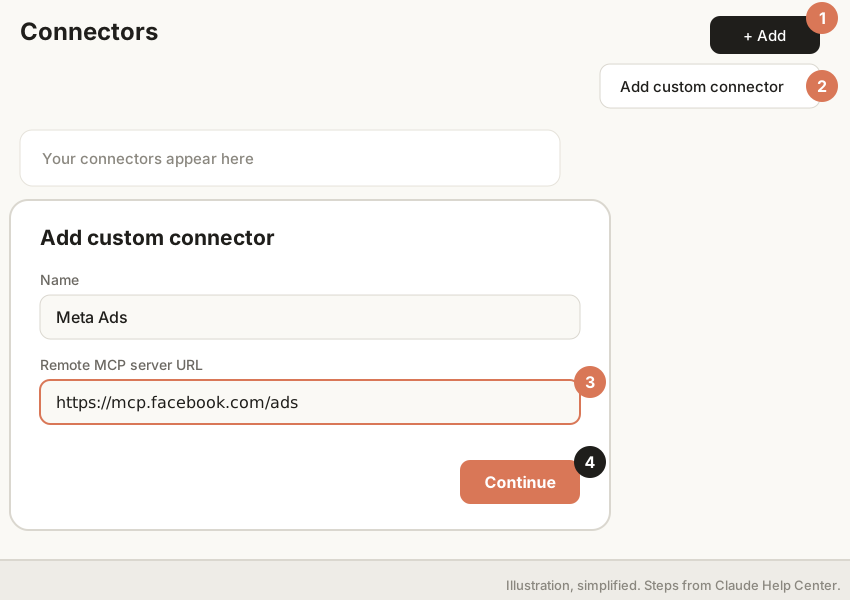
Steps 1–4 in Claude. Illustration, simplified.
- Open Customize → Connectors.
- Click + Add, then Add custom connector.
- Enter a name, for example
Meta Ads. - Paste the server URL
https://mcp.facebook.com/adsand click Continue. - Under Authentication, choose Sign in now. Under OAuth client, keep Use Claude's published identity (Recommended). Click Add.
- In any chat, click + in the message box, open Connectors and switch Meta Ads on.
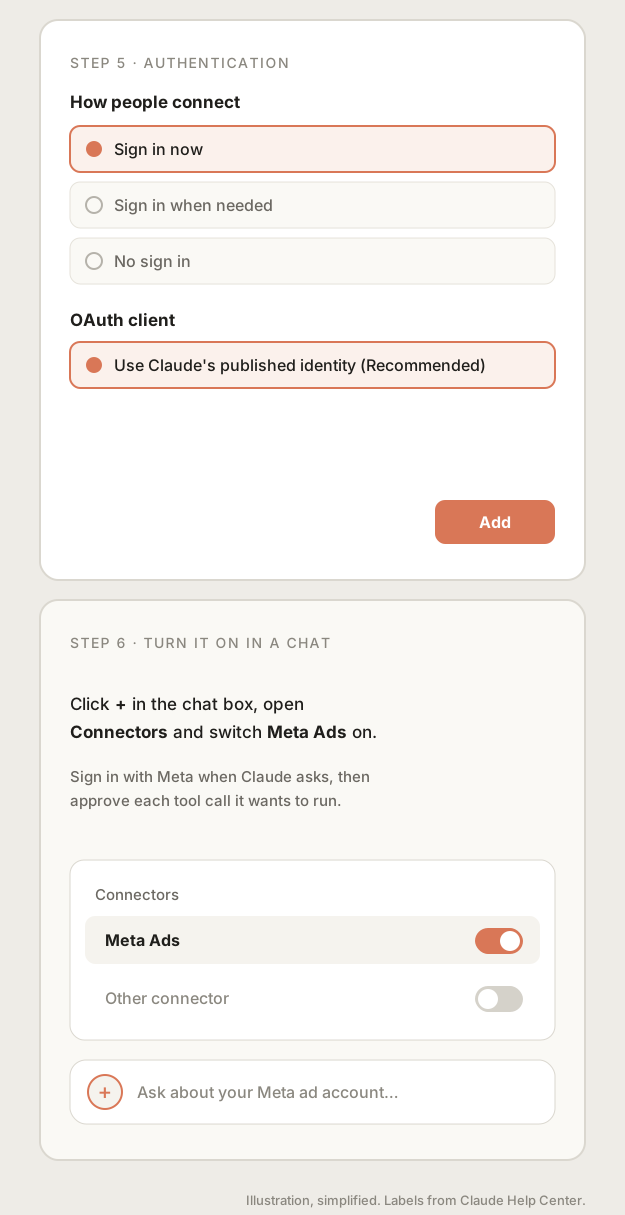
Steps 5–6: authentication, then turning the connector on in a chat.
What you should see: a Meta sign-in window, then the Meta Ads connector listed with a toggle. When Claude wants to call a tool, it shows an approval request first. Approve calls one by one at the start. Claude's own guidance is to click "Allow always" only for tools you trust to run unsupervised.
On a Team or Enterprise plan, an owner adds the connector once in Organization settings → Connectors → Add → Custom → Web. Members then open Customize → Connectors, find it and click Connect.
Signing in with Meta
The sign-in is Meta's own Facebook Login for Business screen. You approve what the agent may do, and you can change it later without reconnecting.
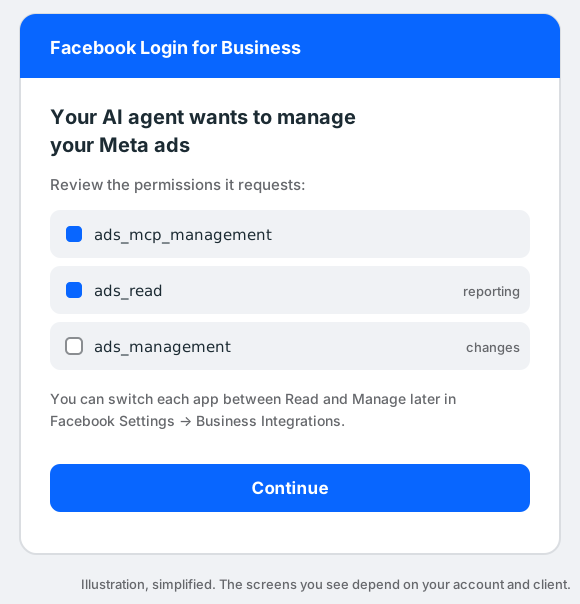
The permissions behind the scenes. The exact screens depend on your account and client.
Read access covers reporting. Changes need manage access. Meta's docs say you can switch each app between Read and Manage later in Facebook Settings → Business Integrations, and review or revoke connections there every few months.
How to connect Meta Ads MCP to ChatGPT
In ChatGPT you add Meta's server as a custom MCP server on the web, then call it with @ in a conversation. The steps follow OpenAI's "Add custom MCP server" guide.
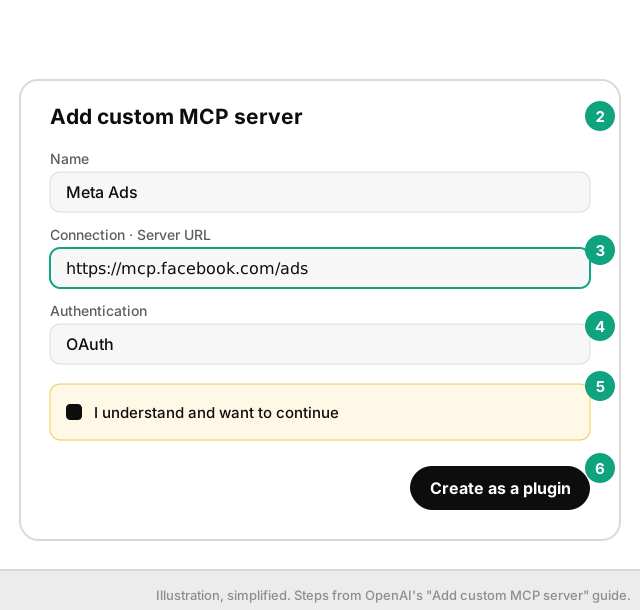
Steps 1–6 in ChatGPT. Illustration, simplified.
- Open ChatGPT on the web and go to Plugins (chatgpt.com/plugins).
- Click +, then Add custom MCP server.
- Enter a name, for example
Meta Ads. - Under Connection, paste
https://mcp.facebook.com/adsas the Server URL. - Set authentication to OAuth, read the risk warning and select I understand and want to continue.
- Click Create as a plugin, install it, then type
@and pick Meta Ads in a chat to use it.
What you should see: a Meta sign-in, then a plugin you can mention with @. ChatGPT treats any tool not marked read-only as a write action and asks you to confirm it. Each plugin has a details page in app settings where you can switch individual tools off.
Workspace permissions apply. If you're on a company workspace and don't see the option, your admin controls it.
How to connect Meta Ads MCP to Perplexity
Perplexity supports custom remote connectors as an Enterprise feature, so this path is for organizations where an admin has turned it on. The steps follow Perplexity's help center.
- Open Plugins in the sidebar (or Customize → Connectors).
- Choose Add custom → Connector → Add MCP connector, then Remote.
- Enter a name and the MCP server URL
https://mcp.facebook.com/ads. - Set Authentication to OAuth.
- Tick the acknowledgement box and click Add.
- Click the connector card to sign in with Meta and enable it.
Admins can add the connector for the whole organization from Enterprise settings → Permissions → Connectors permissions.
How to connect from Claude Code or your own app
Developers can connect through their own Meta app, which Meta opened up on July 16, 2026. This is the path for Claude Code with your own client ID, token-based setups and software you build for clients.
1. Add the use case. In the developer dashboard, open your app, go to Use cases → Add use cases → Ads and monetization, select Create & manage ads with ads MCP server and save.
2. Pick an authentication method.
- OAuth through Facebook Login for Business. Your app's redirect URL must match your client.
- User access token from the Graph API Explorer or your own OAuth flow.
- System user access token for server-to-server setups. Only Employee-role system user tokens work. Meta's docs say Admin-role system user tokens can't access the server.
3. Grant permissions. The minimum is ads_mcp_management plus ads_read or ads_management. Adding ads_management, catalog_management, business_management, pages_show_list or instagram_basic unlocks more tools.
4. Add the server. For Claude Code, Meta gives this command:
claude mcp add --transport http --client-id <META_APP_ID> meta-ads https://mcp.facebook.com/ads
For a programmatic check, pass a token in the header and list the tools:
curl -i -X POST "https://mcp.facebook.com/ads" \
  -H "Authorization: Bearer <ACCESS_TOKEN>" \
  --data-raw '{"jsonrpc":"2.0","method":"tools/list","id":1}'
Agencies and partners: if you manage ads for other businesses, Meta requires Advanced Access on ads_mcp_management. You request it under your use case's Permissions and features tab, and it goes through App Review. Start early.
Your first 10 minutes: a safe read, then a first write
Start with reads, because they can't change anything. Then make one change that can't spend money, a paused campaign, and turn it on only after you've looked at it.
A safe first read. Ask these three in order:
- "List my ad accounts with their currency and time zone."
- "For ad account
<AD_ACCOUNT_ID>, summarize the top-spending campaigns over the last 30 days." - "Are there any delivery-blocking errors on this account right now?"
What you should see: account names from ads_get_ad_accounts, a spend table from ads_get_ad_entities, and either a clean bill or a list of errors from ads_get_errors. If the numbers look off, check the date range and the ad account ID first.
A first write that can't spend money. Meta's write tools create campaigns, ad sets and ads in a paused state, and activation is a separate tool. That gives you a natural review step.
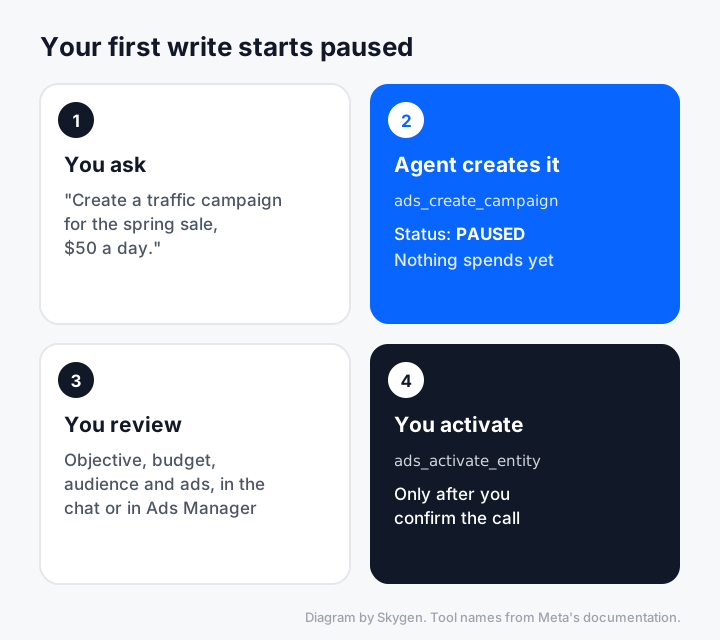
Nothing spends until step 4.
- Ask: "Create a paused traffic campaign called Spring sale test with a $50 daily budget."
- Check what the agent created, in the chat or in Ads Manager.
- Ask for previews: "Show me how the ad looks in Feed and in Stories."
- Only then ask: "Activate the Spring sale test campaign." Your client will ask you to confirm the tool call.
Prompt library: 24 prompts by job
Each prompt below uses tools from Meta's reference. Replace the names in angle brackets with yours.
Reporting
- "Compare spend, CPC and cost per result for my top 5 campaigns this week versus last week."
- "Break down last month's spend by age and gender for
<CAMPAIGN>." - "Track how CPM and CTR changed over the last 30 days for
<AD SET>." - "Show my ad account's opportunity score and the top recommendations."
Finding problems
- "Flag any unusual changes in performance across my active campaigns."
- "Which ads did best in the auction, and where would better bids or ad quality help?"
- "How do my ad sets compare with benchmarks from similar advertisers?"
- "List every delivery-blocking error on this account and what to do about each."
Creative
- "Which creatives are used by more than one ad, and how did each perform?"
- "Preview
<AD>in Reels, Feed and Stories." - "Find boost-eligible posts on our Instagram account from the last two weeks."
- "Search the Meta Ad Library for active ads from
<COMPETITOR>and summarize their angles."
Budgets and launches
- "Create a paused campaign for
<OFFER>with three ad sets for<AUDIENCES>." - "Draft a $40 daily budget ad set under
<CAMPAIGN>optimized for link clicks. Keep it paused." - "Lower the daily budget of
<AD SET>to $75 and tell me the old value first." - "Which paused ad sets were created this week and haven't been activated?"
Audiences and signals
- "List my custom audiences with their size and the ad sets that use them."
- "Create a lookalike audience from
<SOURCE AUDIENCE>." - "What is the Event Match Quality score on my main pixel?"
- "Which conversion events fired yesterday, and did any drop to zero?"
Catalogs and tests
- "Is my catalog healthy enough for Advantage+ catalog ads?"
- "List products with errors that stop them from showing in ads."
- "Check whether these two ad sets are eligible for an A/B test, then propose one."
- "Show the activity log for the last 48 hours and who made each change."
How to control what the agent can do
Meta gives you two layers of control: the access you grant at sign-in, and ads MCP server rules that apply to every agent on an ad account. Together they let you say "read everything, change nothing" or "change budgets, but never above $1,000."
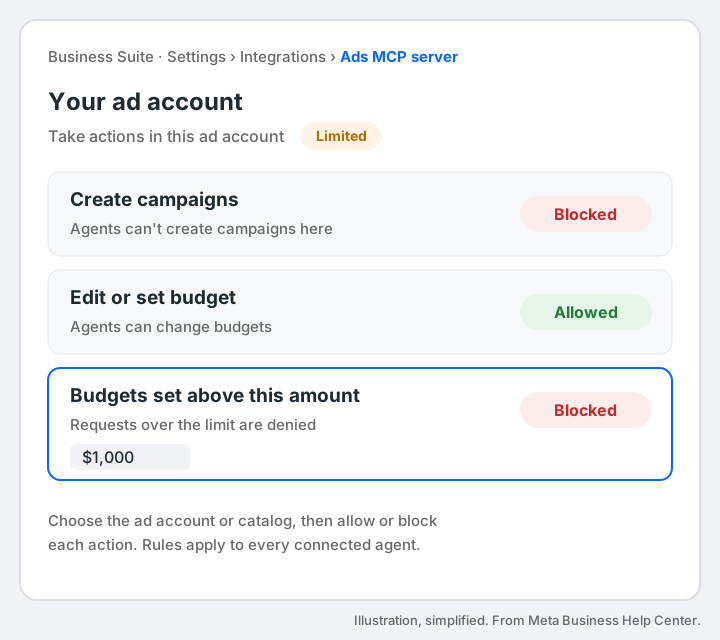
Ads MCP server rules in Business Suite. Illustration, simplified.
To set rules (you need full control of the business portfolio):
- Go to Settings in Meta Business Suite.
- Under Integrations, select Ads MCP server. If you don't see it, your business doesn't have the feature yet.
- Select the ad account or catalog.
- Allow or block specific actions. For example, switch Create campaigns to Blocked, or set Budgets set above this amount to Blocked with a limit of $1,000.
When some actions are blocked, Business Suite shows Limited next to "Take actions in this ad account." A partner you share an ad account with can set its own rules, which apply only to that partner's employees. Developers can also manage rules in bulk through the Marketing API.
A short safety checklist, from Meta's guidance:
- Keep apps at Read unless the agent needs to make changes.
- Use separate apps for testing and production.
- Review connected servers in Business Integrations every few months.
- Don't give manage access to an agent that reads untrusted content, such as web pages or inbound webhooks. Meta warns that hidden instructions in that content can push an agent to misuse its access.
Will this get my ad account banned? Meta's answer is direct: it's safe to connect through the ads MCP server, and an account is unlikely to be banned simply for using it. Bans usually follow policy violations, such as non-compliant ads, not the connection.
Troubleshooting common problems
Most problems come from access, rollout or token type. Here's what to check, based on what Meta and the client vendors document.
| Problem | What to check |
|---|---|
| The connector works but some tools are missing | Meta rolls tools out gradually. Ask the agent which tools it sees, and try again later. |
| Your ad account doesn't appear | Make sure your own Facebook profile can manage it in Ads Manager, then sign in again. |
| "Ads MCP server" is missing from Business Suite settings | Your business doesn't have rules yet. You can still connect; you just can't set rules. |
| A system user token is refused | Only Employee-role system user tokens work. Admin-role ones are refused. |
| OAuth fails with your own app | The app's redirect URL must match your client. Perplexity's is https://www.perplexity.ai/rest/connections/oauth_callback. |
| Claude won't let you add a second connector | Free plans are limited to one custom connector. |
| An agent's change was denied | A rule on the ad account blocked it. Check Business Suite → Integrations → Ads MCP server. |
Official server or a third-party one?
Pick Meta's own server if you only run Meta ads and want first-party access. Pick a hosted alternative if you need several ad platforms in one connection, drafts before anything goes live, or reporting that blends channels. Each row uses only that vendor's own page, read in October 2026.
| Option | Ad platforms | Writes and safety | Best for |
|---|---|---|---|
| Meta ads MCP server | Meta | New objects paused; activation separate; rules in Business Suite | Meta-only teams |
| Meta Ads CLI | Meta | Command-line tool for managing Meta ads from a terminal | Developers |
| Pipeboard | Meta, Google, TikTok, Snap, Reddit and more | "Explicit confirmation on every write"; read-only tokens | Multi-platform teams |
| Markifact | 14 ad platforms | "Approve every change" before it touches your ads | One-click install in Claude or ChatGPT |
| AdKit | Meta, Google, TikTok, Reddit, LinkedIn, X, Microsoft | "Everything is a draft first" | Drafts before publishing |
| Coupler.io | Facebook Ads among 70+ MCP connections | Reports and lists | Reporting |
| Windsor.ai | 350+ data sources | Analytics focus | Cross-channel reporting |
| Skygen (our product) | Meta (management), Google (reporting), LinkedIn, Reddit, TikTok (spend reporting) | Owner approves every write, including pauses and budget edits | An audit, a plan and approvals in one place |
How to run Meta ads through Skygen
Skygen connects your Meta ad account once, reads spend and campaign structure, flags what to fix and prepares changes for you to approve. On Meta that covers pausing campaigns, ad sets and ads, editing daily budgets, and creating campaigns before you activate them.
- Connect your ad account in Skygen and run the free ads audit. It only reads your account, reviews the last 30 days and runs six checks: access, campaigns, spend, signals, creative and plan.
- Ask in plain language, inside Skygen or from your own agent. For Claude Code, create a key under Coding agents in the Skygen app, then run the command below.
- Review the prepared change. Skygen shows the exact before and after, and checks the current campaign version before applying it.
- Approve it. Nothing is written to Meta until the account owner ticks "I approve this exact change" and confirms.
claude mcp add --transport http skygen https://skygen.ai/api/mcp --header "Authorization: Bearer YOUR_KEY"
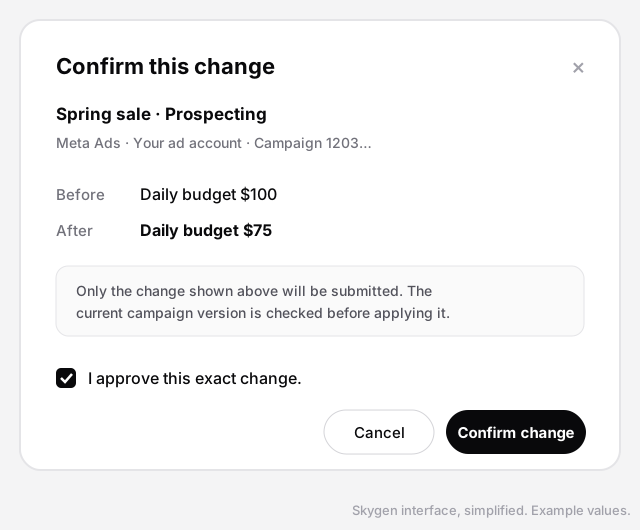
Skygen's confirmation step. Example values.
What Skygen doesn't do yet: Google Ads is reporting-only in Skygen at the time of writing, LinkedIn, Reddit and TikTok cover connection and spend reporting, and conversion and ROAS reporting isn't in the ads module yet.
The short version
Meta Ads MCP puts your ad account inside Claude, ChatGPT, Perplexity or Claude Code. Connect it with one URL, start with reads, make your first write a paused campaign, and set ads MCP server rules before you give any agent manage access.
Running Google Ads too? Read our guide to the Google Ads MCP server. Prefer rules to agents? See how to automate Facebook ads.