
The best Clay alternative depends on which part of Clay you actually use. Our read: for one contact database with email sequences, start with Apollo. For European data, look at Cognism or Kaspr. For a waterfall that charges only for data it finds, try FullEnrich or BetterContact. For Clay-style AI workflows, look at Freckle.
Clay does four jobs. It buys contact data from more than 150 providers in a waterfall, runs AI agents for research and automates work in tables. And it now sends email through Clay Sequencer. If you're leaving Clay, you may need only one or two of those jobs done, cheaper or simpler.
Below: what Clay's new 2026 pricing really costs, 12 Clay alternatives sorted by the job they replace, and how to switch without breaking your outbound. Every price comes from the vendor's own pages on October 24, 2026. Skygen is our product, and we label it where it appears. For Skygen, we also checked saved copies of its production code.
Key takeaways
- Clay changed its pricing on March 11, 2026: Data Credits pay for data, and a second meter, Actions, pays for platform work. Launch starts at $185 a month on monthly billing.
- Clay's docs put a fully enriched record at 6 to 20 Data Credits, at $0.05 per credit to start.
- Clay now sends email itself, so lists that say it can't are out of date.
- Most alternatives replace Clay's data, not its AI workflows. Decide which job you're replacing first.
What does Clay actually do?
Clay is a workbench first, with its own people database for building lists. Clay's pages show it doing four jobs. It buys contact data from 150+ providers in a waterfall and runs AI agents for research. It also automates work in tables and sends cold email through Clay Sequencer.
Clay's homepage says: "Infrastructure to get any data, run agentic workflows, and launch GTM plays."
- Data. Clay's waterfall lets you "search sequentially across multiple tools until you find a valid match." For work emails it names Prospeo, DropContact, Datagma, Hunter, PeopleDataLabs, Nimbler, Apollo, Lusha and Snov. Clay's pricing page counts 150+ data providers; its homepage says 200+.
- AI research. Claygents are Clay's agents. "They take inputs, follow your instructions, and write a structured output."
- Workflows. Tables, signals, CRM syncs, webhooks and HTTP API calls. Clay sizes its plans by how many records you enrich a year.
- Sending. Clay Sequencer lets you reach new leads "by combining lead sourcing and enrichment with cold email sequencing in Clay," and you can buy inboxes and domains without leaving Clay.
Clay calls itself "an end-to-end GTM Engineering tool," and it runs a directory of partner agencies that build Clay systems for customers. In our read, it's built for people who like building. If nobody on your team wants to build tables, you're paying for flexibility you won't use.
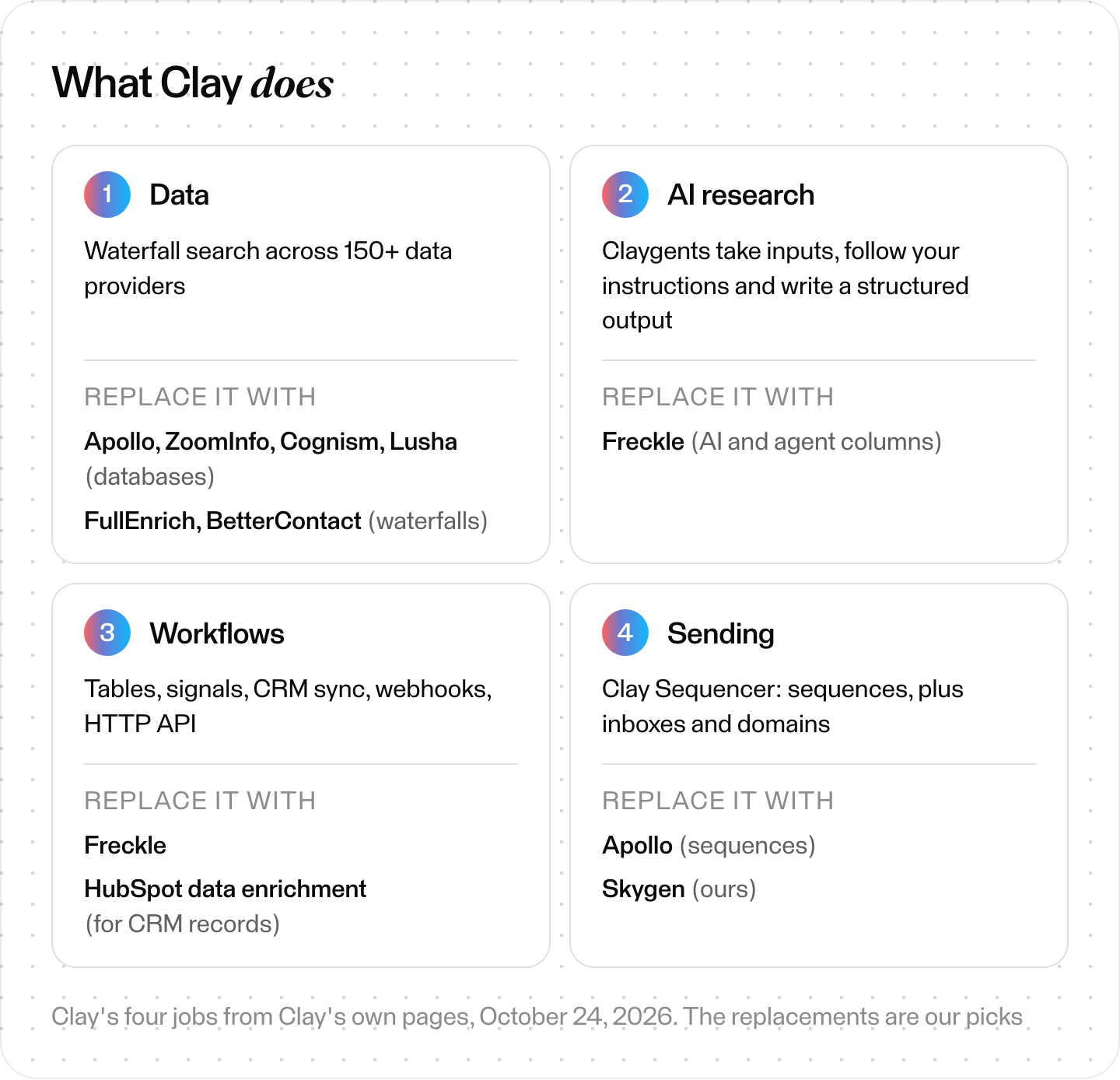
Clay's four jobs, from Clay's own pages (October 24, 2026), and our picks for what replaces each.
Clay pricing: how much does Clay cost in 2026?
Clay's FAQ and billing docs say Launch starts at $185 a month and Growth at $495 a month on monthly billing. Free is $0, and Enterprise is custom. Clay's pricing page now meters two things: Data Credits from $0.05 each and Actions from less than $0.01 each.
On that page, Data Credits "buy data & AI from vendors in Clay's marketplace" and Actions measure platform work. Clay announced the switch on March 11, 2026. Customers on the legacy Starter, Explorer and Pro plans can stay on them.
| Plan | Monthly price (Clay's FAQ) | What's included each month |
|---|---|---|
| Free | $0 | 500 Actions, 100 Data Credits, up to 200 rows per table |
| Launch | from $185 | 15,000 Actions, 2,500 Data Credits, up to 50,000 rows per table |
| Growth | from $495 | 40,000 Actions, 6,000 Data Credits, CRM sync, HTTP API, webhooks |
| Enterprise | custom, annual | 100,000+ Data Credits, SSO, data-warehouse syncs, Clay API |
Clay's Launch card says 3K Data Credits; its FAQ and docs say 2,500. The plan cards also show lower prices, $167 for Launch and $446 for Growth. Those match the sum of Clay's annual-billing tiers ($54 + $113 and $185 + $261). Clay offers 10% off for annual billing.
Clay's docs on Actions and Data Credits say each enrichment always costs 1 Action, while Data Credits vary from 0.5 to 10+ by data type. "Each fully enriched record typically costs 6–20 Data Credits." At $0.05 a credit, that's about $0.30 to $1.00 per fully enriched record before Actions. That's our arithmetic. Clay doesn't publish a per-record price.
Four rules change the bill:
- Failed lookups are free. "If an enrichment returns no result, you're not charged Data Credits or Actions."
- Your own API keys still cost Actions. One Action per run, no Data Credits. Clay itself says customers who mostly use their own keys may pay more under the new model.
- Top-ups cost extra. Extra Data Credits carry a 30% premium on Launch and Growth.
- Actions don't roll over. On monthly Launch and Growth plans, unused Data Credits can pile up to twice your monthly amount. Annual plans can roll over up to 15% of their annual Data Credits if you renew on the same or a higher tier. Free plans roll over none.
In Clay's own worked example, you enrich 100 contacts with LinkedIn profiles and emails. That uses 95 Data Credits, or 50 if you bring your own email API key.
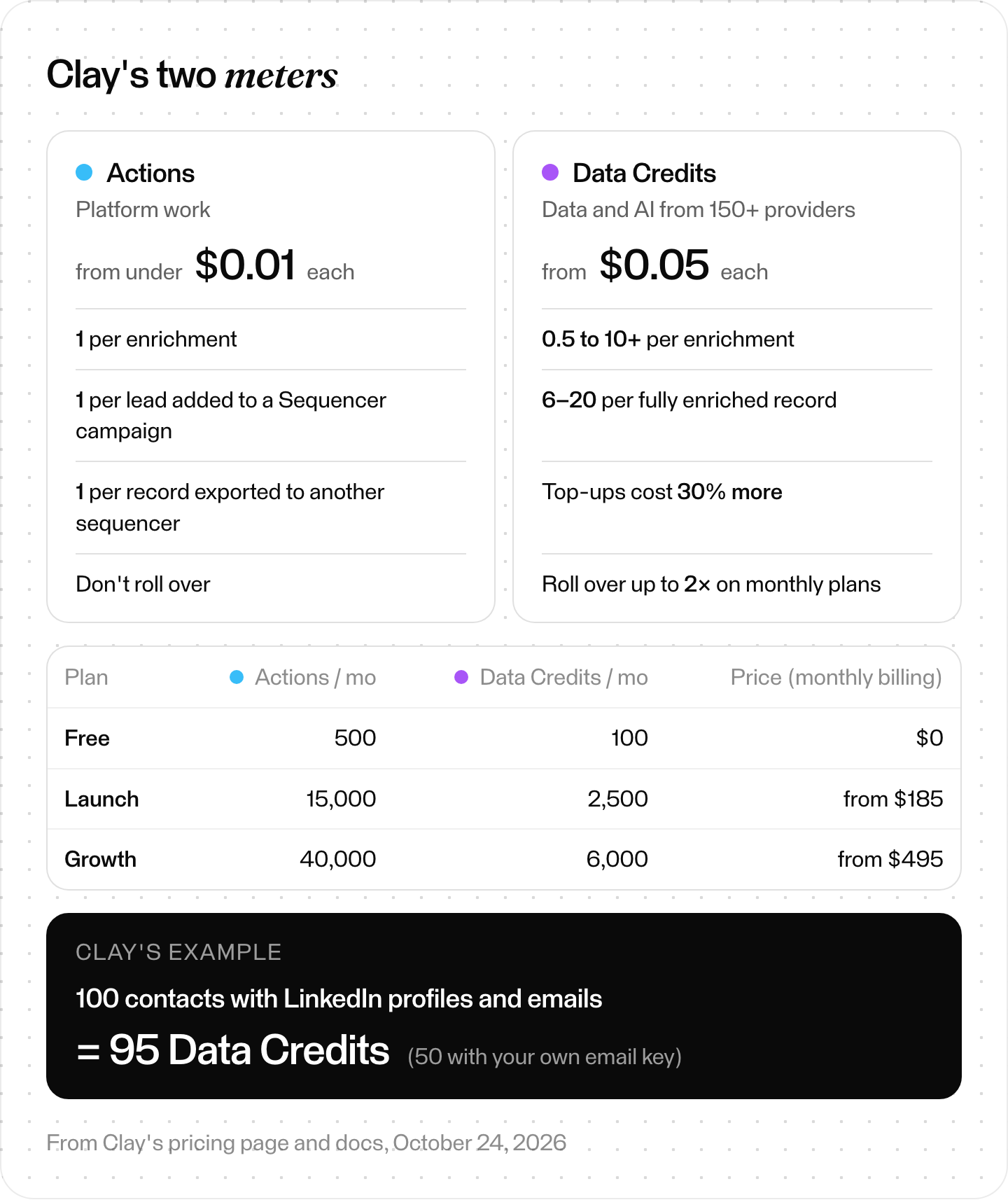
Clay's 2026 pricing, two meters. Plan figures from Clay's pricing page and docs.
Why do teams look for Clay alternatives?
Teams look for Clay alternatives when the bill is hard to predict or Clay takes more building than they want. Others only need contacts, or want the whole loop done. Each reason points to a different kind of alternative, and Clay's own pages show the mechanics behind the first two.
- The bill is hard to predict. Two meters, credits that vary by data type, and Actions for every enrichment, every AI prompt and every export to another tool. Exporting to an outside sequencer costs one Action per record. CSV downloads are free.
- It takes building. Clay recommends testing new workflows on 10 to 20 records first, and lists partner agencies that build Clay systems for customers.
- You only need contacts. If all your tables do is find emails and phone numbers, a single database or a waterfall tool does that with fewer moving parts.
- You want the whole loop done. You may want research, writing and sending handled by one system, not assembled from parts.
One thing that isn't a reason anymore: sending. Clay's old FAQ page still says Clay "doesn't replace your email sequencer" and that paid plans start at $149 a month. Clay's pricing and Sequencer pages say otherwise. At least two of the top-ranking comparison pages repeat the old lines.
How we compared these Clay alternatives
We read each vendor's own pricing, product and help pages on October 24, 2026. For Skygen, we also checked saved copies of its production code. We didn't buy plans or benchmark data quality, so this compares what vendors publish.
- Prices are as displayed, in US dollars. Some vendors draw prices with JavaScript, so we read the rendered page. Lusha's prices come from the pricing data built into its page.
- No public price: ZoomInfo, Cognism and Seamless.AI send you to sales.
- Left out: Persana AI, which announced on March 30, 2026 that it is joining Rox and will sunset its platform.
- Disclosure: Skygen is our product. Six of the seven top-ranking lists we could read were written by vendors pitching their own tool.
What are the best Clay alternatives at a glance?
Which Clay alternative is best depends on the job you're replacing. In our grouping, based on vendor pages, Apollo, ZoomInfo, Cognism, Lusha, Seamless.AI, Kaspr, UpLead and RocketReach replace Clay's data. FullEnrich and BetterContact replace its waterfall. HubSpot data enrichment fills records inside HubSpot, and Freckle replaces Clay's tables and AI workflows.
Entry prices as displayed on October 24, 2026 (Lusha: from the pricing data built into its page).
| Tool | Replaces Clay's… | Entry price | Sends email? |
|---|---|---|---|
| Apollo.io | data + sending | Free; Basic $49/seat/mo annual, $65 monthly | Yes, sequences on every account |
| ZoomInfo | data + AI agents | Not published ("Get Pricing"); free ZoomInfo Lite | Not confirmed; exports emails to Outreach or Salesloft |
| Cognism | data (Europe) | Not published; plans include 5 seats | No sequencer on the pages we read |
| Lusha | data | Free (40 credits/mo); Starter $49.90/mo monthly | Yes, through Lusha Engage |
| Seamless.AI | data | Not published; free up to 50 credits | Yes, built-in emailing |
| Kaspr | data (Europe, LinkedIn) | Free; Starter $49/user/mo annual, $65 monthly | Not stated; pushes to Lemlist and CRMs |
| UpLead | data | Essentials $99/mo monthly, $74/mo annual | Separate done-for-you service |
| RocketReach | data | Essentials $27/mo, $329 billed annually | Yes, sequences up to 500 emails a day |
| FullEnrich | waterfall | Pro from $29/mo (500 credits) | Not stated |
| BetterContact | waterfall | Starter $15/mo (200 credits) | Not stated |
| HubSpot data enrichment | enrichment inside your CRM | Included in most HubSpot hubs from Starter up | Not part of this feature |
| Freckle | tables + AI workflows | Free (250 credits); Build from $99/mo | Not stated |
| Skygen (ours) | the whole outbound loop | Outreach Pro $2,000/mo | Yes, after your approval |
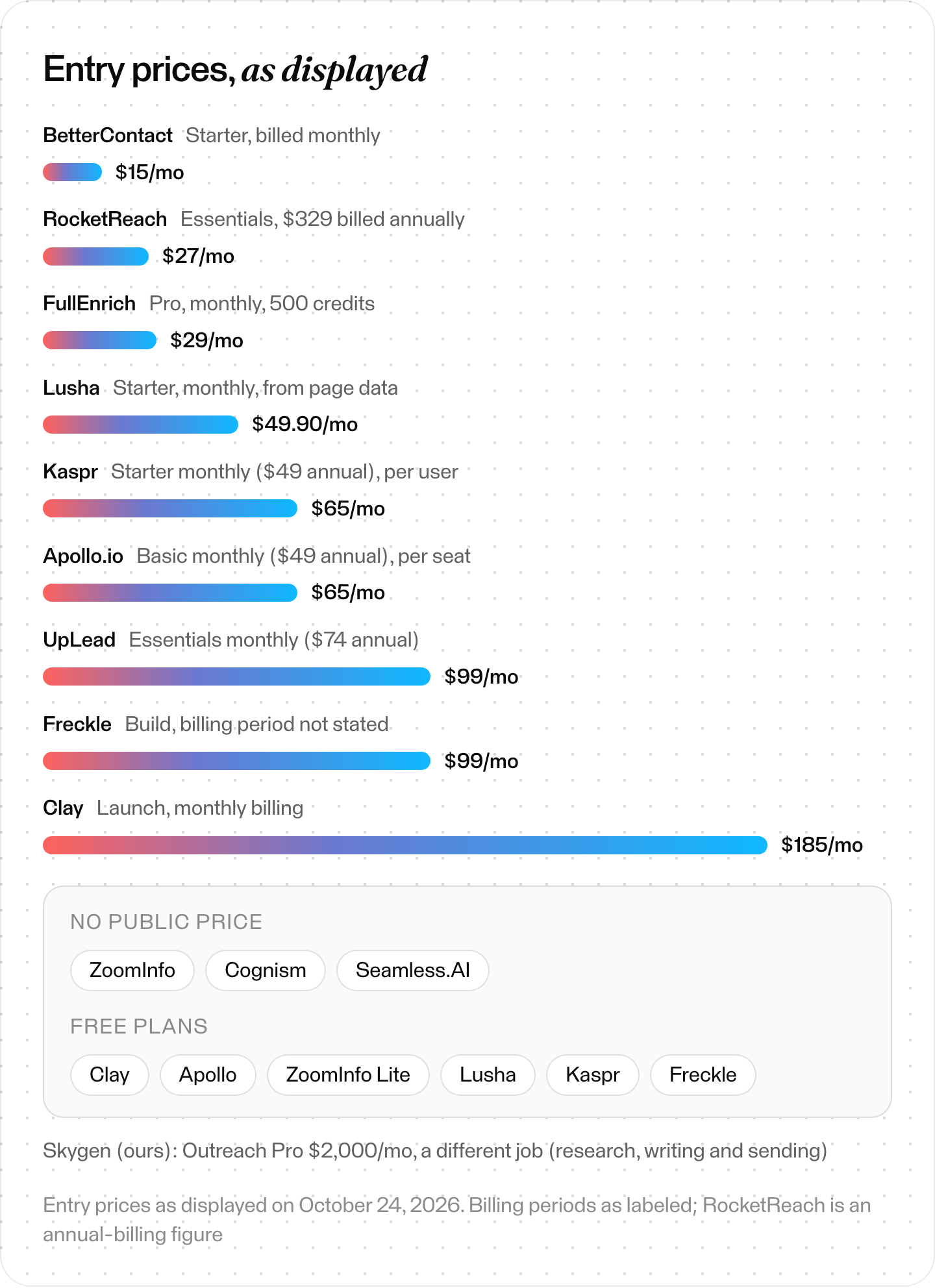
Entry plans as displayed, October 24, 2026. Annual and monthly billing are labeled; nothing converted.
Which Clay alternative fits your team?
Our read, based only on what each vendor publishes: pick by the job. Apollo suits teams that want data and sending in one tool. Cognism and Kaspr say they focus on Europe. FullEnrich and BetterContact charge only for data their waterfalls find. HubSpot teams can enrich inside the CRM, and GTM engineers can try Freckle.
- You use Clay to find emails and phones. Take one database: Apollo if you also want sequences, Lusha or Kaspr for a cheap start. Or ZoomInfo, if you want data and AI agents from one large vendor.
- You sell into Europe. Cognism and Kaspr both say Europe is their focus.
- You like the waterfall but not the bill. FullEnrich and BetterContact run waterfalls and charge only for data they find.
- You live in HubSpot. Its data enrichment doesn't use HubSpot Credits and fills records inside the CRM.
- You build GTM workflows yourself. Freckle is built as a Clay alternative for GTM engineers and works from coding agents.
- You want the research, writing and sending done for you. Skygen (ours) runs that loop and sends only after you approve the campaign.
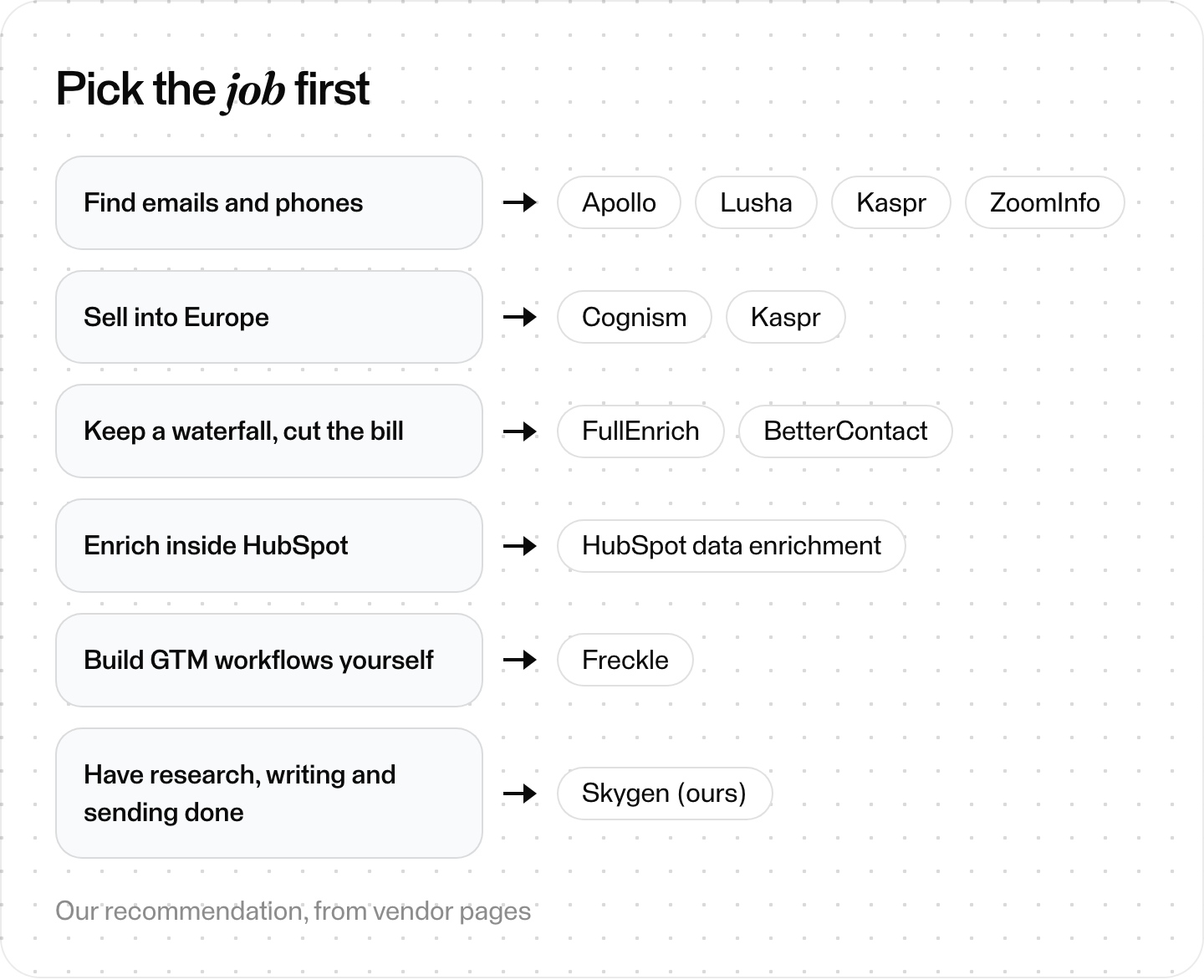
Pick the job first, then the tool. Our recommendation, from vendor pages.
The 12 best Clay alternatives, one by one
Each entry uses the same fields. Prices are as displayed on October 24, 2026. "Best for" is our read of each vendor's own pages.
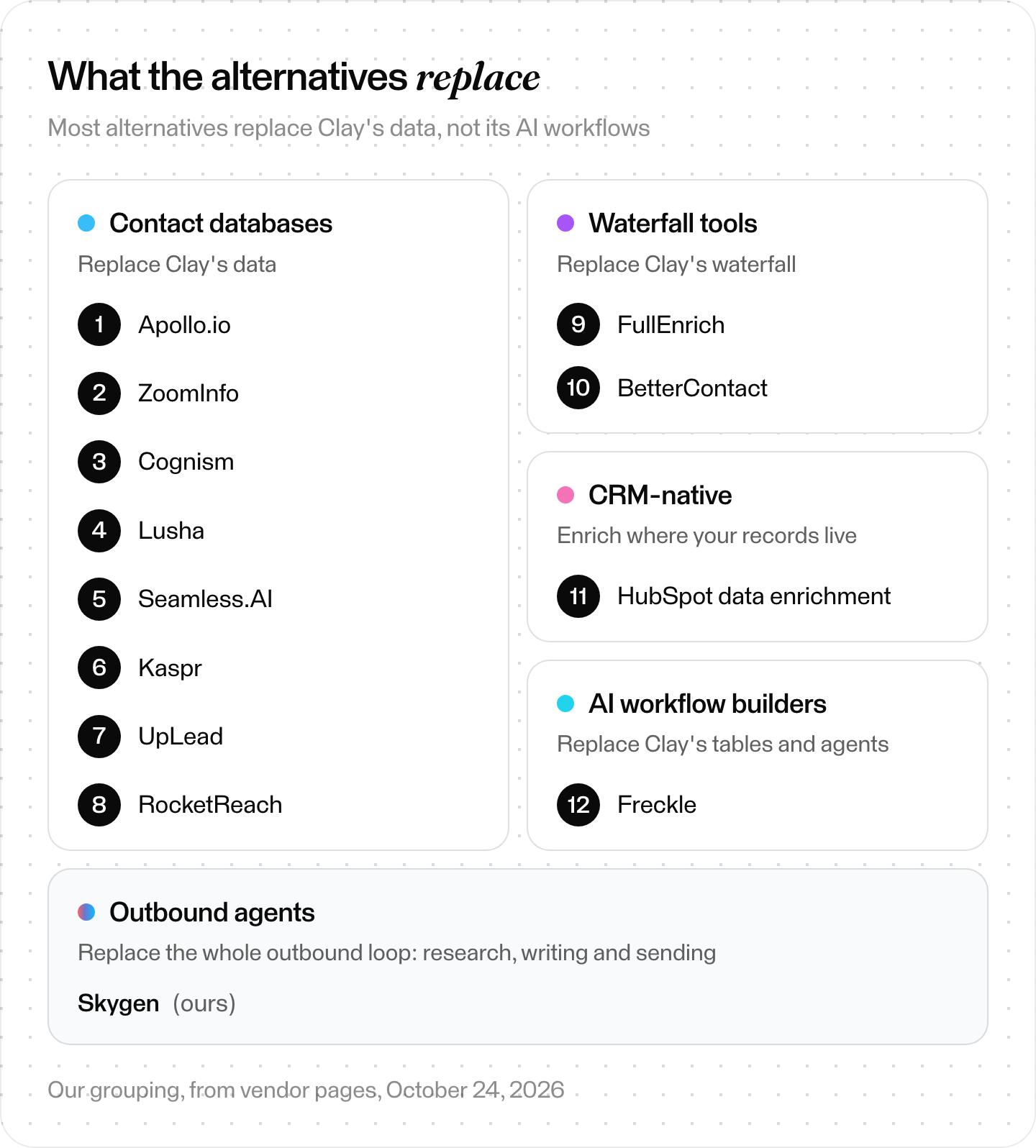
Clay alternatives by the job they replace. Our grouping, from vendor pages.
Contact databases: replace Clay's data
1. Apollo.io
- Best for: teams that want one database and email sequences in one tool.
- Data: its own database, "240M contacts & 30M companies" by Apollo's claim. It also runs a waterfall across connected providers.
- Entry plan: Free; Basic $49 per seat per month billed annually or $65 monthly; Professional $79 or $99, on its pricing page.
- Sends email: yes. Apollo says email campaigns are included on every account; free plans can only connect Gmail.
- Watch out for: "Unused credits expire at the end of each billing cycle and do not carry over," add-on credits included.
2. ZoomInfo
- Best for: larger teams that want data and AI agents from one vendor.
- Data: it claims verified data on 500M+ contacts and 100M+ companies, checked by "300+ human researchers."
- Entry plan: no price on its pricing page, only "Get Pricing." ZoomInfo Lite is a free plan with no card.
- Sends email: not confirmed on the pages we read. The Professional package lists AI email generation and dialing, and Copilot Advanced lists exporting emails to Outreach or Salesloft.
- Watch out for: you find the price in a sales call.
3. Cognism
- Best for: B2B teams prospecting into Europe.
- Data: its own data engine. It claims director-level data is "continually refreshed on a 30 day basis" and offers MCP access inside Claude and ChatGPT.
- Entry plan: not published on its pricing page. Standard and Pro each include 5 seats.
- Sends email: no sequencer on the pages we read; it pushes contacts to Outreach and Salesloft.
- Watch out for: Cognism says teams with at least 5 salespeople "often see the most value."
4. Lusha
- Best for: small teams that want a free start and a browser extension.
- Data: its own database, which it says holds "515M+ verified contacts," plus a Data Waterfall on Pro and above.
- Entry plan: Free with 40 credits a month; Starter $49.90 a month on monthly billing, from the pricing data built into its pricing page.
- Sends email: yes, through Lusha Engage, its email sequencing tool, from a Gmail or Microsoft Outlook account. Lusha says its MCP and API don't send messages or run sequences.
- Watch out for: a verified email costs 1 credit and a phone number 5. Data Waterfall matches, on Pro and above, cost 2 credits per email and 8 per phone.
5. Seamless.AI
- Best for: reps who want search, emailing and calling in one place.
- Data: "Every time you search with Seamless.AI, our sales software scours the public web in real-time," it says. It counts 1.8B+ verified business emails.
- Entry plan: not published on its pricing page; free up to 50 credits.
- Sends email: yes, its Engagement Hub includes emailing and calling.
- Watch out for: paid plans start with a sales conversation.
6. Kaspr
- Best for: LinkedIn-first prospecting in Europe.
- Data: "real-time verified data from over 150 sources," with a focus on European contact data.
- Entry plan: Free; Starter $49 per user per month annually or $65 monthly, with unlimited B2B email credits, on its pricing page.
- Sends email: not stated. It pushes leads to Lemlist, HubSpot, Salesforce and Pipedrive.
- Watch out for: on Starter, only B2B email credits are unlimited. Monthly billing includes 100 phone and 5 direct-email credits a month; annual billing includes 1,200 and 60 a year. Exports go up to 12,000 a year, and you can buy add-on credits at any time.
7. UpLead
- Best for: buying verified contacts without a long contract.
- Data: "200M+ leads," verified as you search, by its claim.
- Entry plan: Essentials $99 a month for 170 credits, or $74 a month billed annually, on its pricing page. One credit gets you one contact with email and mobile.
- Sends email: not stated; UpLead sells a separate done-for-you cold email service.
- Watch out for: the free trial is 7 days and 5 credits.
8. RocketReach
- Best for: searching a large database of professionals and companies.
- Data: "700 million professionals and 60 million companies," by its count.
- Entry plan: Essentials $27 a month ($329 billed annually), email only, on its pricing page. Pro is $69 a month with phones.
- Sends email: yes, sequences of up to 500 emails a day.
- Watch out for: Essentials allows 1,200 exports a year. A lookup that finds no verified email or phone is refunded.
Waterfall tools: replace Clay's waterfall
9. FullEnrich
- Best for: teams that want a waterfall without building one.
- Data: a waterfall across 25+ sources on its pricing page, or 20+ on its homepage. Its pricing file says: "Real-time lookups, no stored contact database," though its pricing page also offers search across 800M people and 50M companies.
- Entry plan: Pro from $29 a month for 500 credits. A work email is 1 credit, a personal email 3, a mobile number 10.
- Sends email: not stated.
- Watch out for: credits are spent only on data found and verified, and they roll over for 3 months on monthly plans.
10. BetterContact
- Best for: the lowest paid entry to a waterfall in this list, $15 a month.
- Data: a waterfall across 20+ providers, including RocketReach, Apollo, People Data Labs and Hunter.
- Entry plan: Starter $15 a month for 200 credits; Pro from $49 a month for 1,000, on its pricing page.
- Sends email: not stated. It integrates with HubSpot, Google Sheets, Make, Zapier and Clay itself.
- Watch out for: a mobile number costs 10 credits, an email 1.
CRM-native: enrich where your records live
11. HubSpot data enrichment (Clearbit is now part of HubSpot)
- Best for: teams whose records already live in HubSpot.
- Data: HubSpot's own dataset, third-party providers and public web data. Clearbit's site says "Clearbit has joined HubSpot."
- Entry plan: included with Starter, Professional and Enterprise editions of most HubSpot hubs (Smart CRM and Revenue Hub: Professional and up). HubSpot's help center says it "does not consume HubSpot Credits."
- Sends email: through HubSpot's own tools.
- Watch out for: HubSpot's Prospecting agent does consume credits.
AI workflow builders: replace Clay's tables and agents
12. Freckle
- Best for: GTM engineers who work in coding agents. Freckle calls itself "The Clay alternative built for GTM engineers who live in coding agents."
- Data: "40+ data providers," with AI columns and agent columns.
- Entry plan: Free with 250 credits; Build from $99 a month with unlimited rows, HTTP API and your own keys.
- Sends email: not stated.
- Watch out for: the FAQ on its pricing page was placeholder text when we checked, so its credit rules weren't stated.
Clay vs Apollo: which should you pick?
Our read: pick Apollo if you want one database plus sending at a per-seat price. Pick Clay if you need many providers, custom AI research and your own workflows. Apollo claims 240M contacts in its own database and includes sequences on every account. Clay's pricing page counts 150+ data providers, and Clay charges in Data Credits and Actions.
| Clay | Apollo | |
|---|---|---|
| Data | 150+ providers in a waterfall | Own database, 240M contacts (its claim), plus a waterfall |
| AI | Claygents, Account Agents (beta) | AI Research on every plan; AI Lead Scoring from Professional |
| Sending | Clay Sequencer | Sequences on every account |
| Entry price | Launch from $185/mo, monthly | Basic $49/seat/mo annual, $65 monthly |
| Unused units | Data Credits roll over (up to 2× on monthly plans) | Credits expire each billing cycle |
Clay's docs size Launch for enriching about 10,000 records a year and Growth for about 50,000. If you enrich more than that, compare your real volume against both price lists before you choose.
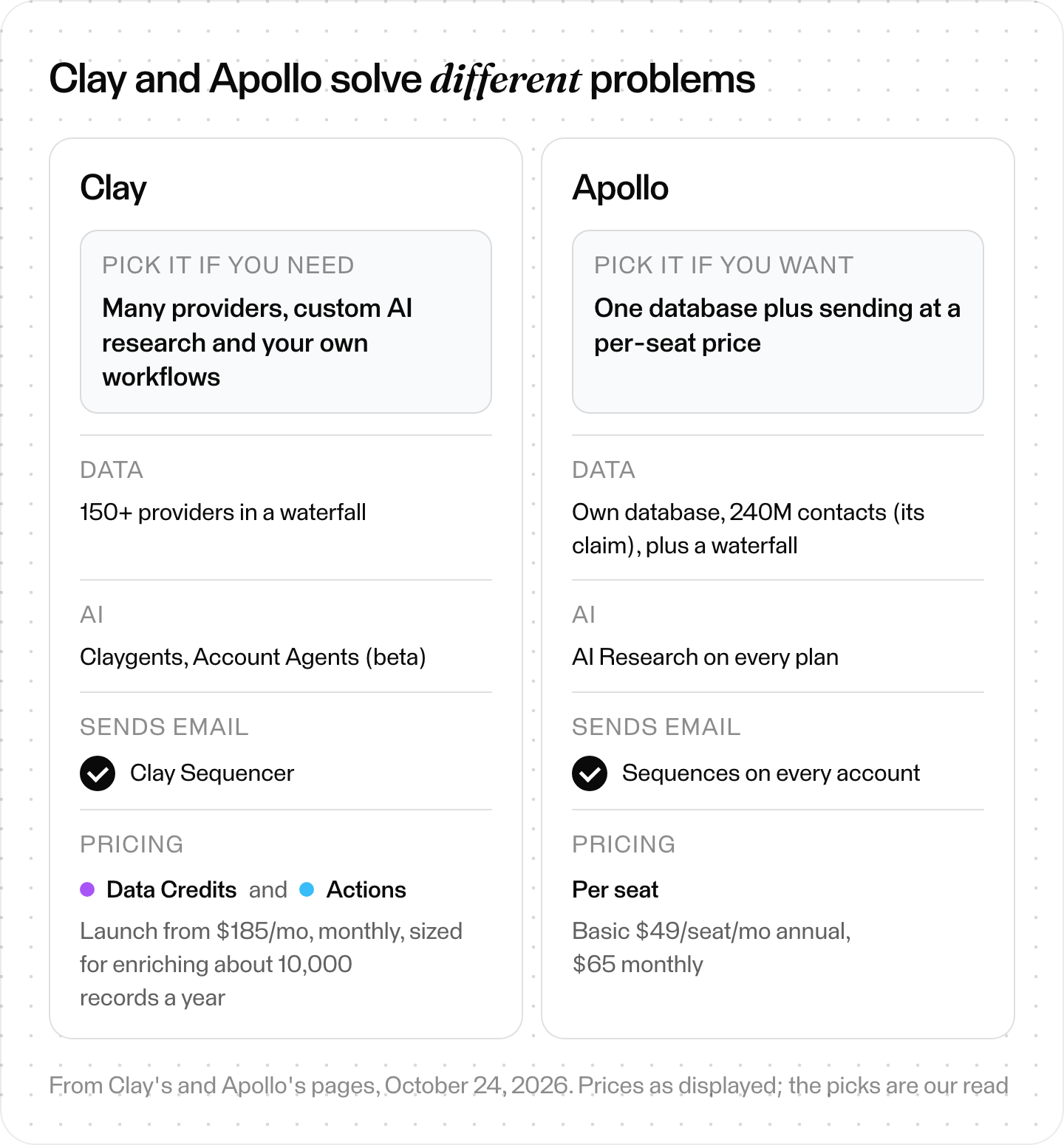
Clay vs Apollo side by side. Prices as displayed on October 24, 2026; the picks are our read.
How do you switch from Clay without losing work?
Treat a switch like a data migration, and don't swap tools in one go. Clay's legacy-plans doc says leaving a legacy plan is final, so check your plan first. Then map tables to jobs, export with opt-outs, test the same 100 records and compare cost per verified contact. Move sending last and keep Clay Free for edge cases.
On a legacy Clay plan? Check before you change it.
If you stay on a legacy Starter, Explorer or Pro plan, Clay says you keep your pricing and current features. But Clay's legacy-plans doc says any plan change after April 10, 2026 moves you to the new plans, and you can't return once you leave. Weigh that before you downgrade, cancel or move to Free.
Step 1: Map your Clay tables to jobs
List each table and mark what it does: find, enrich, research, score or send.
What you should see: a list where every column has an owner in the new setup.
Step 2: Export before you cancel
Pull tables out with the raw fields. CSV export is free in Clay; exports to an outside sequencer cost one Action per record, and CRM exports use Actions too. Export every opt-out and do-not-contact decision as well. The FTC's CAN-SPAM guide says you must honor an opt-out request within 10 business days.
What you should see: CSVs or CRM records with provider, date and verification status kept, plus a do-not-contact list for the new tool.
Step 3: Test on the same 100 records
Clay recommends testing new workflows on 10 to 20 records first. Run the same 100 records through the new tool and compare found rates.
What you should see: how many emails and phones each tool found, and how many verified.
Step 4: Compare cost per verified contact
Sticker prices mislead. Divide what you'd pay by the contacts you'd actually get. Credit costs vary a lot. Lusha charges 1 credit per verified email and 5 per phone, or 2 and 8 for Data Waterfall matches. FullEnrich charges 1 per work email and 10 per mobile.
What you should see: one number per tool you can compare with your Clay bill.
Step 5: Move sending last
Warmed mailboxes and domains take time to rebuild. Smartlead, for one, recommends warming an existing mailbox for at least 2 weeks and a new domain for 1 to 2 months. Read what Gmail, Yahoo and Outlook require from bulk senders before you move them. For a new sender, see our Instantly alternatives guide.
What you should see: new campaigns live before the old ones stop, with opted-out people still excluded and no one emailed from both tools.
Step 6: Keep Clay Free for edge cases
Clay's Free plan keeps 500 Actions and 100 Data Credits a month, enough for small one-off jobs. On a legacy plan, moving to Free is a plan change you can't undo.
What you should see: a plan for the jobs only Clay did well.
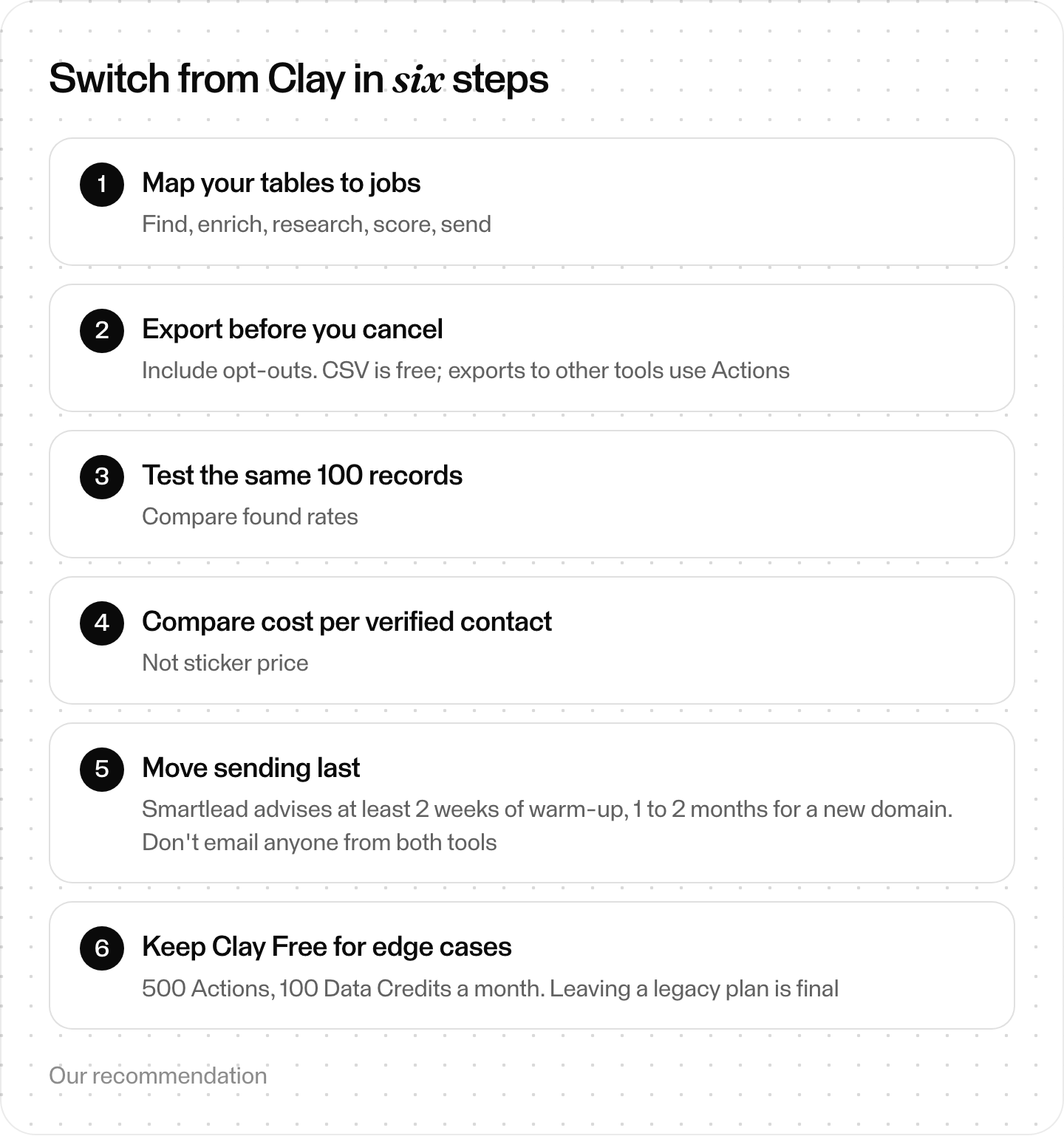
Switching from Clay in six steps. Our recommendation.
Where Skygen fits (our product)
Disclosure first: Skygen is ours. Where Clay gives you tables to build, Skygen is an agent that runs outbound for you. It finds people, researches prospects in source-linked Dossiers and sends template sequences or individual first emails. Nothing goes out until you approve the campaign.
- Research with sources. For each prospect it researches, a Dossier reads what that person has written, said and shipped on the open web. Every claim keeps the URL it came from, and a quote that isn't in the fetched page is dropped along with its claim.
- Individual first emails, if you pick them. Campaigns can send template sequences. For prospects you pick, Skygen drafts an individual first email from their Dossier. It must use at least one exact Dossier fact, and its body stays at 140 words or fewer before the signature is added. It never invents a trial, incentive or referral. A separate reviewer model checks it, and it waits for a person's approval.
- You start every campaign. No tool starts one; that's the account owner's decision. Agent-drafted replies wait for a person too.
- Careful sending. Each mailbox sends at most 20 emails a day (18 by default). A mailbox that isn't warmed yet ramps up over 14 days, and a lower daily limit from the mailbox provider wins. Sends rotate across healthy mailboxes. A sending domain leaves rotation when more than 10% of its mail bounces over 7 days, once it has at least 20 sends in that window. A campaign pauses itself at 5% bounces by default, counted after 100 sends.
- Price. Outreach Pro is $2,000 a month for 10,000 prospect research units and 10,000 emails. The pricing page lists a "Monthly target" of 50 leads.
Our read: if you want research, writing and sending done for you, with nothing sent before you approve, Skygen is the one to pick.
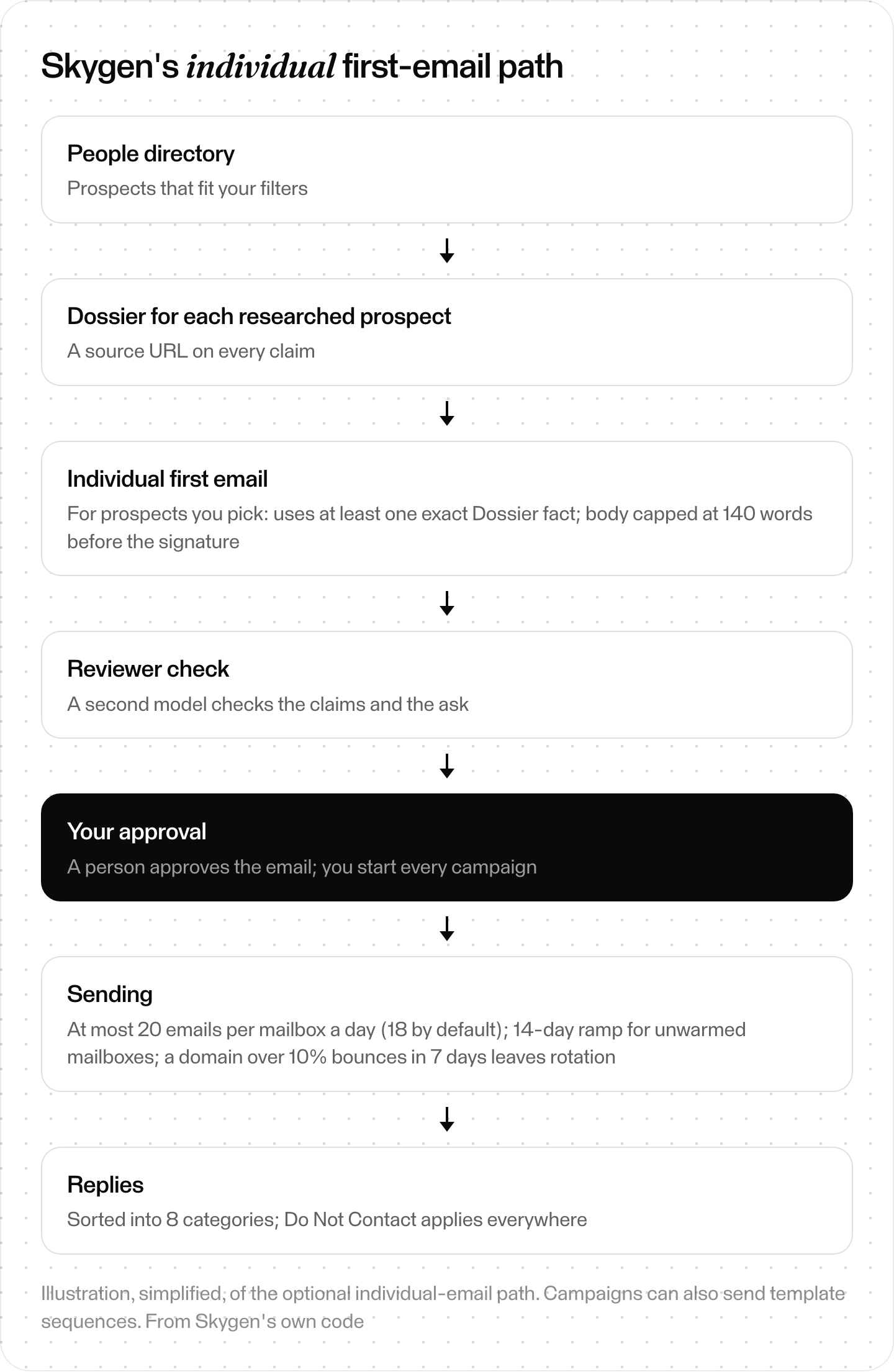
Skygen's optional individual first-email path. Campaigns can also send template sequences. Illustration, simplified.
The short version
Decide which of Clay's four jobs you're replacing. Our read: for data, pick a database (Apollo, Lusha, Cognism, Kaspr). For the waterfall, FullEnrich or BetterContact. For workflows, look at Freckle. Then test on the same 100 records and compare cost per verified contact, not sticker price.