
Our read: start your Smartlead alternatives shortlist with Instantly for volume email, lemlist or QuickMail for email plus LinkedIn, and Apollo or Saleshandy for lead data. This compares what vendors publish; we didn't run campaigns or test deliverability. Smartlead itself is built for volume sending: unlimited email accounts on every plan, inbox rotation, a unified inbox and white-label workspaces for agencies.
Below: what each Smartlead plan includes and 10 alternatives compared on their own pages (October 24, 2026; Reply.io from an archived copy dated October 16, 2026). Then what Gmail, Yahoo and Outlook now require from cold email senders, and how to plan a switch. Skygen is our product and is labeled where it appears.
Key takeaways
- Smartlead costs $39 to $379 a month on monthly billing, priced by send volume and verified leads, not seats or mailboxes. API, webhooks and CRM start on Pro.
- Domains bought through Smartlead's SmartSenders can't be moved out of Smartlead. Buy your own if you want to keep them.
- For LinkedIn in the same campaign, look at lemlist, QuickMail, Woodpecker, Reply.io or Salesforge. For data built in, Apollo or Saleshandy.
- Since November 2025 Gmail has been ramping up enforcement, including rejections, on mail that breaks its sender rules. Fix SPF, DKIM, DMARC and unsubscribe before you switch tools.
What does Smartlead do well?
Smartlead is built for sending a lot of cold email from many mailboxes. Smartlead says pricing is "based on send volume and verified lead allowance, not per seat and not per mailbox." Every plan includes unlimited email accounts. By its own account, it also offers inbox rotation, one unified inbox, warmup, white-labeled client dashboards and automation.
- Inbox rotation. Sending is spread across all mailboxes connected to a campaign.
- Unified Master Inbox. Replies from every mailbox land in one place, with sentiment tags, filters and assignment to teammates.
- Warmup. A private network where AI sends, opens and replies to warmup emails. The pool tier depends on your plan: Foundation on Base, Growth on Pro, Premium on the Unlimited plans.
- Agencies. Each client gets its own white-labeled dashboard, and the platform can run on your own domain.
- Automation. An API, webhooks, SmartAgents that build an outbound agent from a plain-English task, and a Kanban CRM tied to the inbox.
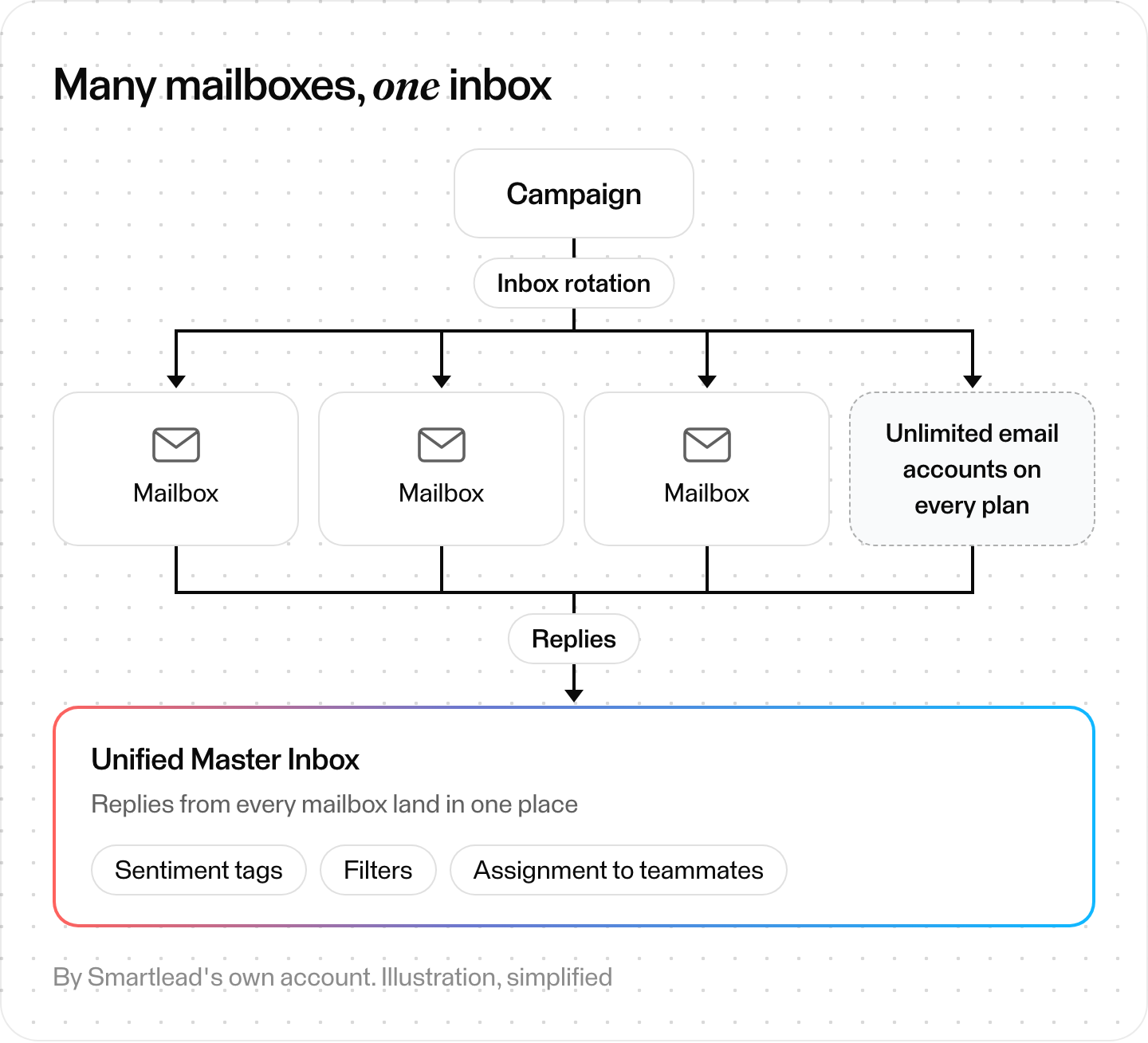
How Smartlead spreads sending and gathers replies, by its own account. Illustration, simplified.
The rest of this guide is for teams that need something it doesn't do.
Smartlead pricing: how much does Smartlead cost?
Smartlead's pricing page lists four self-serve plans. On monthly billing, Base is $39 a month, Pro is $94, Unlimited Smart is $174 and Unlimited Prime is $379. Annual billing "saves 17%." Plans are priced by send volume and verified leads, not by seats or mailboxes, and add-ons cost extra.
| Plan | Monthly | Annual (per month) | Included |
|---|---|---|---|
| Base | $39 | $32 | 2,000 contacts stored, 6,000 sends a month |
| Pro | $94 | $78 | 30,000 contacts stored, 90,000 sends a month, API, webhooks, CRM |
| Unlimited Smart | $174 | $144 | Unlimited contacts; 150,000 sends and 50,000 verified emails a month |
| Unlimited Prime | $379 | $315 | Unlimited contacts; 500,000 sends and 170,000 verified emails a month; 3 SmartServers; 3 client workspaces |
Smartlead's pricing.md, dated July 28, 2026, lists the annual rates as $32.50, $78.30, $144.50 and $314.60 a month. The table shows the prices its pricing page displayed on October 24, 2026.
On Base and Pro, the verified-prospect-email allowance is a $59-a-month add-on. Enterprise is custom.
The add-ons are where bills grow:
- White-label: $29 a month per client workspace, from Pro up. Unlimited Prime includes 3 client workspaces.
- SmartSenders mailboxes: $13 per domain a year plus $4.5 per mailbox a month for new Google or Outlook mailboxes via Zapmail. Or $9 a month per pre-warmed mailbox plus $18 per domain a year.
- SmartDelivery inbox-placement tests: from $49 a month.
- SmartServers (dedicated IPs): $39 per server a month.
Before you buy, check two rules in Smartlead's terms. Fees are non-refundable, with no credit for cancelling mid-period. And its Fair Use Policy applies even on "unlimited" plans. It names "abusing the unlimited email warm-up" as an example.
The pricing page says "All plans come with a free trial and no credit card is required to get started." Smartlead's llms.txt puts the trial at 14 days.
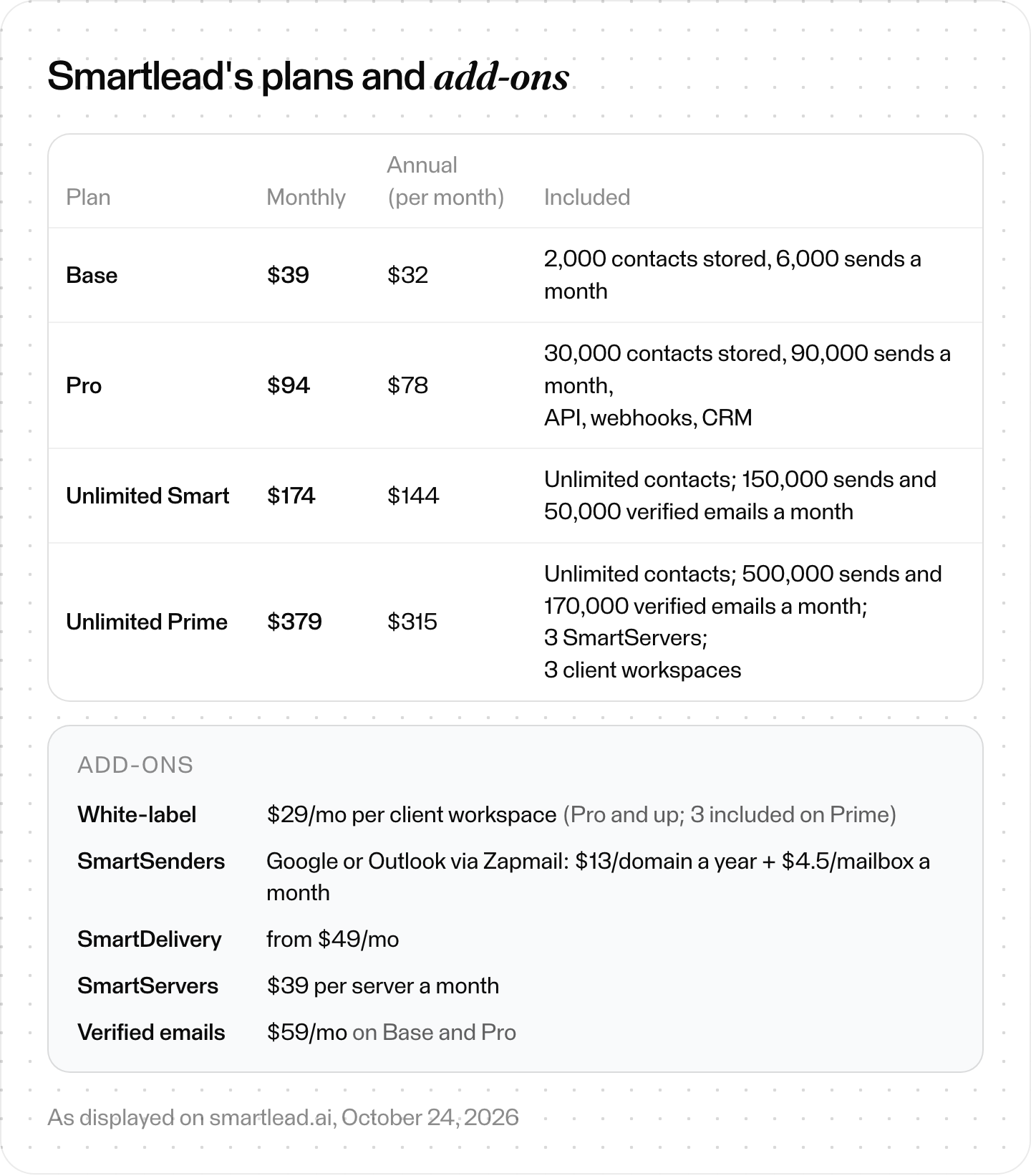
Smartlead's plans and add-ons as displayed on October 24, 2026.
Why do teams switch from Smartlead?
Teams switch when Smartlead lacks something they need. In the Smartlead pages we read, LinkedIn runs through a connected tool, and SmartSenders domains can't be moved out of Smartlead. Verified prospect emails cost extra on Base and Pro, and the API starts on Pro at $94 a month. Some teams don't want to run sending at all.
Check which of these fits you. Each one points to a different alternative:
- You want LinkedIn in the same sequence. Smartlead's llms.txt says it unifies "email, LinkedIn, and calls," but in the Smartlead pages we read, LinkedIn outreach runs through a connected tool, HeyReach or Aimfox.
- You want leads built in. On Base and Pro, verified prospect emails are a paid add-on. Some tools, such as Apollo and Saleshandy, include lead credits in the plan.
- You need the API on a cheap plan. API, webhooks and CRM access start on Pro at $94 a month.
- You want to own your sending domains. SmartSenders domains "can't be transferred and used outside of Smartlead."
- You don't want to run sending at all. Then you're shopping for a done-for-you service or an agent, not another sequencer.
How we compared these Smartlead alternatives
We read each vendor's own pricing, product, help-center and terms pages on October 24, 2026. Every price and limit below comes from those pages. For Skygen, we also checked saved copies of its production code, the source of its sending rules. We didn't run campaigns or test deliverability, so this compares what vendors publish.
- Prices are as displayed, in US dollars, with the billing period each page shows. Some pages draw prices with JavaScript; we read the page's own pricing data. Reply.io blocked our reader, so its figures come from an archived copy of its pricing page dated October 16, 2026.
- Not stated means the vendor's pages we read don't say. It isn't proof the feature is missing.
- Disclosure: Skygen is our product. Every top-ranking list we read for this search was written by a competitor or a company selling something adjacent.
Smartlead alternatives at a glance
Entry plans as displayed on October 24, 2026 (Reply.io: archived copy of its pricing page, October 16, 2026).
| Tool | Entry price | Entry sending limit |
|---|---|---|
| Smartlead (for reference) | Base $39/mo | 6,000 sends, 2,000 contacts |
| Instantly | Growth $47/mo | 5,000 emails, 1,000 contacts |
| lemlist | Email $55/mo yearly ($69) | 50,000 emails |
| Saleshandy | Starter $41/mo ($34 annual) | 6,000 emails, 2,000 prospects |
| Woodpecker | Email $39/mo ($26 annual) | 5,000 emails |
| Apollo.io | Free; Basic $49/seat annual, $65 monthly | Not stated per plan |
| Reply.io | $49/user/mo annual, $59 monthly | Unlimited emails to 1,000 active contacts/mo |
| Mailshake | Starter $29/mo per user ($25 yearly) | 1,500 sends, 1 address |
| QuickMail | Starter $49/mo | 5,000 emails, 1,000 contacts |
| SmartReach.io | Basic $29/mo | 10,000 emails, 1,000 prospects |
| Salesforge | Pro $40/mo annual | 5,000 emails, 1,000 contacts |
| Skygen (ours) | Outreach Pro $2,000/mo | 10,000 approved emails |
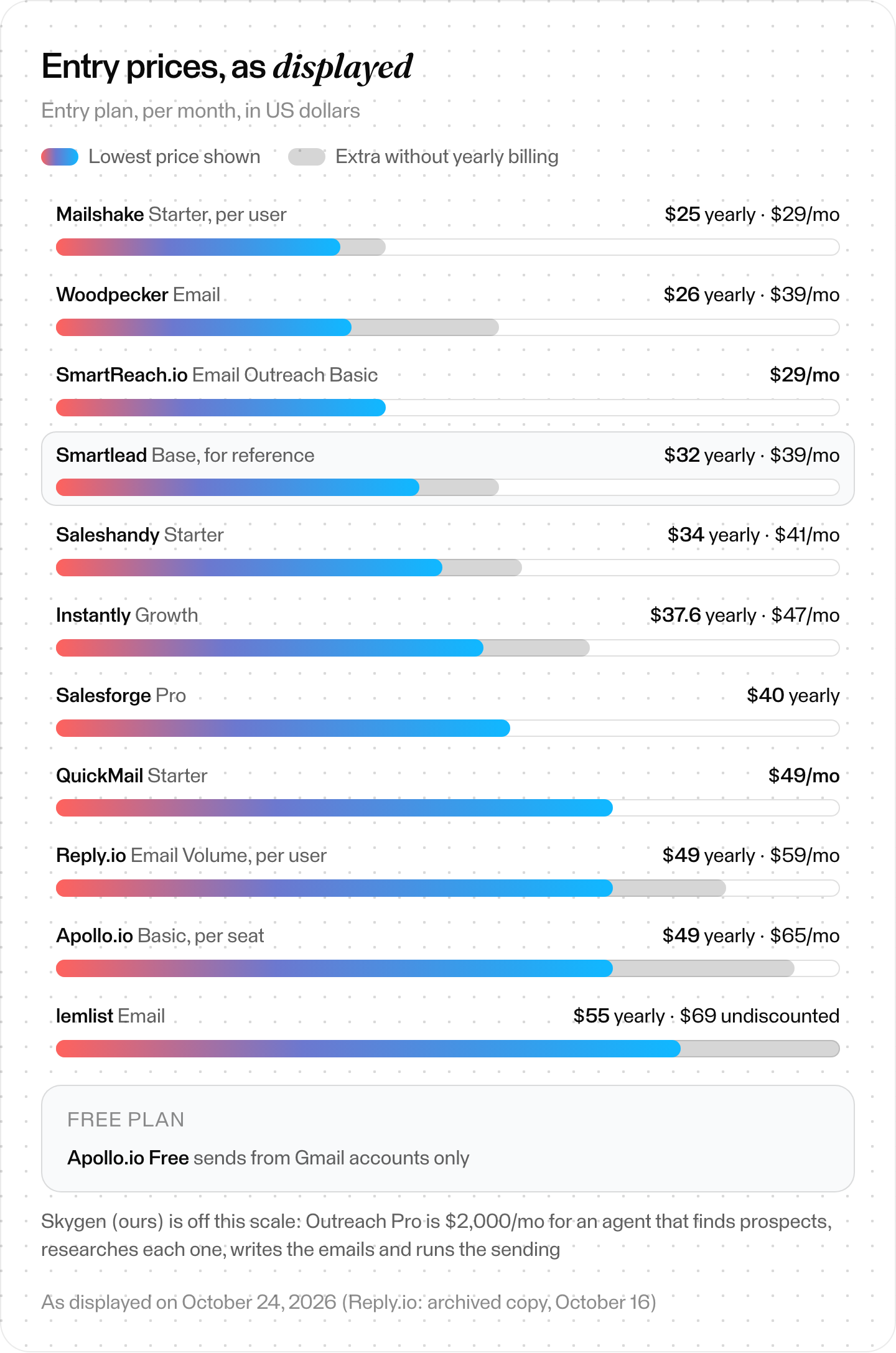
Entry plans as displayed on vendor pages, October 24, 2026 (Reply.io: archived copy, October 16). Billing periods as labeled.
LinkedIn steps and lead data, from the same pages:
| Tool | LinkedIn steps | Lead database |
|---|---|---|
| Smartlead (for reference) | Documented via HeyReach | Verified emails, add-on on Base |
| Instantly | Connections managed in its CRM add-on | 450M+ contacts (its claim), separate credits plan |
| lemlist | Multichannel plan | 600M–650M+ leads (its pages differ), credits add-on |
| Saleshandy | Multichannel sequences | 852M+ contacts (its claim) |
| Woodpecker | +$29/mo per LinkedIn account | Lead Finder, 100 credits |
| Apollo.io | Call and networking steps | 240M+ contacts (its claim) |
| Reply.io | +$69/mo per account | 50 live-data credits/mo |
| Mailshake | Not on its pricing page | Data Finder add-on, $19/mo |
| QuickMail | Unlimited LinkedIn accounts | Not on its pricing page |
| SmartReach.io | Add-on, $29/mo per account | Lead finder credits on Plus |
| Salesforge | 1 LinkedIn sender | Separate product (Leadsforge) |
| Skygen (ours) | No | Third-party people directory, plus per-person research |
Which Smartlead alternative fits your team?
Our read: pick by the gap you need to fill, based only on what each vendor publishes. For LinkedIn and email in one campaign, look at lemlist or QuickMail. For lead data built in, Apollo or Saleshandy. Agencies can compare Woodpecker, Reply.io and QuickMail. Mailshake, Woodpecker and SmartReach have the lowest paid entry prices, depending on billing.
- You need LinkedIn and email in one campaign. lemlist (Multichannel), QuickMail (unlimited LinkedIn accounts on Starter), Woodpecker (+$29 per LinkedIn account), Reply.io or Salesforge.
- You want data and sending in one tool. Apollo or Saleshandy. lemlist also has a lead database. For data tools without sending, see our Clay alternatives guide.
- You run an agency. Woodpecker prices agency features per active client, Reply.io's Agency Core starts at $210 a month with unlimited clients, and QuickMail's Agency plan is $299. One catch: Apollo's standard plans are for internal use, so using its data for clients needs a separate agreement.
- You want the lowest entry price. On yearly billing, Mailshake Starter is $25 a month per user and Woodpecker $26. On monthly billing, SmartReach Basic and Mailshake Starter are $29. Apollo's Free plan costs nothing but sends from Gmail only.
- You want the API on the entry plan. Saleshandy lists API access on every plan, and so does Instantly's pricing summary (its comparison table ticks it only on Hypergrowth).
- You'd rather not run sending. Smartlead's own SmartServices, Instantly's VIP service, or an agent such as Skygen (ours).
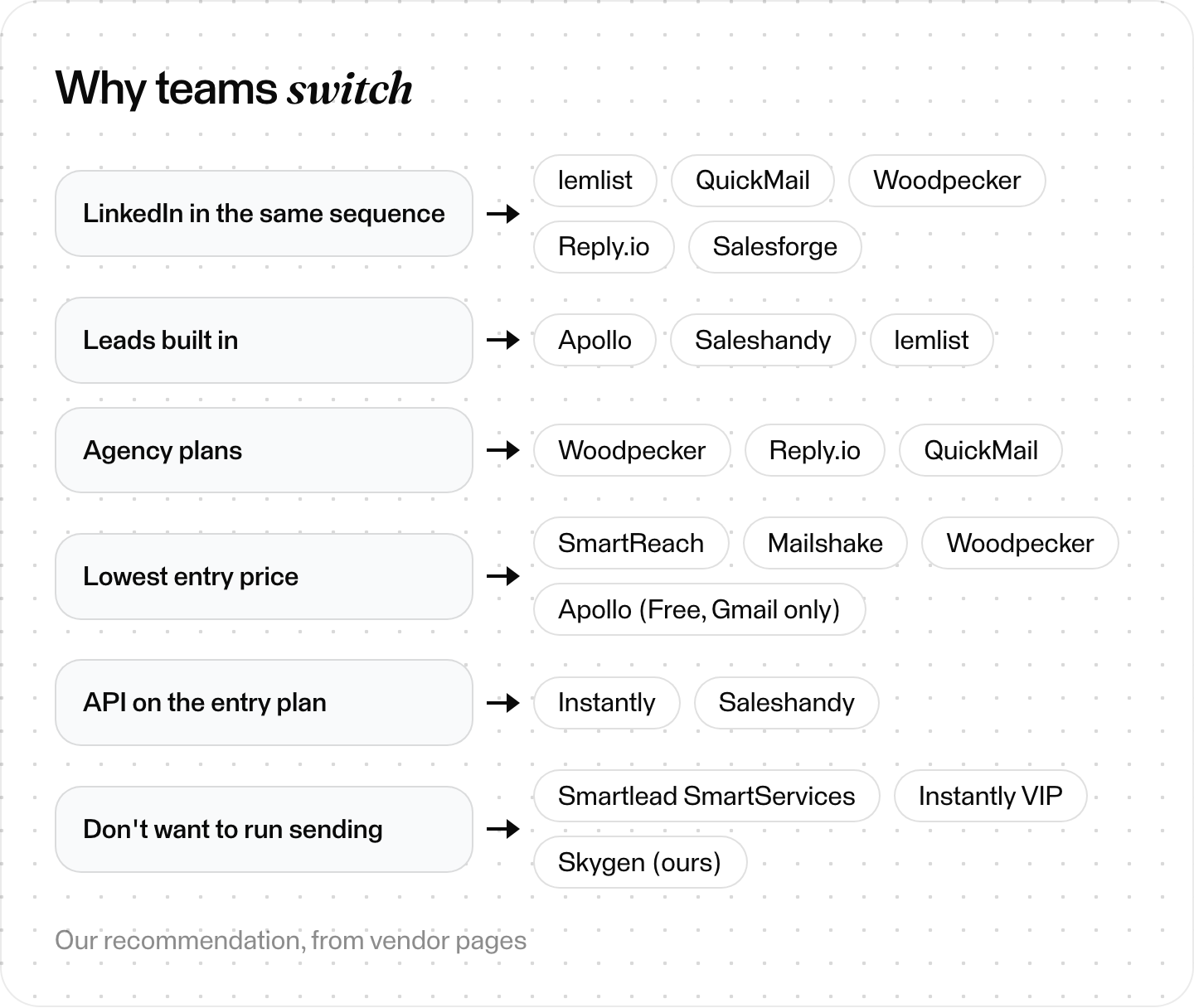
Pick the reason first, then the tool. Our recommendation, from vendor pages.
What are the best Smartlead alternatives?
Our read: the 10 best Smartlead alternatives are Instantly, lemlist, Saleshandy, Woodpecker, Apollo.io, Reply.io, Mailshake, QuickMail, SmartReach.io and Salesforge. Each entry uses the same fields; "Best for" is our read of each vendor's own pages. Prices are as displayed on October 24, 2026 (Reply.io: archived copy, October 16).
1. Instantly
- Best for: volume email with a large lead database next to it.
- Entry plan: Growth at $47 a month ($37.6 billed yearly) for 1,000 uploaded contacts and 5,000 emails, with unlimited email accounts and warmup. Its terms cap connected accounts at 100 per workspace.
- Lead data: Lead Finder (formerly SuperSearch), which Instantly sizes at 450M+ B2B contacts, runs on a separate Credits subscription.
- vs Smartlead: Instantly's pricing summary lists API access on all plans, though its comparison table ticks it only on Hypergrowth; Smartlead starts it on Pro. But Instantly's webhooks and replying from Unibox start on Hypergrowth ($97).
- Watch out for: Outbound, Credits, CRM and Inbox Placement are billed as separate subscriptions. Our Instantly alternatives guide breaks them down.
- Main source: Instantly's pricing page.
2. lemlist
- Best for: personalized campaigns that mix email and LinkedIn.
- Entry plan: the Email plan shows $55 a month on yearly billing ($69 undiscounted) for 50,000 emails a month, with unlimited users and senders. Multichannel is $87 a month yearly, per user.
- LinkedIn: profile visits, connection requests, messages, InMails and voice messages, which lemlist says work with free LinkedIn and Sales Navigator.
- vs Smartlead: native LinkedIn steps; in the Smartlead pages we read, LinkedIn runs through a connected tool such as HeyReach.
- Watch out for: its pricing page doesn't mention white-label or a client portal.
- Main source: lemlist's pricing page.
3. Saleshandy
- Best for: budget sending with a lead database included.
- Entry plan: Starter at $41 a month ($34 billed annually): 1 user, 2,000 active prospects, 6,000 emails and 1,500 Lead Finder credits a month.
- Included on every plan: unlimited email accounts, unlimited warm-up and a unified inbox.
- vs Smartlead: the same 6,000 emails a month as Smartlead Base, with lead credits included. On Smartlead Base, verified prospect emails cost $59 a month extra.
- Watch out for: the trial is 7 days and capped at 100 emails. Its pages disagree on which plan includes white-label.
- Main source: Saleshandy's pricing page.
4. Woodpecker
- Best for: smaller teams and agencies that bill per client.
- Entry plan: Email at $39 a month, or $26 a month billed annually, for 5,000 emails with 3 warm-ups and 100 Lead Finder credits.
- Included: unlimited contacts, email verification, team members and email accounts.
- vs Smartlead: agency features are priced per active client: $27 a month for the Agency Panel and $5 for White Label, versus Smartlead's $29 per white-label workspace (Unlimited Prime includes 3).
- Watch out for: LinkedIn costs $29 a month per LinkedIn account on top of the email tier.
- Main source: Woodpecker's pricing page.
5. Apollo.io
- Best for: teams that want contact data and sequences in one tool.
- Entry plan: Free, with no time limit. Basic is $49 per seat a month billed annually or $65 monthly.
- Lead data: its own database of 240M+ contacts, by Apollo's figure. From Basic up, Apollo adds its deliverability suite (warm-up, verification) and in-app domain and mailbox purchases.
- vs Smartlead: you pay per seat and get data built in, instead of paying for send volume.
- Watch out for: free plans send from Gmail accounts only. Standard plans are for internal business use; using Apollo data in external products, sharing it with customers or reselling it needs a separate agreement.
- Main source: Apollo's pricing page.
6. Reply.io
- Best for: sales teams and agencies running email, LinkedIn, calls and SMS.
- Entry plan: Email Volume at $49 per user a month billed annually ($59 monthly) for 1,000 active contacts, with unlimited mailboxes under its fair-usage policy. Each active contact can get one first-step email and unlimited follow-ups a month.
- LinkedIn: a $69-a-month add-on per account, or the Multichannel plan from $89 per user a month billed annually.
- vs Smartlead: Agency Core starts at $210 a month with unlimited clients and users and an optional white-label.
- Watch out for: the entry tiers and Multichannel are priced per user. Email Volume covers unlimited users only from 10,000 active contacts.
- Main source: an archived copy of Reply.io's pricing page, October 16, 2026.
7. Mailshake
- Best for: founders sending modest volume from one or two addresses.
- Entry plan: Starter at $29 a month per user ($25 yearly) with 1 email address and 1,500 sends, plus unlimited contacts and warmup.
- Next step up: Email Outreach at $49 a month has 2 addresses (Starter has 1), unlimited sends, rotation and a unified inbox. Mailshake's FAQ instead ties one mail account to each paid user.
- vs Smartlead: cheaper at entry, but Smartlead Base sends 6,000 emails a month from unlimited accounts.
- Watch out for: there's no free trial; Mailshake collects payment up front.
- Main source: Mailshake's pricing page.
8. QuickMail
- Best for: agencies running email and LinkedIn together.
- Entry plan: Starter at $49 a month with unlimited email senders, LinkedIn accounts and users, 1,000 uploaded contacts and 5,000 emails.
- Included: a free AutoWarmer via MailFlow on all plans. The Agency plan is $299 a month for 2 workspaces.
- vs Smartlead: LinkedIn and email run in the same campaign, with rotation across LinkedIn accounts.
- Watch out for: its pricing page lists no lead database, and QuickMail says it doesn't provide lead generation services.
- Main source: QuickMail's pricing page.
9. SmartReach.io
- Best for: 10,000 emails a month for $29, priced by prospects instead of seats.
- Entry plan: Email Outreach Basic at $29 a month for 1,000 active prospects, 10,000 emails, 1 user and 10 warmup accounts.
- vs Smartlead: more emails than Smartlead Base for less money. But SmartReach's Basic card lists no inbox rotation and no integrations (the page's "All plans include" list says otherwise).
- Also: Sales Engagement Basic at $39 adds a calling seat and a manual LinkedIn seat. LinkedIn automation is $29 a month per account.
- Watch out for: lead-finder credits start on the $89 Plus plan, and so does inbox rotation on SmartReach's plan cards.
- Main source: SmartReach's pricing page.
10. Salesforge
- Best for: teams that want email and LinkedIn replies in one inbox.
- Entry plan: Pro is shown at $40 a month on annual billing (its page title says "Starting at $48/mo"). It comes with unlimited email senders, 1 LinkedIn sender, 1,000 active contacts and 5,000 emails.
- Included: unlimited warm-up, mailbox rotation and Primebox, a single inbox for email and LinkedIn messages.
- vs Smartlead: LinkedIn senders are part of the plan.
- Watch out for: its lead finder is a separate product, Leadsforge; Salesforge's calculator shows its Essential plan at $49 a month.
- Main source: Salesforge's pricing page.
Smartlead vs Instantly: what's the difference?
Smartlead and Instantly both include unlimited email accounts and warmup on every plan, though Instantly's terms cap connected accounts at 100 per workspace. Smartlead starts API, webhooks and CRM on Pro ($94). Instantly's pricing summary lists API access on all plans, but webhooks start on Hypergrowth ($97). They're often compared, and Instantly appears in every top-ranking list we read.
| Smartlead | Instantly | |
|---|---|---|
| Entry plan | Base $39/mo: 6,000 sends, 2,000 contacts | Growth $47/mo: 5,000 emails, 1,000 contacts |
| Priced by | Send volume and verified leads | Uploaded contacts and emails |
| API and webhooks | Both from Pro ($94) | API on all plans; webhooks from Hypergrowth ($97) |
| Unified inbox | Master Inbox | Unibox preview on Growth; replies from Hypergrowth |
| Agencies | White-label, $29/mo per client workspace; 3 included on Unlimited Prime | Agency portal on Hypergrowth and Light Speed |
| Lead data | Verified-email allowance (add-on on Base and Pro) | Lead Finder, on a separate credits plan |
| Done-for-you domains | Can't be transferred out | Instantly keeps ownership |
| Trial | Free, no card (14 days per its llms.txt) | 14 days, no card, 2 email accounts |
Our read: Smartlead suits an agency on email only; Instantly suits teams that want its lead database and AI agents next to sending. More on Instantly's layers in our Instantly alternatives guide.
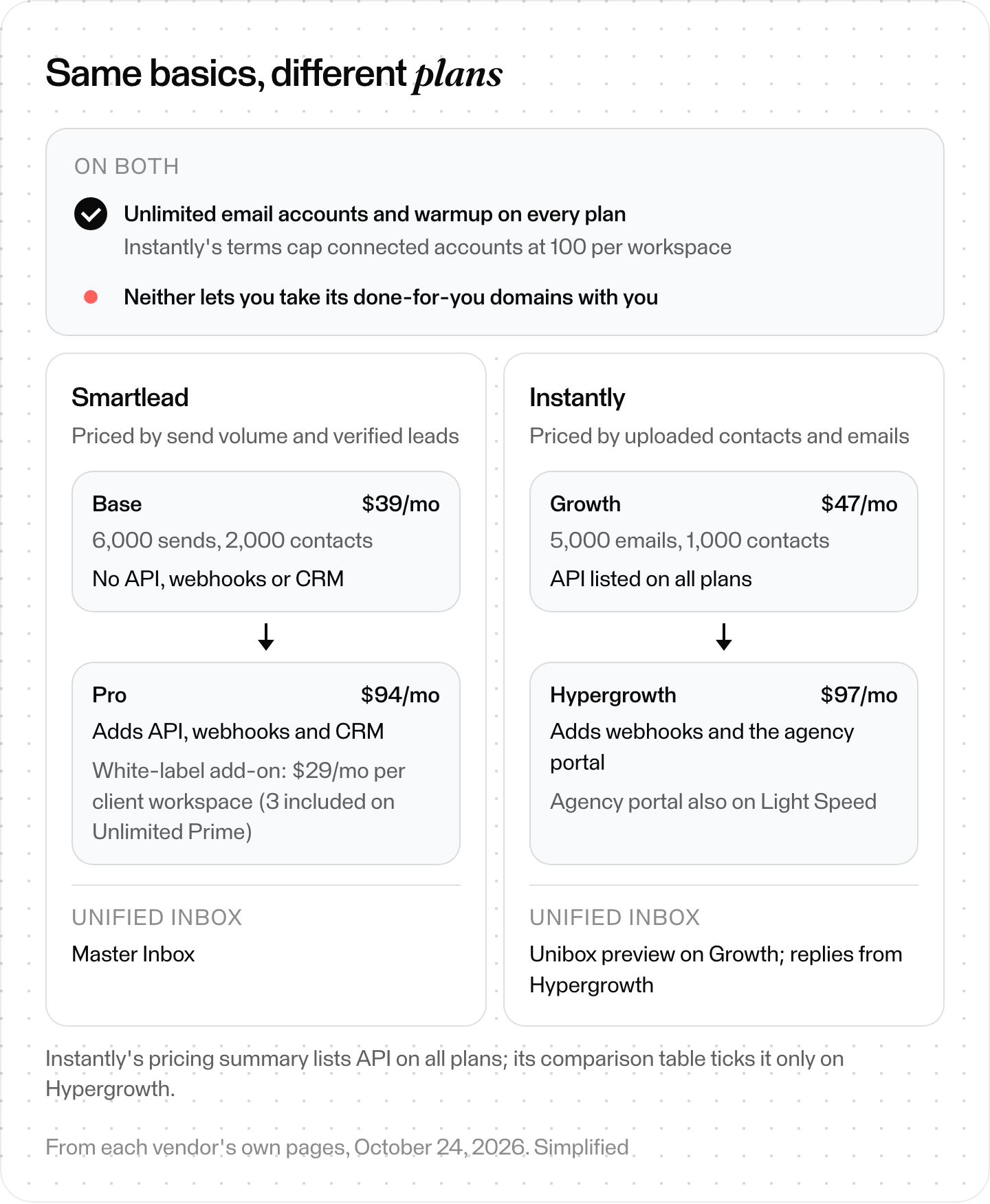
Smartlead vs Instantly: what both include and what the next plan adds, from each vendor's pages on October 24, 2026. Simplified.
What do Gmail, Yahoo and Outlook require from cold email senders?
Gmail's and Yahoo's sender rules ask all senders for SPF or DKIM, valid forward and reverse DNS and a spam rate below 0.3%. Bulk senders at both also need SPF, DKIM and DMARC. Microsoft requires domains sending more than 5,000 emails a day to hotmail.com, live.com and outlook.com addresses to pass SPF and DKIM, with DMARC aligned.
Switching tools doesn't change the rules your mail is judged by. All three big mailbox providers now publish requirements, and none of the top-ranking Smartlead lists we read cites them.
Gmail. Google's sender guidelines say all senders need SPF or DKIM, valid forward and reverse DNS, TLS, and a spam rate below 0.3% in Postmaster Tools. Google counts all mail from one primary domain, subdomains included, toward its bulk threshold. If you send close to 5,000 or more messages a day to personal Gmail accounts, you're a bulk sender, "permanently," and you also need:
- both SPF and DKIM, a DMARC record (p=none is enough), and a From: domain aligned with your SPF or DKIM domain;
- one-click unsubscribe on marketing and subscribed messages, with a visible unsubscribe link;
- unsubscribes honored within 48 hours.
Google targets a spam rate below 0.10%. It also says that starting November 2025, "Gmail is ramping up its enforcement on non-compliant traffic," including "temporary and permanent rejections." These guidelines cover mail sent to personal Gmail accounts, not mail sent to Google Workspace accounts. Sending from Workspace doesn't exempt you.
Yahoo. Yahoo's sender requirements ask all senders for SPF or DKIM, a spam rate below 0.3% and valid forward and reverse DNS. Bulk senders need SPF and DKIM, DMARC of at least p=none, one-click unsubscribe and unsubscribes honored within 2 days. Yahoo doesn't publish a volume threshold for "bulk."
Outlook.com. Microsoft's rules apply to domains sending more than 5,000 emails a day to hotmail.com, live.com and outlook.com addresses: SPF and DKIM must pass, and DMARC must be at least p=none and aligned. Microsoft's updated announcement says it rejects mail that fails these checks, starting May 5, 2025. Rejected mail comes back with error 550 5.7.515. Microsoft also asks high-volume senders to keep unsubscribe links working, clean their lists regularly and make sure recipients have consented to their messages.
Unsolicited mail. Google lists avoiding unwanted or unsolicited email among its requirements for senders of 5,000 or more messages a day. Its guidelines also say not to buy email addresses or to mail people who didn't sign up. Yahoo says to send only to users who specifically requested your mail.
The law. In the US, CAN-SPAM covers "all commercial messages" and makes no exception for business-to-business email, says the FTC. Each message needs a valid physical postal address and a working opt-out, and opt-outs must be honored within 10 business days. The opt-out must keep working for at least 30 days after you send.
The FTC's main requirements also include accurate header information, subject lines that aren't deceptive and a clear disclosure that the message is an ad. Using a tool doesn't move the responsibility: both the company promoted and the sender can be held liable.
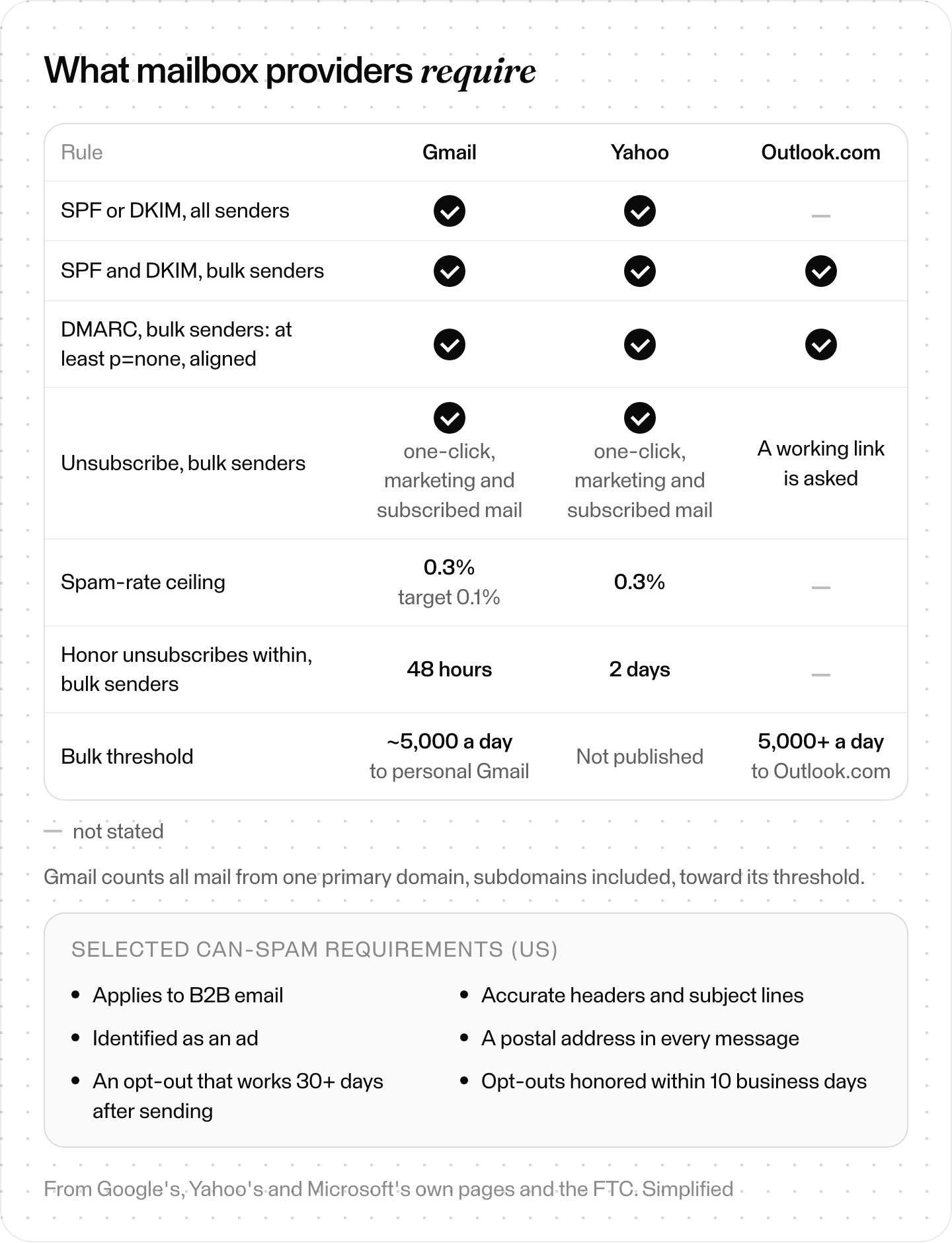
What mailbox providers require, from their own pages. Simplified.
How do you switch from Smartlead?
A tool change is a deliverability event. Our read: switch in six steps, in this order. Export leads and opt-outs, check who owns each mailbox, and buy new domains at your own registrar. Then warm up, run both tools side by side, and cancel last. The steps draw on Smartlead's help center, the providers' rules and the FTC.
Step 1: Export your leads and your opt-out list
Take contacts, statuses and campaign history. Most important: everyone who unsubscribed. CAN-SPAM gives you 10 business days to honor an opt-out, and Gmail expects 48 hours. That doesn't reset when you change tools.
What you should see: a suppression list loaded into the new tool before any campaign starts.
Step 2: Check who owns your mailboxes
Mailboxes you bought from Google or Microsoft yourself move with you. SmartSenders mailboxes don't. Smartlead says they "can't be transferred." SmartSenders domains run a fixed 12-month term with no renewal, and their mailboxes expire with them. Cancelling a Base or Pro plan also cancels SmartSenders mailboxes.
What you should see: a list of every sending domain, marked "ours" or "Smartlead's."
Step 3: Buy any new domains at your own registrar
If you'll need new domains, register them yourself so they stay yours next time.
What you should see: domains in your own registrar account, with SPF, DKIM and DMARC records.
Step 4: Warm up before you send
Smartlead itself recommends warming an existing mailbox for at least 2 weeks and a new domain for 1 to 2 months. We'd follow that advice in any tool.
What you should see: new mailboxes warming while old campaigns keep running.
Step 5: Run both tools side by side
Move one campaign at a time. Google advises ramping up changed traffic separately after a significant change to your sending infrastructure. As volume grows, watch server responses, plus spam rate and domain reputation in Postmaster Tools. If messages start bouncing or being deferred, cut volume, then increase it slowly again.
What you should see: spam rate below 0.3% (Google's ceiling), ideally below 0.1%.
Step 6: Cancel last
Smartlead's fees are non-refundable and plans run to the end of the billing cycle, so cancel when the last campaign has moved. Before you do, make sure opt-outs from your last Smartlead emails will still reach you. The FTC says an opt-out must keep working for at least 30 days after you send.
What you should see: no live campaign left in Smartlead on the day you cancel.
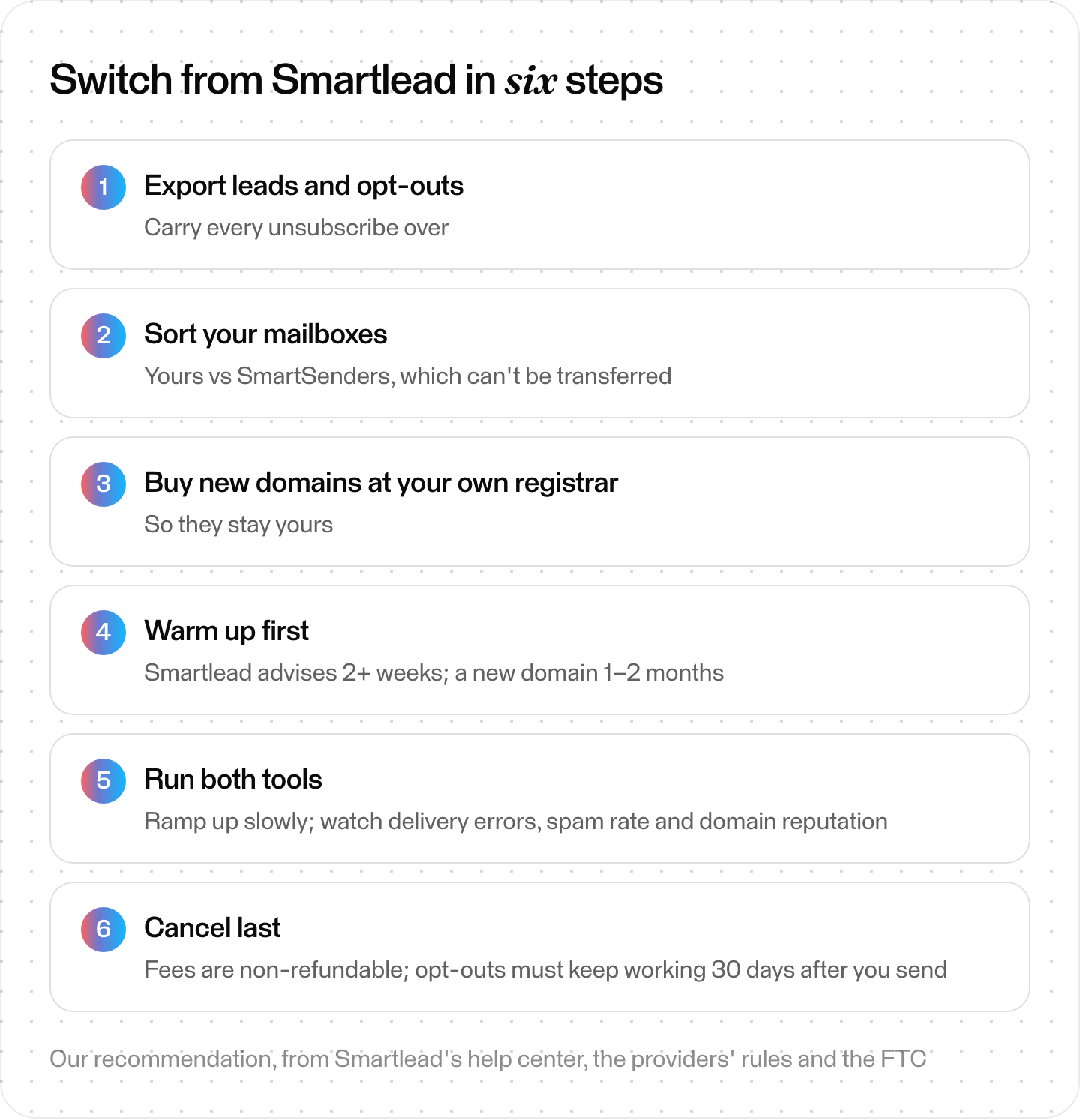
Switching from Smartlead in six steps. Our recommendation, from Smartlead's help center, the providers' rules and the FTC.
Where Skygen fits (our product)
Disclosure first: Skygen is ours, and it goes a step further than a sender. Smartlead gives you sending infrastructure to run yourself. Skygen is an agent that finds prospects, researches each one, writes the emails and runs the sending, with the account owner approving each campaign.
How it handles the parts this guide cares about:
- Mailboxes. Skygen assigns sending mailboxes to your account after payment. They're rented from a mailbox provider, which also runs their warm-up.
- Sending limits. Each mailbox sends at most 20 emails a day (18 by default). A mailbox that isn't warmed yet ramps up over 14 days, and a lower daily limit from the mailbox provider wins. Sends rotate to the least loaded healthy mailbox, and follow-ups stay on the mailbox that started the thread. Skygen holds back a mailbox when 20% or more of its warm-up mail lands in spam.
- Bounce protection. A campaign pauses itself at 5% bounces by default, counted after 100 sends. A sending domain leaves rotation when more than 10% of its mail bounces over 7 days, once it has at least 20 sends in that window.
- Replies. A real reply stops that person's sequence and, by default, pauses the other people at the same company. Replies are sorted into eight categories, and anyone marked Do Not Contact is skipped by every campaign, including future ones.
- Sequences. Up to 6 letters, 0 to 30 days apart, sent inside the time window and days you set.
Outreach Pro costs $2,000 a month and includes 10,000 prospect research units, 10,000 emails, source-linked Dossiers and checked first emails. Our read: if you want the whole outbound job done for you, not another sender to run, Skygen is the one to pick.
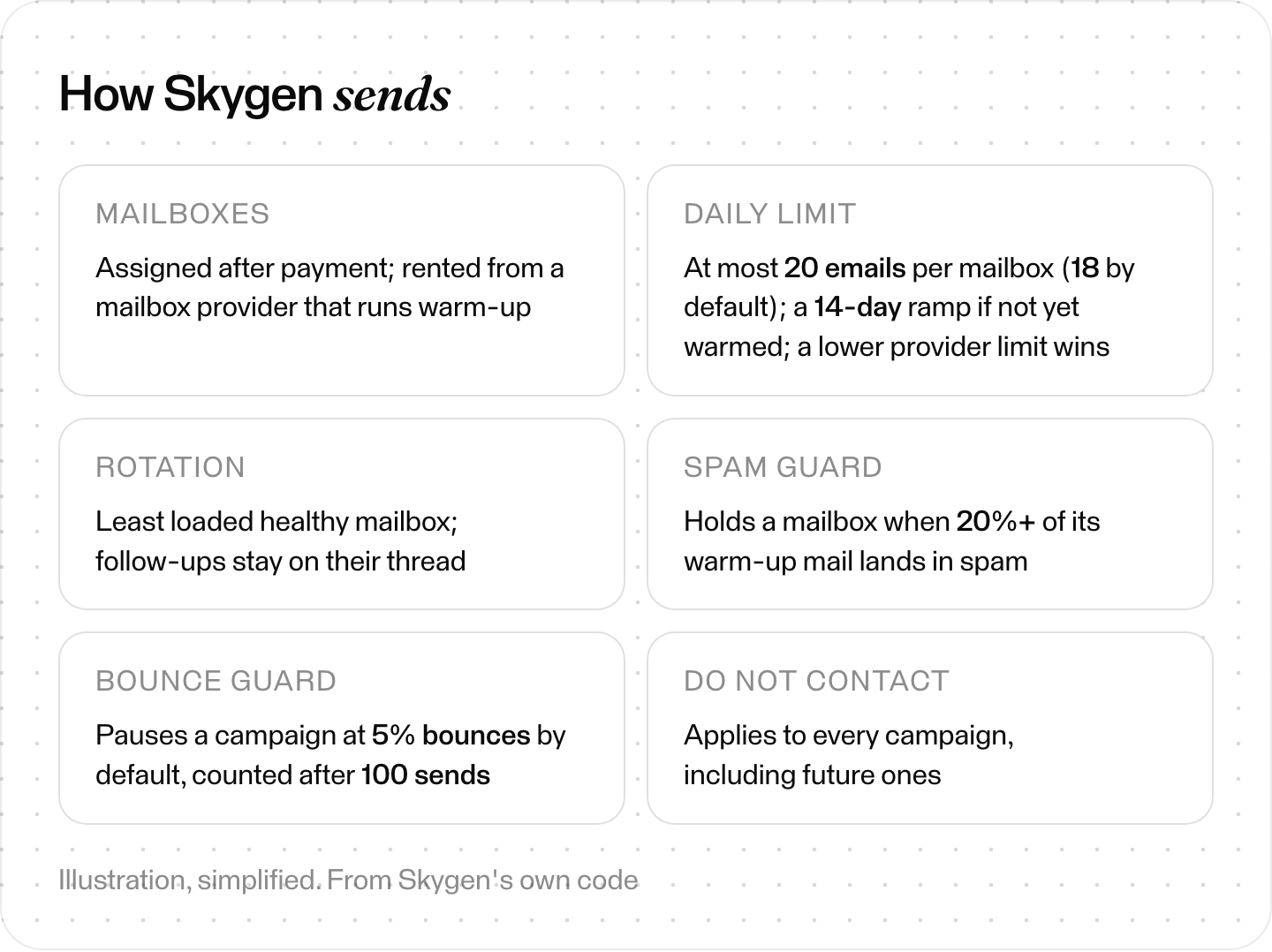
How Skygen sends. Illustration, simplified, from Skygen's own code.
The short version
Smartlead is built for volume email, especially for agencies. Switch when you need LinkedIn in the same sequence (lemlist, QuickMail), data built in (Apollo, Saleshandy), agency plans (Woodpecker per client, Reply.io's Agency Core) or the cheapest start (Mailshake, Woodpecker, SmartReach, or Apollo's Free plan if you send from Gmail). Whatever you pick, carry your opt-out list over first, keep your own domains, and meet Gmail's sender rules before you send.