ChatGPT ads, also called OpenAI ads, are sponsored listings that OpenAI shows below ChatGPT's answers to people on the Free and Go plans. Advertisers buy them in OpenAI's self-serve Ads Manager or through its sales team and partners, and pay per impression or per click. They reach people through the context of the conversation, plus location, platform and their own customer lists.
OpenAI started testing them in the US on February 9, 2026. By September 23, it said ads were available in more than 60 countries.
This guide covers how ChatGPT advertising works and what it costs, from OpenAI's own documentation, then shows how to run ads on ChatGPT step by step. OpenAI's site and help center block automated readers, so most OpenAI facts here come from archived copies dated July to October 2026. We say so where it matters.
Key takeaways
- Ads appear below answers for Free and Go users, including logged-out users. Plus, Pro, Business, Enterprise and Edu are ad-free.
- You bid per 1,000 impressions, per click or for conversions. OpenAI suggests starting at $3 to $5 per click; the minimum daily budget in the US is 25 USD.
- There's no keyword targeting: context hints guide matching but aren't exact-match keywords. Location, platform and customer lists narrow it further.
- Set up conversion measurement before launch, with the Measurement Pixel, the Conversions API or both. OpenAI has no performance benchmarks yet.
What are ChatGPT ads?
ChatGPT ads are OpenAI's ad product: a sponsored unit that Free and Go users see under a ChatGPT response, chosen for the conversation above it. US testing began on February 9, 2026, and the product has grown fast since. OpenAI's help center still calls ChatGPT Ads "currently in beta and in the early stages of scaling."
| Date (2026) | What happened |
|---|---|
| January 16 | OpenAI said it would start testing ads in the US for Free and Go "in the coming weeks" |
| February 9 | Testing began in the US "for logged-in adult users on the Free and Go subscription tiers" |
| March 26 | Pilots announced in Canada, Australia and New Zealand |
| May 5 | A beta self-serve Ads Manager and cost-per-click bidding |
| August 11 | Live in the UK, Mexico, Brazil, Japan and South Korea |
| August 31 | Self-serve live in all 31 European markets announced on August 18 |
| September 16 | Sponsored Agents test, an Ads Manager plugin in ChatGPT, AI creative tools, HubSpot and Shopify integrations |
| September 23 | Rollout in Southeast Asia and Taiwan; "more than 60 countries" |
| October 5 | A visual ad format to be tested during image generation, in the US |
OpenAI also claims, as of August 31, a $1 billion annualized revenue run rate for ads in less than 200 days. AdExchanger reported on October 21 that OpenAI announced an expansion into 26 more countries, 14 of them in Latin America. According to the same report, OpenAI said more than 100,000 advertisers had run ads. AdExchanger also cited a report by The Information of about 60,000 active advertisers as of early October.
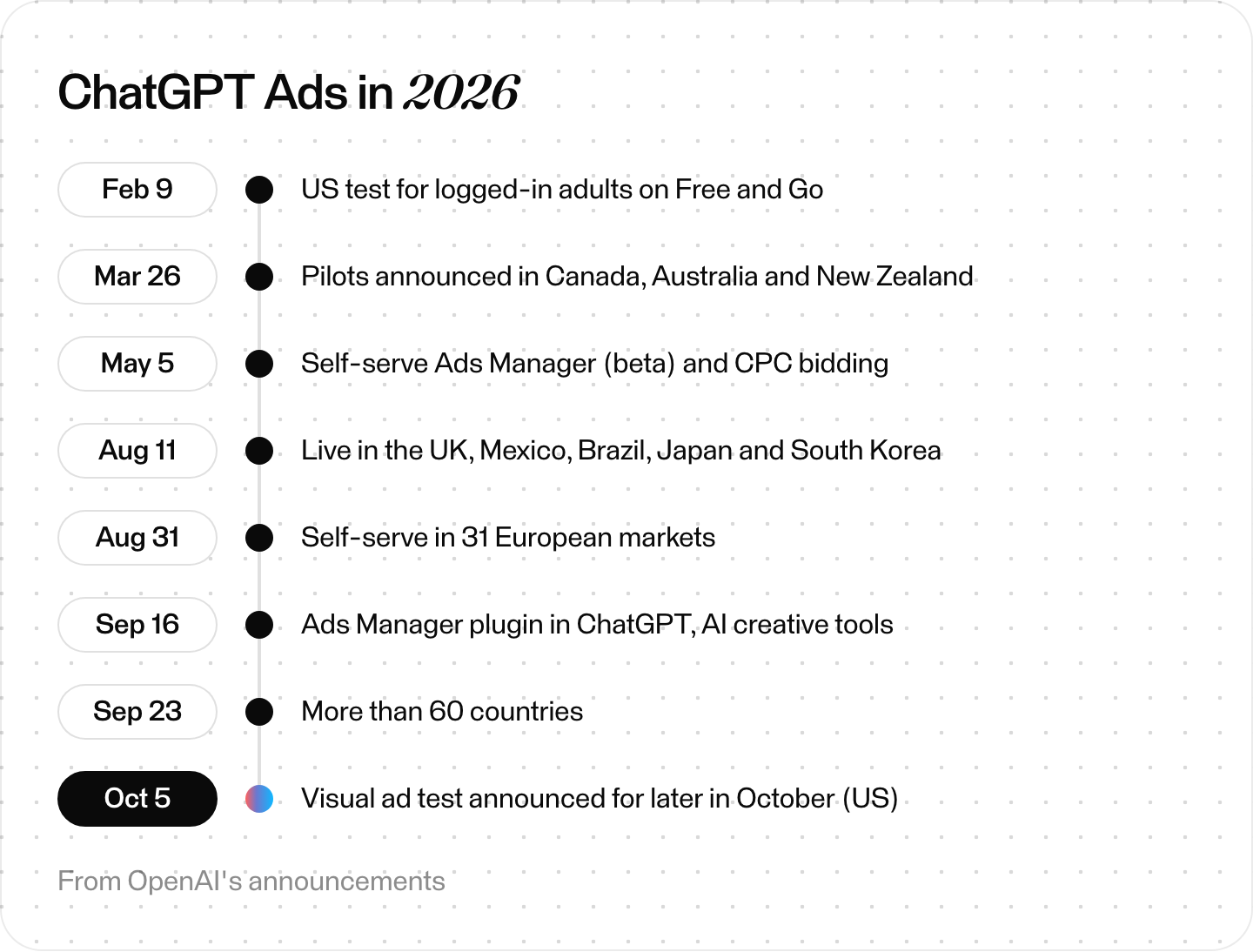
ChatGPT Ads in 2026. From OpenAI's announcements.
Who sees ChatGPT ads, and who doesn't?
Free and Go users see ChatGPT ads, and so do logged-out users. OpenAI's help center says: "Ads may appear for users on the Free and Go plans. Plus, Pro, Business, Enterprise, and Edu accounts will not have ads." Beyond the plan, five rules shape your audience:
- No teens. OpenAI doesn't show ads to accounts it identifies as under 18, using stated age and an age-prediction model.
- Logged-out users too. The launch post said logged-in adults. The help center now says ads also appear in logged-out ChatGPT, where they must be "appropriate for all audiences."
- Not everywhere in the app. "Temporary Chats will not show ads," and during the test, ads don't appear in the ChatGPT Atlas browser.
- Not near sensitive topics. "Ads are not eligible to appear near sensitive or regulated topics, including personal health, mental health, or politics." OpenAI's placement policy also blocks topics such as suicide and self-harm. The policy adds that since April 2026, medical, legal and financial advice chats are no longer blocked by default. Mental and personal health conversations still are.
- Some users opt out. Free users can switch to an Ads-Free option, where offered, with fewer messages a day and no image generation or deep research.
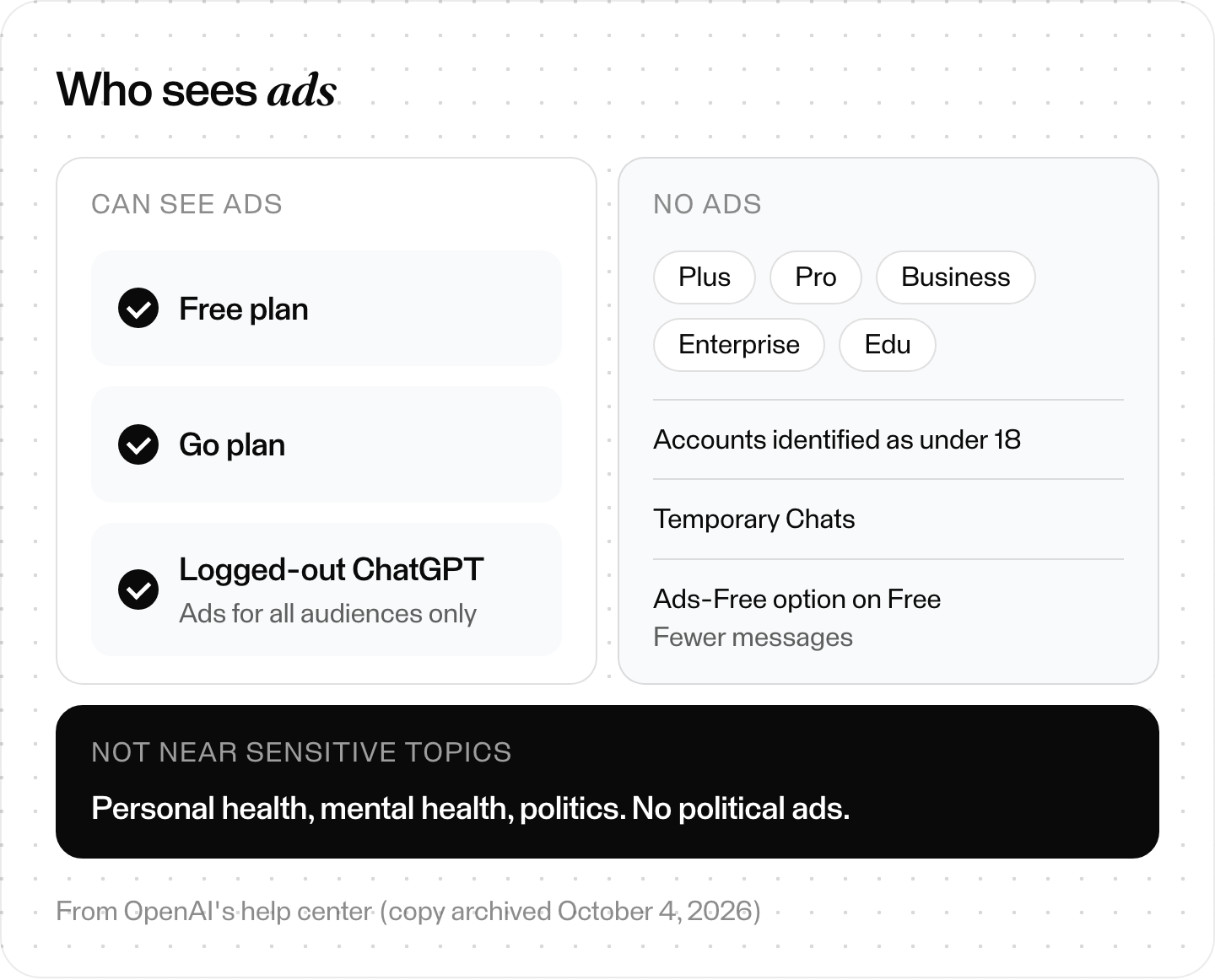
Who sees ChatGPT ads. From OpenAI's help center (copy archived October 4, 2026).
What do ChatGPT ads look like?
A standard ChatGPT ad has six parts: advertiser name, favicon (logo), title, copy, landing page and an image. OpenAI's help center says: "Ads can appear below the end of a response. Ads are clearly labeled as sponsored and visually separated from ChatGPT's response."
A user may see one or more ad units, and one unit can show several items or several advertisers. AdExchanger reported on October 21 that the unit has been redesigned several times. The report traces it from a shaded box, sponsored label on top, to a version with no box and the label off to the side.
OpenAI's API docs set the limits:
- Title: 3 to 50 characters.
- Body: up to 100 characters.
- Image: JPEG, PNG or WebP, at least 640 × 640 pixels.
- Landing page: an HTTP or HTTPS URL up to 2,048 characters that OpenAI's ad crawlers can reach.
OpenAI's bulk-upload guide in the help center is stricter on images: square PNG or JPG, at most 1,200 × 1,200. It also suggests 16 to 24 character titles and 32 to 48 character copy. A square PNG or JPG between 640 and 1,200 pixels fits both.
Besides the standard card, there are product-feed ads built from a catalog. OpenAI says they "have been among the strongest-performing ads" in its program. There are also Sponsored Agents, a chat with a business's AI representative, still in an invite-only alpha.
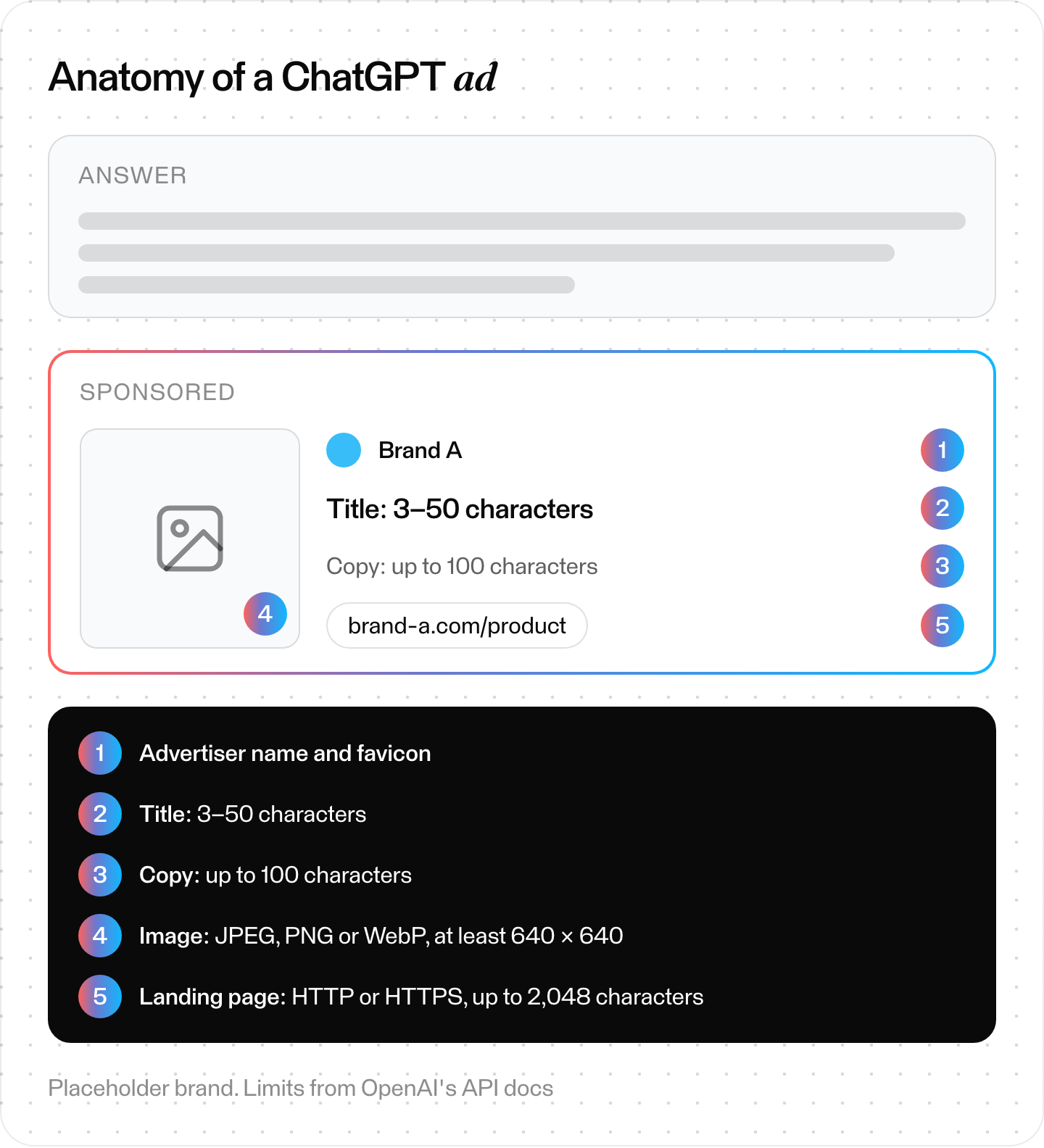
The parts of a standard ChatGPT ad. Placeholder brand; limits from OpenAI's API docs.
How does ChatGPT ad targeting work?
OpenAI weighs the conversation together with your ad and your settings. Its help center says it considers "the context and intent of your current conversation, the ad's landing page, title, copy, advertiser-provided context hints and targeting selections," plus, if the user has personalization on, signals from their wider ChatGPT use.
When several ads fit, OpenAI weighs "a combination of factors, including relevance and advertiser bids."
What you control:
- Context hints. Descriptions of "relevant products, use cases, or needs." In OpenAI's words, "Hints are not exact-match keywords." An ad group can hold up to 2,000. They don't guarantee delivery in a given conversation.
- Location. Country, and in the US also state, DMA and ZIP code.
- Platform. iOS app, Android app and web.
- Custom audiences. Customer lists of emails or phone numbers (plain or SHA-256 hashed) or Google Advertising IDs. OpenAI's API docs say to upload only first-party data you have the right to use for ads, never broker-sourced data. They also say to confirm the required notices, consents and permissions first. Inclusion and bid multipliers need at least 25,000 matched users. Exclusion lists have no minimum. Custom audiences aren't available for campaigns targeting the EEA or Switzerland, where personalized ads aren't offered yet.
What isn't there: OpenAI's docs describe no keyword targeting, no demographic or interest targeting and no lookalike audiences. Qualifying advertisers can add Negative Phrases for brand-specific placement limits. OpenAI says the option is for "qualifying advertisers, not necessarily every advertiser."
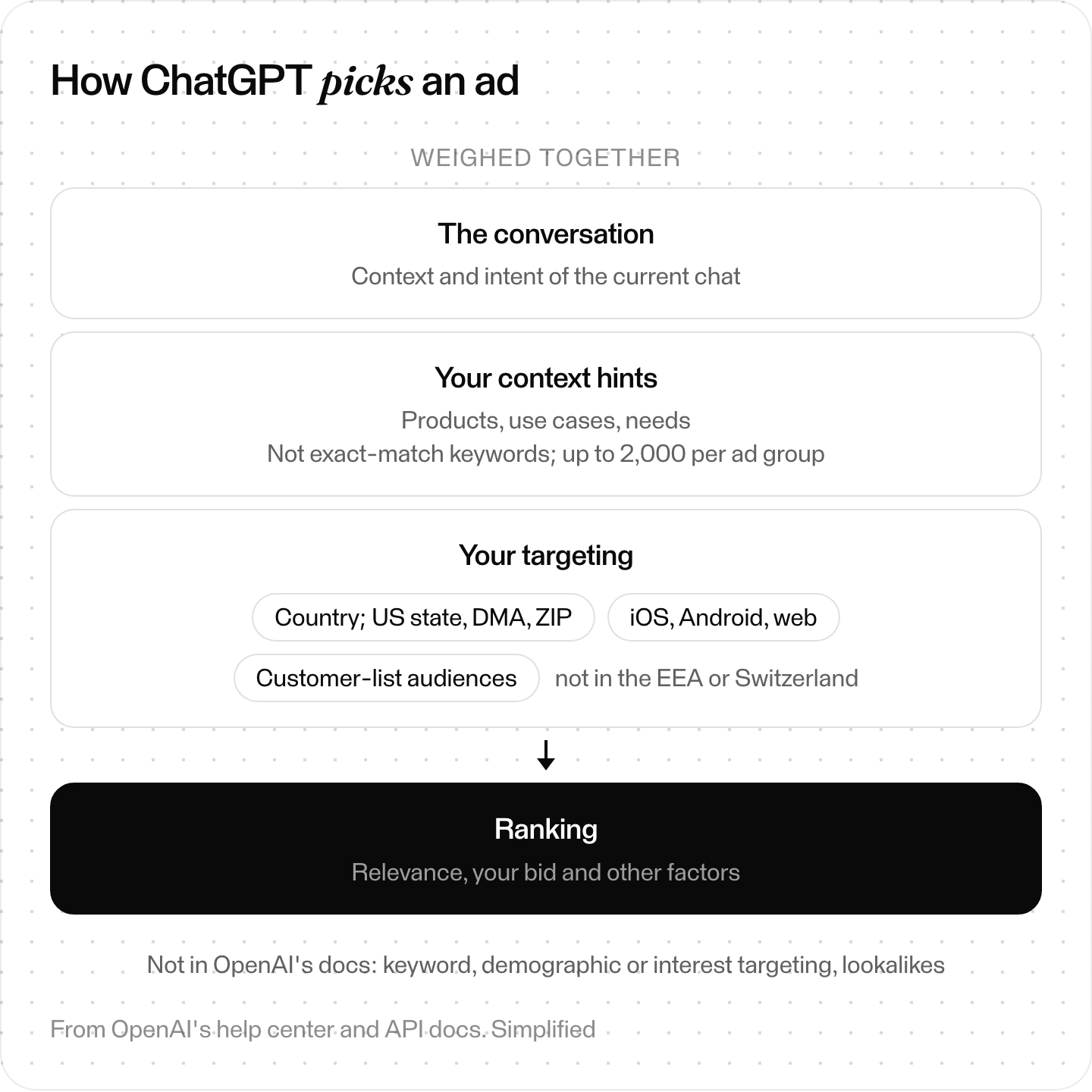
How ChatGPT picks an ad. From OpenAI's help center and API docs; simplified.
How much do ChatGPT ads cost?
OpenAI publishes no price list for ChatGPT ads. You bid in an auction, paying per 1,000 impressions or per click. OpenAI suggests starting click bids at $3 to $5, and the US minimum daily budget is 25 USD. Its help center adds that the platform "does not yet have performance benchmarks across advertisers, industries, or campaign types."
- Three objectives, two ways to be billed. CPM is billed per 1,000 impressions and CPC per valid click. oCPC optimizes for one conversion event but is still paid "Per valid click, not per conversion." OpenAI's newer help pages also let eligible conversion-optimized campaigns be billed on impressions instead of clicks.
- An auction. You set a maximum bid per ad group. OpenAI uses "a relevance-weighted, second-price auction," and for CPC campaigns recommends "starting with a maximum bid of $3–$5 USD per click." Eligible new ad groups default to Maximize results, which sets bids automatically and guarantees no CPA, CPC or ROAS. To set your own, choose a manual max bid. On an oCPC campaign, that max bid is a CPA bid, per conversion rather than per click. OpenAI says to treat it "as an optimization input, not as a conversion charge," and that it isn't a guaranteed cost per acquisition.
- Minimum daily budgets by billing currency: 25 USD, 15 GBP, 15 EUR, 25 CAD, 25 AUD, 2,500 JPY and 725 INR, among others.
- Daily means a weekly average. With an unchanged budget, a campaign can spend up to twice its daily budget in a day and seven times it in a Sunday-to-Saturday week. So $100 a day caps that week at $700. If you change the budget, that day's cap uses the highest budget active that day. The weekly cap is then prorated from the change to the next Sunday at midnight.
Self-serve billing is postpay to a card. A newly added card can get a temporary $100 hold, and you're charged when unpaid spend reaches your payment threshold, then at month-end (from an archived copy of OpenAI's billing page dated July 27, 2026).
Older figures still circulate from the invite-only pilot. Adweek reported in January that OpenAI asked select advertisers to commit at least $200,000. Digiday reported on April 17 that CPMs had fallen from $60 to as low as $25 and the minimum spend from $250,000 to $50,000. OpenAI announced self-serve buying on May 5, after both reports.
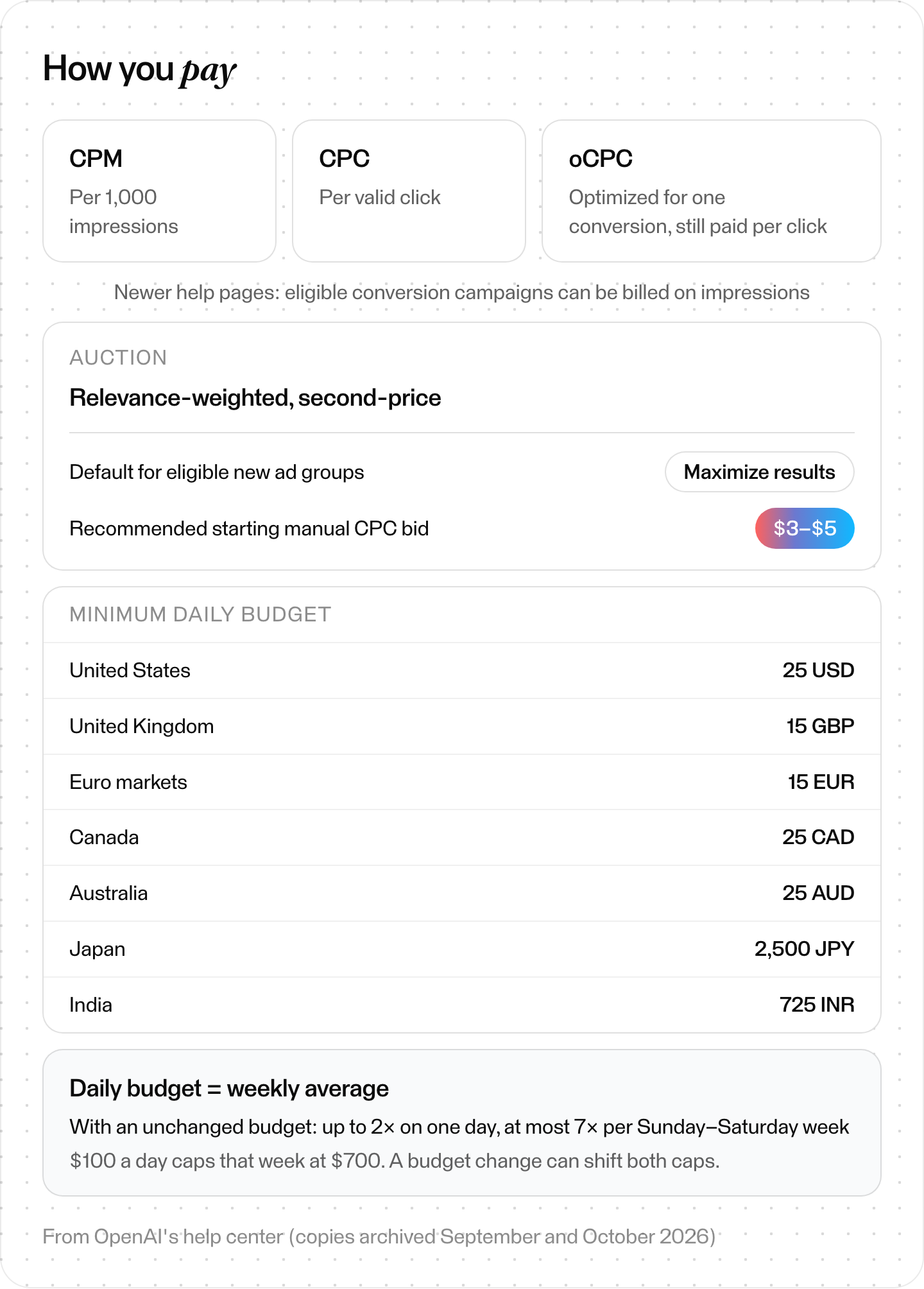
How you pay for ChatGPT ads. From OpenAI's help center (copies archived September and October 2026).
How to advertise on ChatGPT: your first campaign
Seven steps, from OpenAI's Ads Manager guides and API docs. Each ends with what you should see before you move on.
Step 1: Check that you can advertise
Self-serve Ads Manager requires "the legal entity that will advertise and be billed" to be based in a listed country. The US, UK, Canada, India and many European countries are on the list.
Then check your category. OpenAI's ad policies focus on consumer goods, local services, travel and entertainment, and digital products and education. They currently disallow adult content (including dating apps), alcohol and tobacco, gambling, and political ads. The policies say financial and health services are case by case for approved US advertisers and generally prohibited elsewhere. OpenAI's help-center eligibility table (archived October 11) is looser for some categories, such as US deposit accounts and insurance. So check your exact category there.
What you should see: your country listed as available and your category allowed.
Step 2: Create the Ads Manager account
Go to ads.openai.com and sign in "with the OpenAI account you use for ChatGPT," ideally on a work email. You can enter your website URL and let Ads Manager draft a first ad and campaign, or skip that. Choose carefully. Country, currency and time zone "cannot be changed after account creation." Add a brand logo, a card and a billing profile; "Billing must be set up before your campaigns can deliver." Business verification can take up to 7 business days.
What you should see: a verified account with billing set up and the right brand name. Changing the brand name later pauses serving until it's approved again.
Step 3: Set up conversion measurement
Send conversion events with the Measurement Pixel in the browser, the Conversions API from your server, or both. Either way, create a Pixel ID in the conversions tab of Ads Manager. A server-only setup still needs one but skips the browser Pixel.
For the Pixel, add its snippet to the <head> of every page where conversions happen. OpenAI's Pixel docs say consent defaults to true unless you set it to false or the Pixel finds a stored denial. Where measurement requires consent, set it to false before you initialize the Pixel, and switch it to true once the user agrees. While it's false, the Pixel sends no events, and blocked events aren't replayed later.
The Conversions API takes batches of up to 1,000 events no older than 7 days. OpenAI calls it "a more reliable tracking source than the pixel alone," and its help center suggests using both for more resilient measurement. If you use both, send the same event name and event ID for the same conversion. OpenAI then removes duplicates using your Pixel ID, the event name and the event ID.
Send a test event and check that it reaches the right data source. Then define the conversion event you want to count, such as a purchase. You'll attach it to the campaign in Step 4.
Also allow OpenAI's ad crawler: "You must allow OAI-AdsBot," which reviews landing pages for safety.
What you should see: a test event arriving at your data source and a conversion event defined for the action you want to count. If you use both integrations, each sends the same event name and event ID.
Step 4: Create the campaign
The structure is three levels. "An ad account contains campaigns. Each campaign contains ad groups, and each ad group contains ads." The campaign holds the objective, budget, schedule and targeting. The ad group holds the bid, context hints and audience multipliers, and the ad holds the creative and URL.
Pick an objective: CPM for reach, CPC for clicks, or oCPC to optimize for one standard conversion event. oCPC needs working conversion tracking, and you can't switch an existing CPM or CPC campaign to it later. OpenAI recommends that newcomers start with a daily budget. Attach the conversion event from Step 3 to the campaign. OpenAI's help center says to do this before traffic starts, because events from a mismatched setup don't backfill.
What you should see: a campaign, not yet active, with one objective, a daily budget at or above your currency's minimum, your schedule and your conversion event attached.
Step 5: Set targeting and context hints
Choose countries (and US states, DMAs or ZIP codes), platforms and any first-party customer lists you have the right to use for ads. Then write context hints as the products, use cases and needs your ad answers. OpenAI's guide suggests "descriptive phrases rather than only standalone terms." Last, pick the ad group's bid strategy. On oCPC, a manual max bid is a bid per conversion, not per click.
What you should see: a campaign targeting the right places, platforms and lists, and an ad group with a bid strategy (Maximize results or a manual max bid) and hints that describe the needs and situations your ad fits.
Step 6: Write the ads
Write several. OpenAI's guide says "a high volume and diverse set of ads (multiple title/copy variations per offering)" helps the system find more matches. It also says to use product or content pages "rather than defaulting to a generic homepage."
Since September 16, Ads Manager can suggest copy and images from your landing page, and you can opt into AI text customization that adapts headlines to the conversation. One hard rule: "Ads must be clearly distinguishable from the ChatGPT product experience."
What you should see: several ads per ad group, each submitted for review.
Step 7: Launch, then read the results
OpenAI reviews each ad's title, copy, media and landing page, mostly "through automated systems with human oversight," and rejected ads can be appealed. When you're ready, set the campaign to Active. OpenAI's launch guide says to make sure campaigns are set to Active, and its troubleshooting docs check the campaign, each ad group and each ad: a paused campaign can keep an active ad from serving.
After launch, campaigns should start getting impressions and clicks within 24 hours. If nothing serves, check that the ads are approved, the campaign dates include today, and verification, billing and budget are in place. Reports show impressions, clicks, spend, CTR, average CPC, average CPM and conversions. Clicks refresh about every 15 minutes, and spend can lag 7 to 8 hours.
What you should see: the campaign, ad groups and ads marked Active, and impressions and clicks within 24 hours. Conversions show only for events that match the campaign's conversion event and fall within the attribution window. They can take 24 to 48 hours to appear.
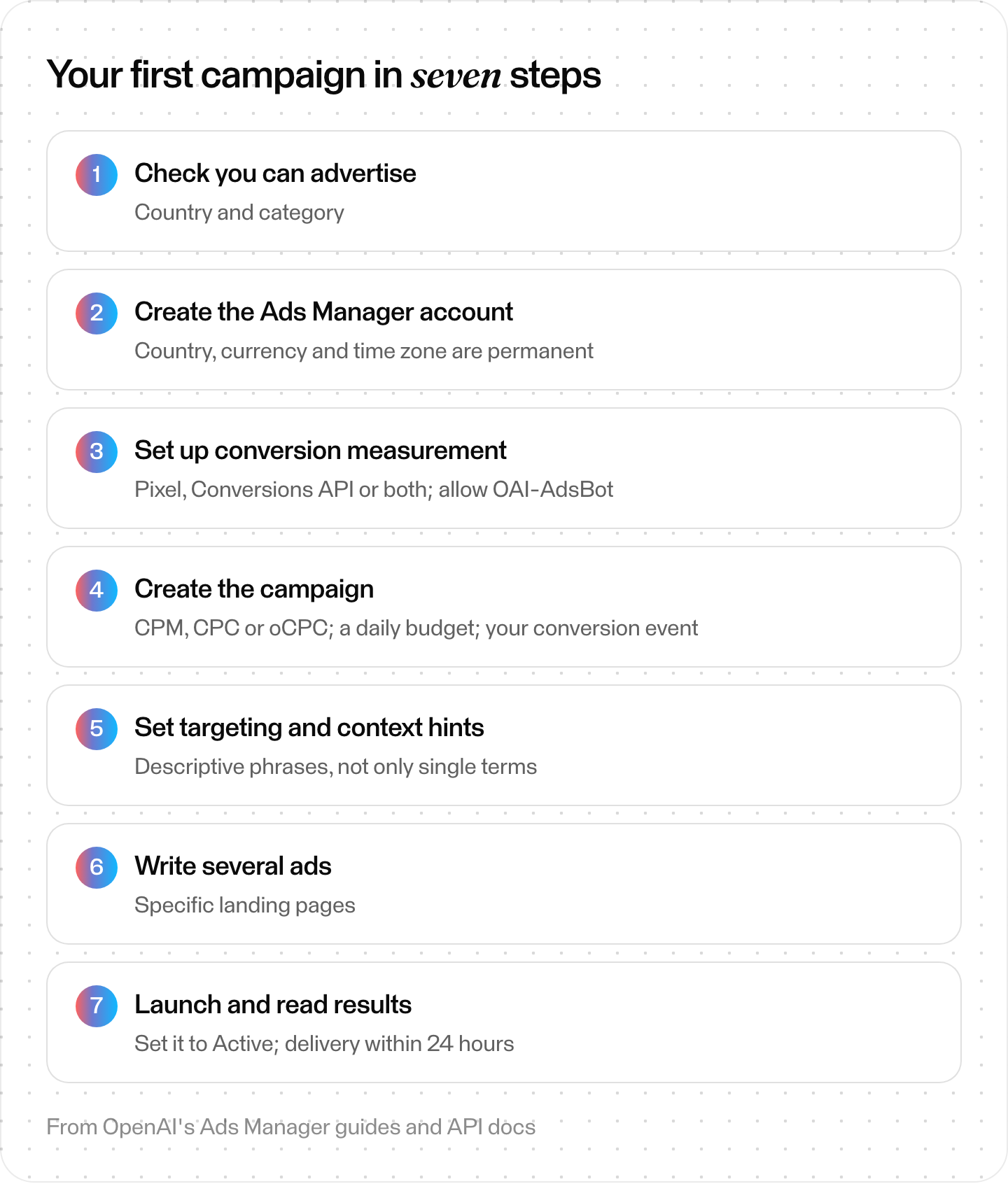
A first ChatGPT ads campaign in seven steps. From OpenAI's Ads Manager guides and API docs.
How do you measure ChatGPT ads?
You measure ChatGPT ads with OpenAI's Measurement Pixel, its Conversions API or both, and with attribution windows you choose. OpenAI's developer docs say click-through windows can be 7, 14 or 30 days, and view-through 0 or 1 day. View-through credits a conversion to an eligible ad impression without a click, where it's available for your account.
"If an outcome is eligible for both click-through and view-through attribution, the click takes precedence." OpenAI adds a click reference called oppref to landing-page URLs, and its reported totals can include modeled conversions.
Two cautions:
- Check which number you're reading. OpenAI's Pixel docs say Ads Manager shows view-through as a separate metric, while its reporting API counts conversions as clicks plus views. Compare like with like.
- Treat case studies as case studies. OpenAI cites partner results, such as WeightWatchers' attributed CPA coming in 15.3% below its blended paid-search benchmark, according to DV Rockerbox. Those are selected by OpenAI and its partners, not benchmarks.
For apps, OpenAI lists Adjust, AppsFlyer, Branch, Kochava, Singular, Airbridge and Tenjin as measurement partners. You can also tag landing URLs with static UTM parameters.
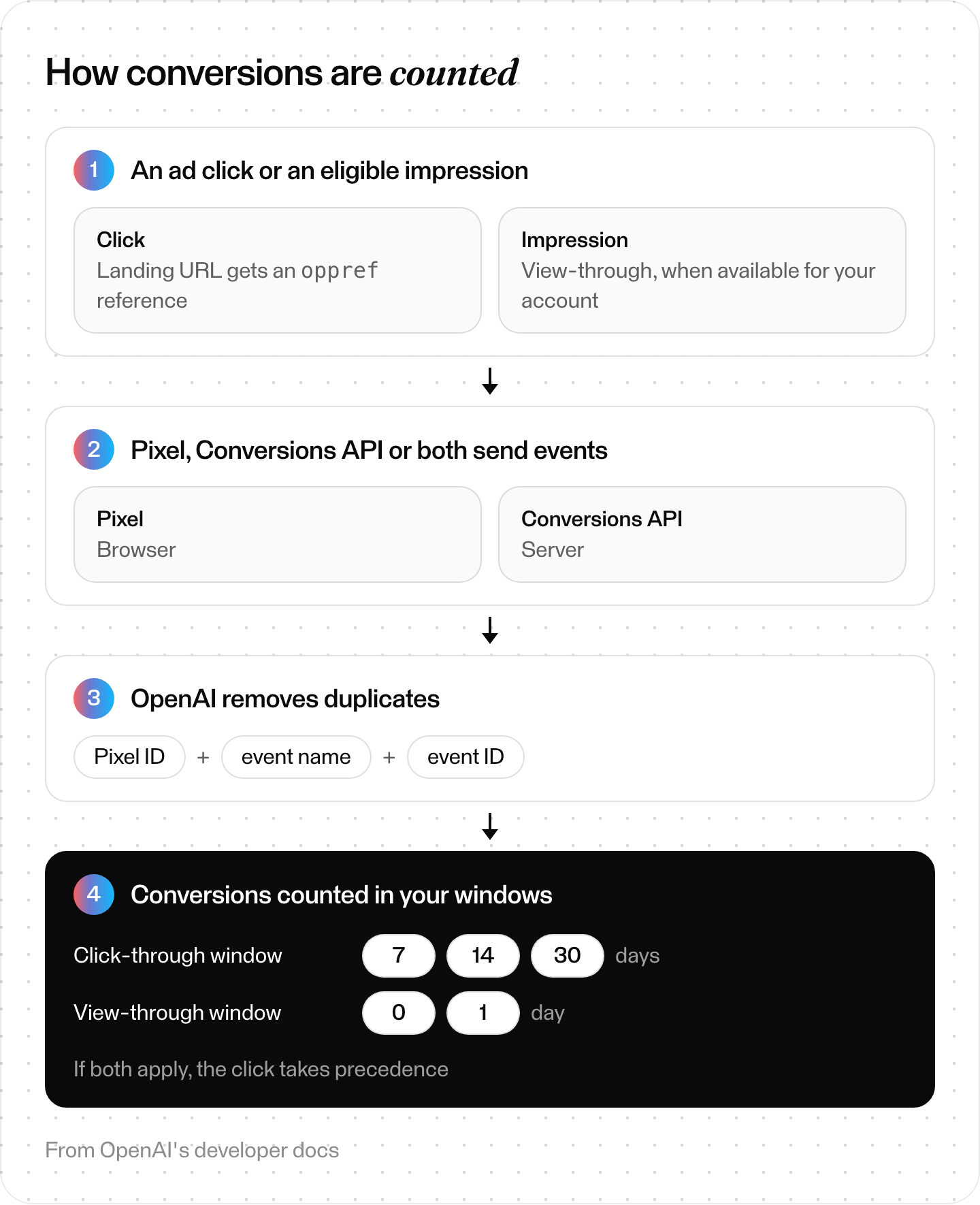
How ChatGPT ads conversions are counted. From OpenAI's developer docs.
Can you manage ChatGPT ads from inside ChatGPT?
Yes. The ChatGPT Ads Manager plugin, built by OpenAI, lets you "discover and manage ad accounts, campaigns, ad groups, and ads; analyze performance, conversions, and change history; upload creative images" from a chat. OpenAI's help center says it also works in Codex.
For code, the Advertiser API at api.ads.openai.com takes a key from the Ads Manager settings page. It allows 600 requests a minute per endpoint. OpenAI's API walkthrough creates a campaign paused, adds an ad group and an ad, previews it, then activates all three.
What does OpenAI promise users, and why does it matter to you?
OpenAI promises users three things in its help center. Ads don't influence ChatGPT's answers, users get ad controls, and advertisers get only aggregated, non-identifying performance data. For you, that means an ad can't place your brand inside the answer. You also get no chat data beyond messages a user sends you through an ad.
- Ads don't change answers. "Ads do not influence ChatGPT's answers," and advertisers "have no ability to shape, rank, or alter ChatGPT's responses." You can't buy a mention inside the answer.
- You get no conversation data. Advertisers "only receive aggregated, non-identifying information about how their ads perform, such as total views or clicks," beyond messages a user chooses to send you through the ad. Your own site analytics and the Pixel are your measurement.
- Users have controls. They can turn off personalization, hide or report an ad, see why it appeared and clear ad data.
So, by OpenAI's account, the answer above your ad is organic. Whether ChatGPT names your brand there is a separate job. Our guide on how to rank in ChatGPT covers it, and these trackers measure it.
Are ChatGPT ads worth testing?
Our read: they're worth testing if your category and country qualify under OpenAI's rules and you can track conversions. OpenAI's help center says there are no performance benchmarks yet. So start small, measure on your own site, and compare against your search campaigns.
- Test them if you sell consumer products or services in an allowed category, in a country with self-serve access, you can track conversions on your site, and you can fund at least the minimum daily budget for a few weeks.
- Wait if your category is restricted (financial or health services outside the US, telehealth, crypto outside approved US advertisers), you can't install the Pixel or Conversions API, or you need demographic targeting or lookalikes, which OpenAI's docs don't offer.
Where Skygen fits (our product)
Disclosure first: Skygen is ours. Its ads agent connects to Meta, Google, TikTok, LinkedIn and Reddit ad accounts. To connect an assistant to those accounts yourself, see our Meta Ads MCP and Google Ads MCP guides.
In ChatGPT, Skygen covers the part OpenAI says ads don't touch: the answer above the ad. Its AI visibility check asks ChatGPT, Claude, Gemini, Grok and Perplexity the same questions through model APIs (via OpenRouter). It records whether each answer names you or cites your pages, and the full workspace tracks which competitors the answers name.
Our read: start with the free first check. It covers up to 3 grounded questions built from your website, with no credit card.
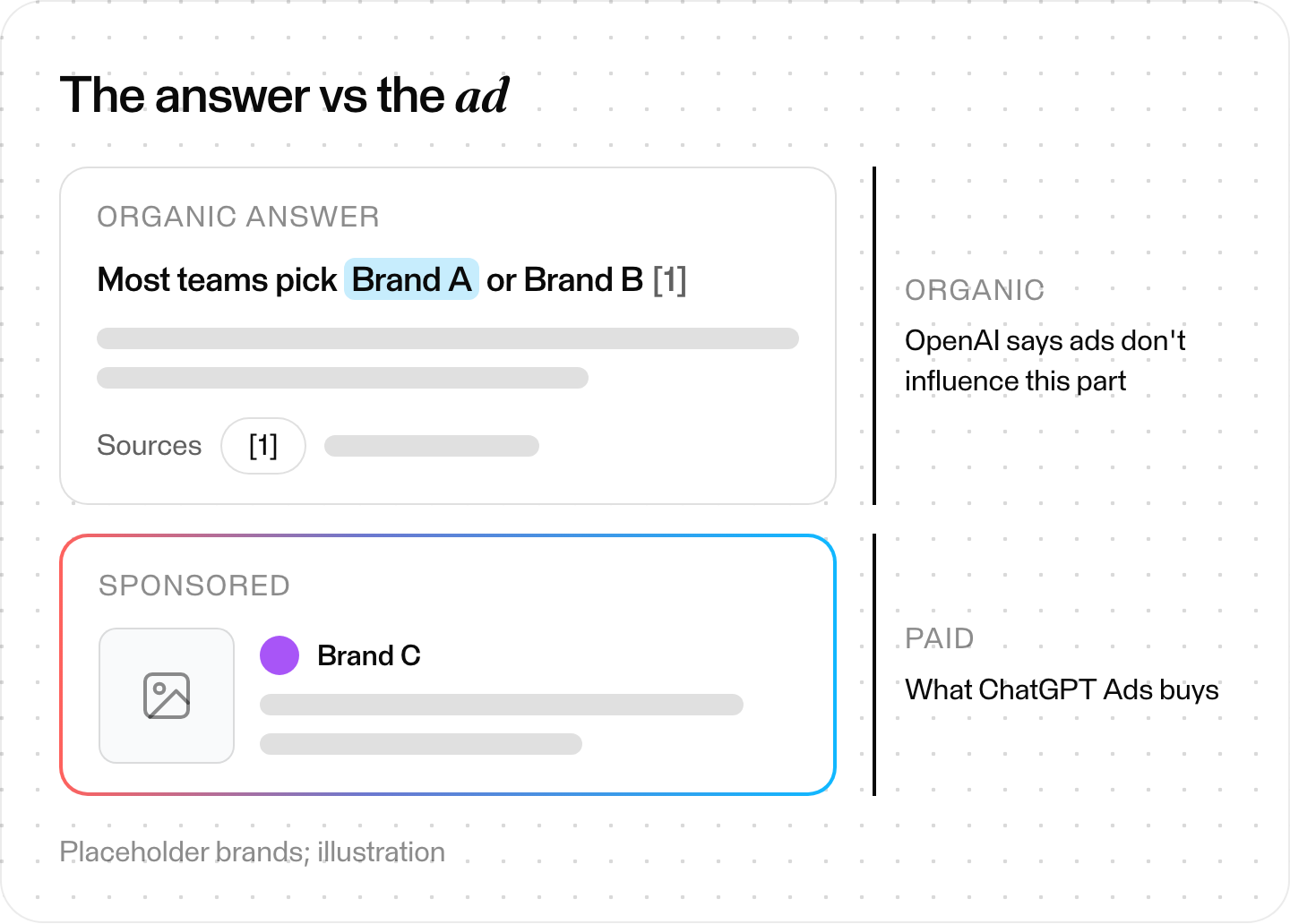
The organic answer vs the ad below it. Placeholder brands; illustration.
The short version
ChatGPT ads sit below answers for Free and Go users in more than 60 countries. You buy them in Ads Manager per impression or per click, at a 25 USD minimum daily budget in the US. They're matched on conversation context rather than exact-match keywords. Set up conversion measurement with the Pixel, the Conversions API or both. Write many ad variations. Start manual click bids around $3 to $5 or let Maximize results bid, and measure on your own site.